# What is the new version of USDD?

The new version of USDD is a fully decentralized stablecoin pegged to the US dollar, backed by crypto collateral. Unlike traditional stablecoins, it operates without a central authority, ensuring that its value remains stable while being governed by the community. USDD provides users with a secure and transparent digital asset, designed to maintain its 1:1 peg to the US dollar through a system of over-collateralization.

USDD is tamper-proof and cannot be frozen, giving users full control over their assets. With its decentralized nature, USDD avoids the risks of centralization and provides a trustless solution for transactions within the decentralized finance (DeFi) ecosystem. It aims to bridge the gap between traditional finance and the growing world of DeFi, offering a stable and reliable currency for users to transact and invest.

\
**Note:** Throughout this document, all references to "USDD" specifically refer to the new version of USDD.


# What is USDDOLD?

USDDOLD is an over-collateralized decentralized stablecoin that is issued by TRON DAO Reserve, who is also the custodian. USDDOLD is minted by the whitelisted institutions of the TRON DAO Reserve (TDR) through burning TRX. Its value is backed by the over-collateralization of highly liquid crypto assets under the TDR, including BTC, USDT, USDC, and TRX. The circulation and use of USDDOLD are free from the intervention of any centralized parties. Similar to BTC and ETH, USDDOLD grants its holders full ownership, meaning that no organization or individual has access to freeze users’ USDDOLD.


# Why upgrade USDD?

The upgrade to USDD aims to enhance its security, decentralization, and overall stability. By incorporating more robust mechanisms, such as secure liquidation processes, dynamic collateral ratio adjustments, and enhanced risk management protocols, the new version ensures that USDD can better withstand market fluctuations while maintaining its 1:1 peg to the US dollar. For instance, when the USDD price deviates, arbitrage opportunities encourage buying or selling to bring the price back in line.

* Secure Liquidation Processes: These mechanisms swiftly handle under-collateralized positions, reducing systemic risk and maintaining the protocol’s stability.
* Dynamic Collateral Ratios: These adjust in response to market conditions, ensuring adequate collateralization and reducing vulnerability during volatile periods.
* Advanced Risk Management Tools: These include predictive analytics to monitor risks and prevent cascading liquidations during market stress.

This upgrade also introduces more community-driven features, empowering users to actively participate in governance and decision-making, ensuring that the protocol evolves based on collective input.

Additionally, the upgrade strengthens the system's transparency and efficiency, with improved collateral management and liquidity solutions. The new version of USDD is designed to provide users with a more secure and adaptable stablecoin, allowing for easier integration with decentralized finance (DeFi) platforms, and ensuring long-term growth and sustainability of the ecosystem.


# Core Features

USDD stands out as a next-generation stablecoin built on principles of decentralization, transparency, and user empowerment. Below are the core features that define its functionality and value:

1. **Decentralized Governance**\
   USDD is governed by a transparent, community-driven process through decentralized proposals and on-chain voting mechanisms.
2. **Transparency and Auditability**\
   All collateral and transactions supporting USDD are fully auditable and recorded on the blockchain. This open-source approach guarantees users can verify the system's integrity in real-time, fostering trust and security.
3. **Enhanced Security**\
   With over-collateralized reserves, USDD ensures asset protection against market fluctuations. Decentralized governance mechanisms further safeguard the stability and security of the ecosystem.
4. **Seamless DeFi Integration**\
   USDD integrates effortlessly into the broader DeFi ecosystem, enabling use cases like lending, borrowing, staking, and trading. This interoperability makes it a versatile tool for both individual users and institutions.
5. **Freeze-Free Transactions**\
   Once USDD is held in a self-custodial wallet on-chain, no centralized authority can directly freeze the USDD token itself.
6. **Multichain**\
   A fully decentralized stablecoin supporting TRON, Ethereum, BNB Chain.

These core features make USDD a robust and adaptable stablecoin, designed to empower its users while maintaining the highest standards of stability, security, and decentralization.


# Contract Addresses

To ensure transparency and security, all collateral backing USDD is held in publicly verifiable smart contracts. Users can check the contract addresses on blockchain explorers to verify the funds at any time. This guarantees that the collateral remains untouched and fully secure.

🌐 Tron Network

Collateral Contracts

* USDD: [TCrEVahRbhDFB6uRXEWUg7wkptXvg47GKs](https://tronscan.org/#/address/TCrEVahRbhDFB6uRXEWUg7wkptXvg47GKs)
* TRX-A: [TJ1VWPvFVq7sVsN7J7dWJVZz4SLT14qRUr](https://tronscan.org/#/contract/TJ1VWPvFVq7sVsN7J7dWJVZz4SLT14qRUr)
* TRX-B: [TGQKnHDQNyc3QeHJ7YxH8wggdg89UVXyvX](https://tronscan.org/#/contract/TGQKnHDQNyc3QeHJ7YxH8wggdg89UVXyvX)
* TRX-C: [TPUPPLTYLdbW4jxwD5g2T7ystxsR9HL2mt](https://tronscan.org/#/contract/TPUPPLTYLdbW4jxwD5g2T7ystxsR9HL2mt)
* sTRX-A: [TKha7zcAXZMaaWzoVmUHtvVFqr9GeiChgJ](https://tronscan.org/#/contract/TKha7zcAXZMaaWzoVmUHtvVFqr9GeiChgJ)
* USDT-A: [TDUkQbjrXs6xUbxGCLknWwJHxVTdysXBhy](https://tronscan.org/#/contract/TDUkQbjrXs6xUbxGCLknWwJHxVTdysXBhy)
* PSM-USDT: [TSUYvQ5tdd3DijCD1uGunGLpftHuSZ12sQ](https://tronscan.org/#/contract/TSUYvQ5tdd3DijCD1uGunGLpftHuSZ12sQ)
* SA001-A: [TXdYNjXaHn3c1whomRpzCkaFbjfCffMFGf](https://tronscan.org/#/contract/TXdYNjXaHn3c1whomRpzCkaFbjfCffMFGf)
* WBTC- A：[TDea6uDwDgxkUwyEefhqMPij6NzRiPrVV1](https://tronscan.org/contract/TDea6uDwDgxkUwyEefhqMPij6NzRiPrVV1/code)
* WBTC-B: [TRoqYfXY7ZLZcjeiTQYNu2vDhJPeJYNf1w](https://tronscan.org/contract/TRoqYfXY7ZLZcjeiTQYNu2vDhJPeJYNf1w/code)

PSM Contracts

* PSM-USDT: [TSUYvQ5tdd3DijCD1uGunGLpftHuSZ12sQ](https://tronscan.org/#/contract/TSUYvQ5tdd3DijCD1uGunGLpftHuSZ12sQ)
* USDTJoin: [TBXW4hS5KYjjbJXDpnrPf4zhkLwrpUjbyz](https://tronscan.org/#/contract/TBXW4hS5KYjjbJXDpnrPf4zhkLwrpUjbyz)

🌐 Ethereum Network

Collateral Contracts

* SA001-A: [0x7a69D5BfC49bC48AF6A2ed4969d32752362793Fc](https://etherscan.io/address/0x7a69D5BfC49bC48AF6A2ed4969d32752362793Fc)
* ETH-A:  [0x75a3a7075867AF105a9ca4b0D25a6806cd682079](https://etherscan.io/address/0x75a3a7075867AF105a9ca4b0D25a6806cd682079#code)
* ETH-B: [0x82756f17B455436dFADe82f71C01CE6daE9a9015](https://etherscan.io/address/0x82756f17B455436dFADe82f71C01CE6daE9a9015)
* ETH-C: [0x2B65f7d21ea885dd4e5b5A44b5CaA033E6B2E953](https://etherscan.io/address/0x2B65f7d21ea885dd4e5b5A44b5CaA033E6B2E953)
* WBTC-A: [0xC677f105fC46E4E87597CE524f95298BB5897648](https://etherscan.io/address/0xC677f105fC46E4E87597CE524f95298BB5897648)
* WBTC-B: [0xbB62eE7d003ee6Bf21d6244A2a919A4C29F2d255](https://etherscan.io/address/0xbB62eE7d003ee6Bf21d6244A2a919A4C29F2d255)
* WBTC-C: [0x5bD2cE3b0D81C54D43179264eBa4b4eDCabb991E](https://etherscan.io/address/0x5bD2cE3b0D81C54D43179264eBa4b4eDCabb991E)

PSM Contracts

* USDD: [0x4f8e5DE400DE08B164E7421B3EE387f461beCD1A](https://etherscan.io/address/0x4f8e5de400de08b164e7421b3ee387f461becd1a)
* PSM-USDT: [0xce355440c00014a229bbec030a2b8f8eb45a2897](https://etherscan.io/address/0xce355440c00014a229bbec030a2b8f8eb45a2897)
* USDTJoin: [0x217e42ceb2eae9ecb788fdf0e31c806c531760a3](https://etherscan.io/address/0x217e42ceb2eae9ecb788fdf0e31c806c531760a3)
* PSM-USDC: [0x12d0351f68035a41d13fc8324562e2d51b7a3b93](https://etherscan.io/address/0x12d0351f68035a41d13fc8324562e2d51b7a3b93)
* USDCJoin:[ 0x9a7e1b324060db7342aea08c0dc56f55ced6f519](https://etherscan.io/address/0x9a7e1b324060db7342aea08c0dc56f55ced6f519)

USDD Savings

* sUSDD: [0xC5d6A7B61d18AfA11435a889557b068BB9f29930](https://etherscan.io/token/0xc5d6a7b61d18afa11435a889557b068bb9f29930)

🌐 BNB Chain Network

Collateral Contracts

* SA001-A: [0x062a738465F30EBe6dD06cFAd3256Ba783EDf000](https://bscscan.com/address/0x062a738465F30EBe6dD06cFAd3256Ba783EDf000)

PSM Contracts

* USDD: [0x45E51bc23D592EB2DBA86da3985299f7895d66Ba](https://bscscan.com/address/0x45e51bc23d592eb2dba86da3985299f7895d66ba)
* PSM-USDT: [0x939d3FB56cd12d68CaA1125cc57a8d2391F7Ee29](https://bscscan.com/address/0x939d3fb56cd12d68caa1125cc57a8d2391f7ee29)
* USDTJoin: [0xe229FdA620B8a9B98ef184830EE3063F0F86B790](https://bscscan.com/address/0xe229fda620b8a9b98ef184830ee3063f0f86b790)

USDD Savings

* sUSDD: [0x8bA9dA757d1D66c58b1ae7e2ED6c04087348A82d](https://bscscan.com/address/0x8ba9da757d1d66c58b1ae7e2ed6c04087348a82d)

For real-time verification, visit the blockchain explorer and enter the contract address to check the fund balances.


# Ecosystem Migration Progress

As the transition to USDD 2.0 progresses, various ecosystem partners have successfully migrated from USDD 1.0. Below is a categorized list of platforms and projects that now support USDD 2.0:

**🔹 Supported Chains**

* **TRON**
* **Ethereum**
* **BNB Chain**
* **BTTC**

**🔹 Supported Exchanges & DeFi Platforms**

* [**Bybit**](https://www.bybit.com/en/trade/spot/USDD/USDT)
* [**Gate.io**](https://www.gate.io/zh/trade/USDD_USDT)
* [**Poloniex**](https://poloniex.com/trade/USDD_USDT?type=spot)
* [**JustLend DAO**](https://app.justlend.org/homeNew?)
* [**SUN.io**](https://sunswap.com/#/home)
* [**CoinW**](https://www.coinw.com/spot/usddusdt)
* [**LBANK**](https://www.lbank.com/trade/usdd_usdt)
* [**AEON**](https://aeon.xyz/)

**🔹 Supported Wallets**

* **TronLink**
* **TokenPocket**
* **imToken**
* **Gate Web3 Wallet**

This list will be continuously updated as more partners complete their migration. Please ensure that the platform or service you are using fully supports USDD 2.0.


# Ecosystem Migration Progress

As the transition to USDD 2.0 progresses, various ecosystem partners have successfully migrated from USDD 1.0. Below is a categorized list of platforms and projects that now support USDD 2.0:

**🔹 Supported Chains**

* **TRON**
* **Ethereum**
* **BNB Chain**
* **BTTC**

**🔹 Supported Exchanges & DeFi Platforms**

* [**Bybit**](https://www.bybit.com/en/trade/spot/USDD/USDT)
* [**Gate.io**](https://www.gate.io/zh/trade/USDD_USDT)
* [**Poloniex**](https://poloniex.com/trade/USDD_USDT?type=spot)
* [**JustLend DAO**](https://app.justlend.org/homeNew?)
* [**SUN.io**](https://sunswap.com/#/home)
* [**CoinW**](https://www.coinw.com/spot/usddusdt)
* [**LBANK**](https://www.lbank.com/trade/usdd_usdt)
* [**AEON**](https://aeon.xyz/)

**🔹 Supported Wallets**

* **TronLink**
* **TokenPocket**
* **imToken**
* **Gate Web3 Wallet**

This list will be continuously updated as more partners complete their migration. Please ensure that the platform or service you are using fully supports USDD 2.0.


# System Architecture

The USDD system architecture is designed to ensure stability, security, transparency, and scalability. It operates as a decentralized platform leveraging robust collateral mechanisms, efficient liquidation processes, and community-driven governance to maintain the stability of USDD and its integration within the DeFi ecosystem.

## Collateral Management

USDD employs an over-collateralization model to safeguard its stability and reduce systemic risk. Users can lock eligible assets, such as TRX, and USDT, to mint USDD. Key aspects of collateral management include:

* Over-Collateralization: Users are required to maintain a collateral ratio above the minimum threshold, varying by asset based on its volatility.
* Multi-Collateral Support: Diversification of supported collateral types minimizes risk and promotes flexibility for users.
* Real-Time Monitoring: The system continuously monitors collateral ratios, alerting users to potential risks and ensuring prompt responses.
* Multichain：A fully decentralized stablecoin supporting TRON, Ethereum, and other major blockchains.

## Liquidation Mechanism

The protocol incorporates a secure liquidation process to address under-collateralized positions and protect the system’s integrity:

* Triggering Liquidation: When a vault’s collateral ratio falls below the minimum threshold, it becomes eligible for liquidation.
* Keeper Incentives: Liquidators, or “keepers,” are incentivized with rewards to participate in the liquidation process.
* Risk Containment: This mechanism ensures that under-collateralized positions do not threaten the overall stability of the system.

## Auction System

The USDD platform utilizes an efficient auction system to optimize the management of liquidated collateral and system deficits:

* Collateral Auctions: Liquidated collateral is auctioned to recover outstanding debt. Participants bid competitively, ensuring fair market pricing and efficient debt recovery. Collateral Auctions are conducted using a Dutch model, where prices decrease over time, encouraging timely participation and equitable pricing.
* Debt Auctions: In the event of a protocol deficit, the system initiates debt auctions, selling governance tokens to recapitalize and maintain stability.

## Peg Stability Module (PSM)

The PSM (Peg Stability Module) is designed to maintain the peg of stablecoins through a fixed 1:1 exchange rate (e.g., between USDD and USDT). Users can exchange one stablecoin (such as USDT and USDC) for USDD directly, with no slippage. This process involves:

* Minting: When users exchange USDT for USDD, the system mints new USDD and sends it to the user while depositing the USDT into the reserve pool.
* Redeeming: When users exchange USDD for USDT, the system burns the USDD and releases the corresponding USDT from the reserve pool.

The Peg Stability Module (PSM) plays a critical role in maintaining USDD’s 1:1 peg to the US dollar by facilitating and hence reducing arbitrage through seamless stablecoin conversions:

* Zero-Slippage Swaps: Users can exchange USDD for other stablecoins, such as USDT, at a 1:1 ratio without incurring slippage.
* Gas-Only Transactions: The PSM allows for seamless swaps with no service fees, requiring users to pay only the gas fees. This approach fosters user trust and enhances liquidity.
* Demand-Supply Balancing: By offering stablecoin swaps, the PSM mitigates price volatility during periods of heightened market activity.

## Governance and Risk Management

USDD leverages a decentralized governance framework to ensure adaptive decision-making and effective risk mitigation. Further details will be shared soon—stay tuned!

## Transparency and Auditing

Transparency is a cornerstone of the USDD protocol, fostering user trust and ensuring accountability:

* On-Chain Auditing: All transactions, collateral reserves, and system metrics are recorded on the blockchain, enabling real-time verification.
* Performance Dashboards: User-friendly dashboards display vital statistics, including total USDD minted, collateral locked, and liquidation activity.
* Open-Source Integrity: The protocol’s codebase is fully open-source, allowing the community and security experts to audit and enhance its reliability.
* Independent Third Party Auditing: The smart contracts have been thoroughly audited by independent third-party security firms to ensure safety and reliability.


# Smart Allocator

The USDD protocol is constantly evolving, and now we are taking a big step towards sustainable yield. We’re proud to introduce [**Smart Allocator**](https://usdd.io/data/3/SA001-A), USDD’s new fully on-chain, transparent, and risk-controlled investment strategy that brings self-sustaining yield to the USDD ecosystem.

Built to be sustainable, transparent and rewarding for users, Smart Allocator allows the protocol to generate yield independently, and its final aim is to remove reliance on external subsidies and pave the way toward long-term economic viability.

## Why Smart Allocator? <a href="#id-4f05" id="id-4f05"></a>

Until now, USDD’s yield has been funded by TRON DAO. While effective for growth, this approach must mature if we want to consider USDD’s long-term development. Incentives backed by centralized subsidies are not sustainable forever, and protocols that depend on them remain vulnerable.

Smart Allocator changes this by enabling the USDD protocol itself to invest idle capital, earn yield, and redistribute those earnings to the community. All this is achieved without affecting peg stability, allowing users a low-risk way to earn yield without compromising stability and security.

With Smart Allocator, USDD is more than just a stablecoin. It becomes a **self-sustaining financial system** that works in the long term.

## How Smart Allocator Works <a href="#f419" id="f419"></a>

To fully understand how Smart Allocator enables sustainable, protocol-driven yield, let’s walk through each step of the process:

**1. Capital is invested**

Smart Allocator is a yield-sharing initiative where capital from USDD’s cash reserve is deployed into investment opportunities to earn returns in the form of interest and platform rewards.

* The overall investment strategy is conservative and under the USDD team’s dynamic monitoring.
* The chosen investment platforms such as Aave are selected by USDD and JUST DAO teams based on strict risk controls, prioritizing high liquidity and high reliability.
* The investment cap is set at a certain amount.

**2. Investment is regularly reviewed.**

* Investments will be made in steps.
* After the first investment is made, it will be carefully reviewed based on market conditions, liquidity amount, and amount of returns.
* This review will determine the next investment amount and chosen platform(s).
* This review process continues with each investment.

**3. Returns are redistributed to users**

As the investments earn yield, the protocol redistributes net returns back to users, excluding a small portion kept as a risk reserve.

* Returns are regularly redistributed as staking rewards, allocated based on users’ contribution to the ecosystem.
* The entire returns redistribution process is automated, on-chain, auditable, and fully transparent.

Users can track each step of the [Smart Allocator](https://usdd.io/data/3/SA001-A) process and view various real-time metrics such as debt, invested amount, APY, etc.

USDD smart contracts have also passed [Chainsecurity’s audit](https://www.chainsecurity.com/security-audit/usdd-rwa-smart-contracts), which found zero vulnerabilities outside of acceptable risks.

## Benefits of Smart Allocator <a href="#b991" id="b991"></a>

Smart Allocator brings a range of benefits to both the USDD protocol and USDD users, enhancing user experience and system performance at the same time. Key benefits of Smart Allocator include:

* **Creating sustainable yield** — Reducing dependence on external subsidies and allowing for long-term growth
* **Rewarding users with investment returns** — Continuing to reward users by distributing regular yield from protocol-generated profits
* **Improving USDD’s overall yield** — Turning idle capital into income-generating assets
* **Optimizing capital efficiency** — Deploying surplus funds effectively without affecting user liquidity or redemption
* **Diversifying systemic risks** — Spreading investments across multiple platforms and increasing the protocol’s resilience to market volatility and other vulnerabilities

## How Do I Participate in Smart Allocator? <a href="#id-9cdf" id="id-9cdf"></a>

There is nothing you need to change or opt into. As a USDD user, you are ready to reap the benefits of Smart Allocator. Just continue staking USDD as you always have, and when the time comes, your share of the yield will flow back to you.

With Smart Allocator, USDD enters a new era of growth, where yield is generated sustainably, risk is carefully managed, and rewards are fairly shared.

**Sustainable, Secure, Shared Yields.** Let’s go!


# sUSDD Mechanism

**sUSDD** is the yield-bearing version of USDD. Its core mechanism is based on the **ERC-4626 tokenized vault standard.** When users deposit and stake USDD into the USDD Earn protocol, sUSDD is minted and distributed according to the current exchange rate.

#### Core Mechanism & Value Accumulation

The value growth of sUSDD stems from its unique redemption mechanism, which reflects the dynamic relationship between total USDD staked and accumulated rewards. The minting and valuation formulas are as follows:

<figure><img src="https://114421464-files.gitbook.io/~/files/v0/b/gitbook-x-prod.appspot.com/o/spaces%2FARwMu8GsAubRHTakjdxU%2Fuploads%2FslnSxAKCVwkPsq3Xb9wm%2Fimage.png?alt=media&amp;token=bd22025b-bdc9-443d-a47a-4e175a5fba93" alt=""><figcaption></figcaption></figure>

**Dynamic value growth**

* At any moment, the **sUSDD-to-USDD** value serves as the key metric for tracking cumulative yield performance.
* As USDD continues to accrue returns via the **Smart Allocator** strategy, the value of sUSDD steadily increases over time.
* This ensures that holders of sUSDD directly benefit from the yield strategy, reflected in the token’s appreciating value.<br>

#### Liquidity & Redeemability

* Each sUSDD is **fully redeemable** for USDD at any time.
* USDD deposited is **never locked**, and withdrawals from sUSDD incur **no liquidity restrictions**.

#### ERC-4626 Standard

sUSDD is an ERC-4626-compliant **tokenized vault** designed for EVM-compatible blockchains. This standard enhances **DeFi composability and interoperability**.

**Key Advantages of ERC-4626:**

* **Standardized API** – Provides a unified interface for managing yield-bearing assets efficiently.
* **Transparent & Efficient Yield Distribution** – Ensures fair and transparent allocation of returns to staked USDD holders.
* **Simplified Integration** – Facilitates future integration of sUSDD with broader DeFi protocols, improving UX and security.

#### sUSDD Yield Mechanism Operation

sUSDD leverages an **ERC-4626 vault** to distribute yields. This standard ensures **transparent and efficient yield allocation** while providing a solid foundation for integration into broader DeFi applications.


# Regarding the Dynamic APY Pricing Mechanism

To ensure the long-term stability and sustainability of the protocol, the USDD team has adopted a "Dynamic APY Pricing Model" for interest rate evaluation and adjustment. The calculation of the Base APY primarily considers the following core factors:

* Crypto Market Benchmark Reference: Continuously monitoring the 7-day moving average yield of mainstream, high-quality yield-bearing stablecoins in the crypto market to serve as the industry baseline.
* Federal Reserve Rate Reference: Incorporating traditional finance risk-free rates (such as the US Federal Reserve target rate) into consideration, ensuring the Base APY remains above traditional market benchmarks to safeguard users' baseline returns.
* Market Competitive Premium: Building upon the dual benchmarks mentioned above, maintaining a competitive premium to ensure the provision of market-competitive returns for users.
* Underlying Yield and Healthy Balance: Taking into account the actual comprehensive return on investment of the protocol's underlying assets, maintaining the overall interest rate within a healthy range while safeguarding capital efficiency, thereby achieving long-term sustainability.


# Getting Started

If you believe in the long-term value of the collateral you've deposited and don't want to sell it, but still need liquidity for other purposes in life, USDD offers a secure and decentralized solution. By minting USDD using your collateral, you can maintain your investment while accessing the funds you need.

## Feature Overview

### Vault Management

The Vault system allows you to manage your collateral and mint USDD securely and efficiently.

* Open a Vault: Select your preferred collateral type, specify the amount of collateral you wish to deposit, and enter the amount of USDD you want to mint. Confirm the transaction with a wallet signature.
* Payback: Repay the minted USDD along with the accrued stability fees to clear your debt and free up your collateral.
* Withdraw: After repaying your debt or ensuring your Vault has sufficient collateral, you can withdraw the collateral you previously deposited.

### Peg Stability Module (PSM)

The USDD PSM enables seamless, zero-fee conversions between USDD and other stablecoins like USDT. This feature plays a critical role in maintaining USDD's 1:1 peg to the US dollar, ensuring stability in all market conditions.

* Convert USDD to USDT or vice versa instantly without slippage.
* A user-friendly way to maintain liquidity and hedge against market volatility.

### Migrate

Easily upgrade from the USDD(OLD) system to the latest version with enhanced features and stability. Migration ensures you can access all the benefits of the new USDD protocol while preserving your assets.

### Portfolio Management

The portfolio dashboard provides a comprehensive view of your Vault activity and collateral health:

* View all active Vaults associated with your wallet.
* Check detailed transaction histories, including minting, payback, and withdrawals.
* Monitor your collateral ratio to avoid liquidation risks.

### Liquidation

Protect the system from under-collateralized positions. If a Vault's collateral ratio falls below the liquidation threshold, the collateral will be liquidated to recover the debt and maintain system stability.

* How It Works: Liquidated Vaults sell collateral to repay debt and fees.
* Stay informed about liquidation risks by checking your Vault regularly.
* Always maintain a healthy collateral ratio to avoid liquidation.

### Auction

The auction system helps redistribute liquidated collateral fairly and efficiently:

* Bid on liquidated collateral to acquire assets at competitive prices.
* View auction details such as Auction ID, debt amount, available collateral, and current bid price.
* Participate in auctions to support system stability while potentially earning a profit.


# Open a Vault

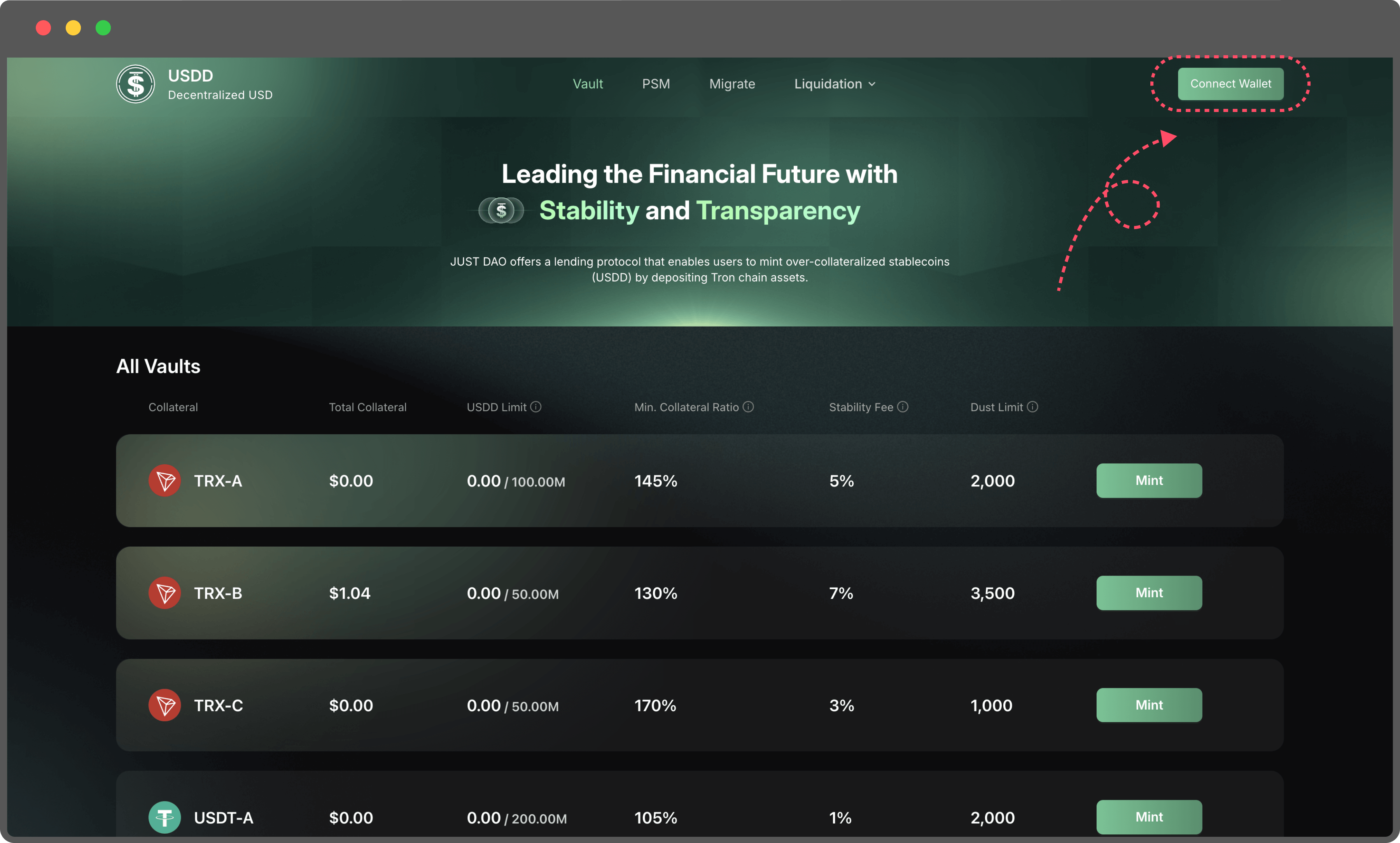
1. **Navigate to the Vault page**
2. **Connect Your TronLink Wallet**
   1. Begin by linking your TronLink wallet to the platform. This wallet will serve as your interface for managing collateral and minting USDD.
   2. Ensure your wallet has sufficient TRX to cover the gas fees for transactions.

      <figure><img src="https://114421464-files.gitbook.io/~/files/v0/b/gitbook-x-prod.appspot.com/o/spaces%2FARwMu8GsAubRHTakjdxU%2Fuploads%2Fgit-blob-0edc8a43b257101cc4e2066ac5276d948470cd82%2F01.png?alt=media" alt=""><figcaption></figcaption></figure>
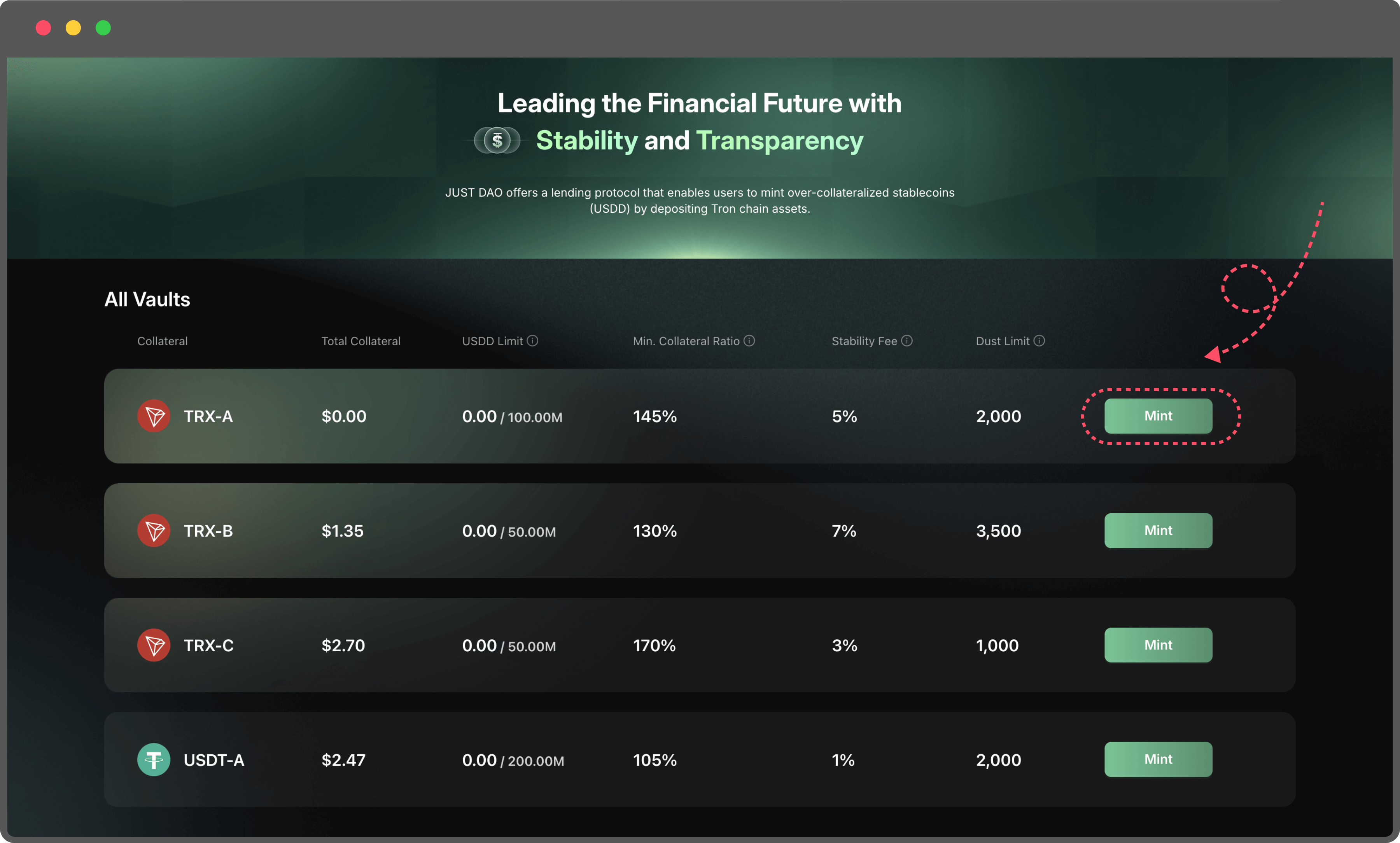
3. **Select a Collateral Type**

   Choose the type of collateral you want to deposit from the available options. Each collateral type may have different stability fees and liquidation thresholds, so select the one that best suits your strategy.

   <figure><img src="https://114421464-files.gitbook.io/~/files/v0/b/gitbook-x-prod.appspot.com/o/spaces%2FARwMu8GsAubRHTakjdxU%2Fuploads%2Fgit-blob-31153a6962f03e0eff1eb1f6c40043382cf8ab81%2F2.png?alt=media" alt=""><figcaption></figcaption></figure>
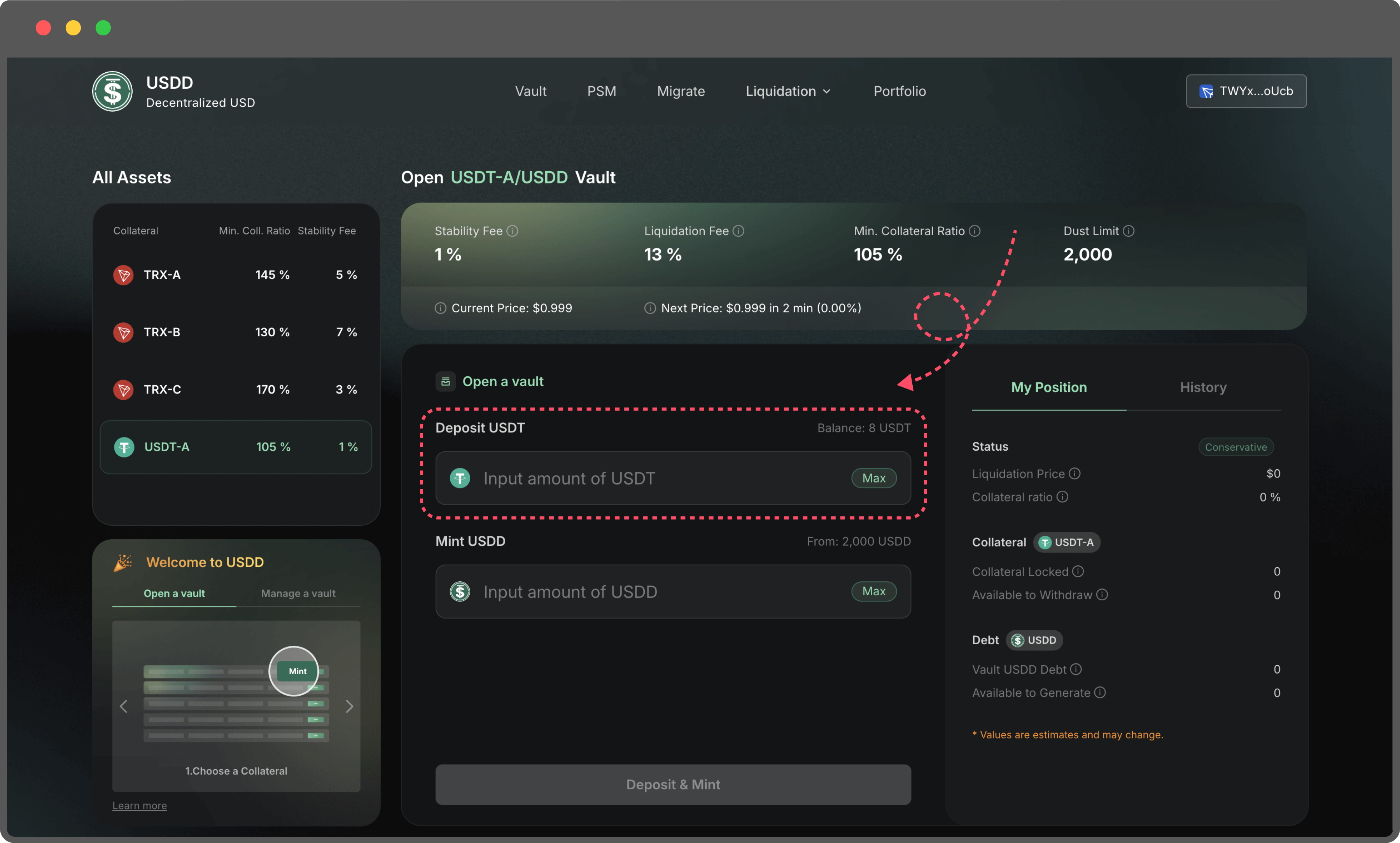
4. **Input Collateral Amount**
   1. Enter the amount of collateral you wish to deposit into the Vault. Make sure the amount does not exceed the balance available in your TronLink wallet.
   2. Double-check your wallet balance to avoid transaction errors.

      <figure><img src="https://114421464-files.gitbook.io/~/files/v0/b/gitbook-x-prod.appspot.com/o/spaces%2FARwMu8GsAubRHTakjdxU%2Fuploads%2Fgit-blob-4259c5a6bf0c4a4289f83d13bc3e3cb8e34809b4%2F3.png?alt=media" alt=""><figcaption></figcaption></figure>
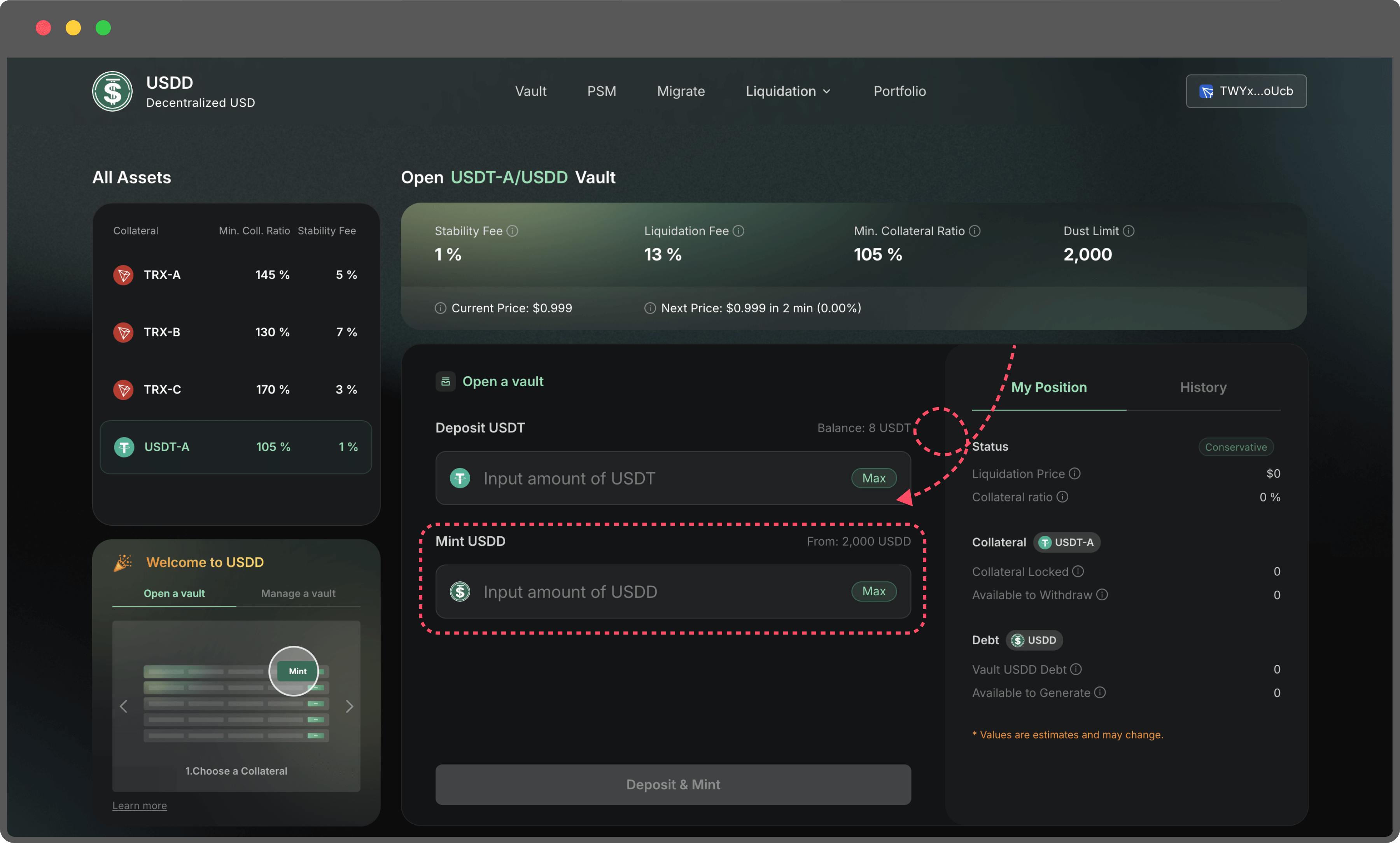
5. **Enter the Amount of USDD to Mint**
   1. Specify the amount of USDD you’d like to mint. The system will automatically calculate the maximum mint amount based on your collateral and the current market conditions.
   2. If the collateral you’re staking is not TRX, you may need to complete an approve transaction before proceeding.
   3. Minting a smaller amount of USDD results in a higher collateral ratio, making your Vault safer from liquidation.
   4. Minting a larger amount of USDD decreases your collateral ratio, increasing the risk of liquidation if the collateral value drops.

      <figure><img src="https://114421464-files.gitbook.io/~/files/v0/b/gitbook-x-prod.appspot.com/o/spaces%2FARwMu8GsAubRHTakjdxU%2Fuploads%2Fgit-blob-6b060bb71fff38b888cadf620cc84d671600efdf%2F4.png?alt=media" alt=""><figcaption></figcaption></figure>

**Pro Tips for Managing Your Vault：**

* Regularly monitor your collateral ratio to ensure it stays above the liquidation threshold.
* Keep an eye on market prices for your collateral, as fluctuations could impact the safety of your Vault.
* Use the platform’s portfolio tools to track your transactions and manage your positions efficiently.
* If you’re new to the system, you’ll be prompted to create a proxy. Don’t worry—this process is straightforward, and step-by-step guidance will help you complete it in just a few clicks.


# Manage a Vault

If you’ve already **opened a Vault**, you can manage it through various actions to optimize its performance and mitigate risks. Below is a detailed guide for managing your Vault:

1. **Add Collateral**

Adding more collateral to an existing Vault increases the Collateralization Ratio, reducing the risk of liquidation.

* Enter the amount of collateral you wish to deposit.
* The updated collateralization ratio and other key metrics will be displayed on the right side of the page, providing a clear view of how this action affects your Vault's stability.

  <figure><img src="https://114421464-files.gitbook.io/~/files/v0/b/gitbook-x-prod.appspot.com/o/spaces%2FARwMu8GsAubRHTakjdxU%2Fuploads%2Fgit-blob-6b060bb71fff38b888cadf620cc84d671600efdf%2F4%20(1).png?alt=media" alt=""><figcaption></figcaption></figure>

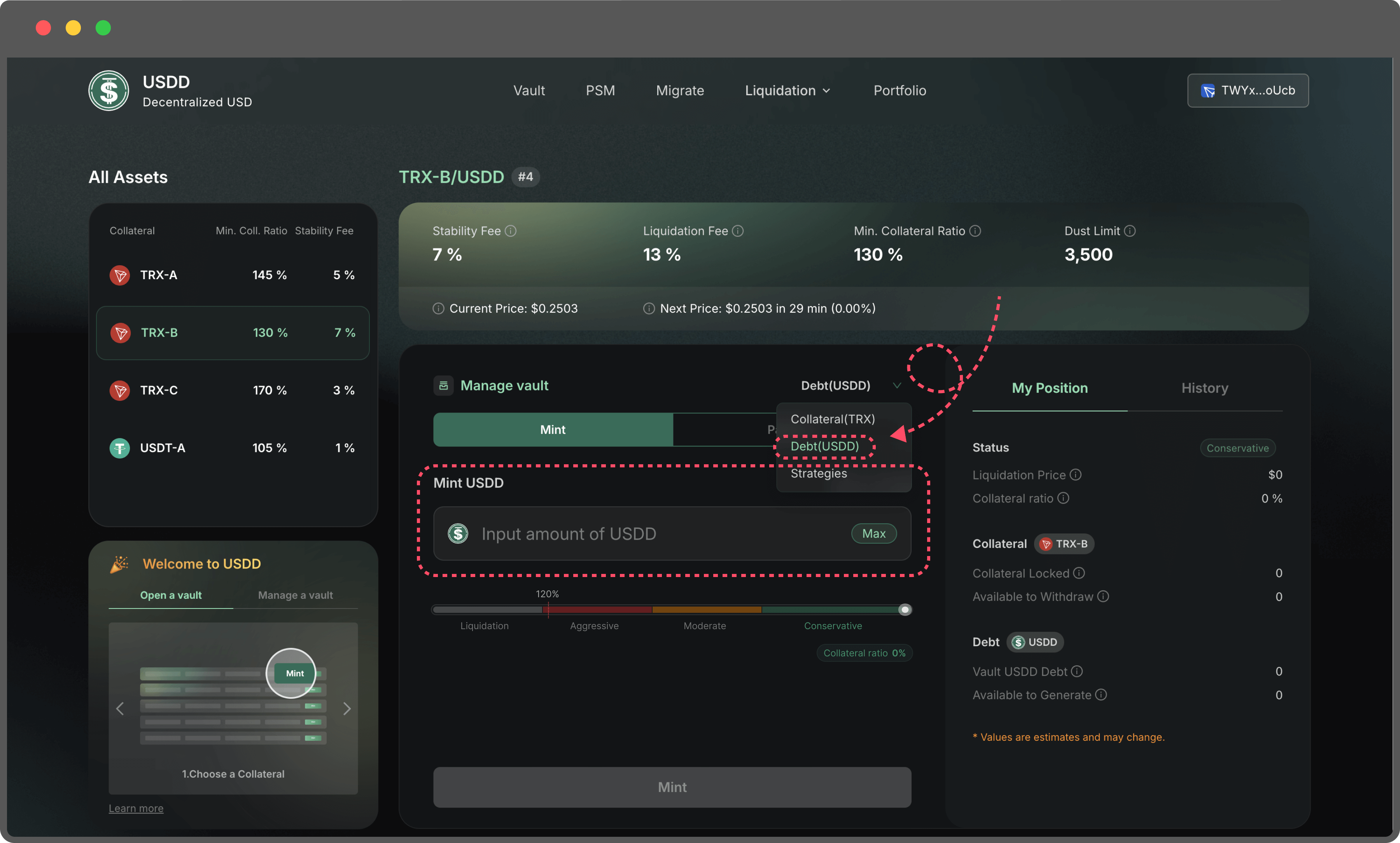
**2. Mint More USDD**

If you need additional liquidity, you can mint more USDD from your Vault.

* Enter the desired amount of USDD to mint, staying within the allowable range to avoid errors.
* Caution: Minting more USDD decreases the Collateralization Ratio, increasing the risk of liquidation. If the ratio falls below the Min. Collateral Ratio, your Vault may be liquidated to cover the debt.

  <figure><img src="https://114421464-files.gitbook.io/~/files/v0/b/gitbook-x-prod.appspot.com/o/spaces%2FARwMu8GsAubRHTakjdxU%2Fuploads%2Fgit-blob-87389ee3d82e85995d4fdc815774c23c16b22814%2F6.png?alt=media" alt=""><figcaption></figcaption></figure>

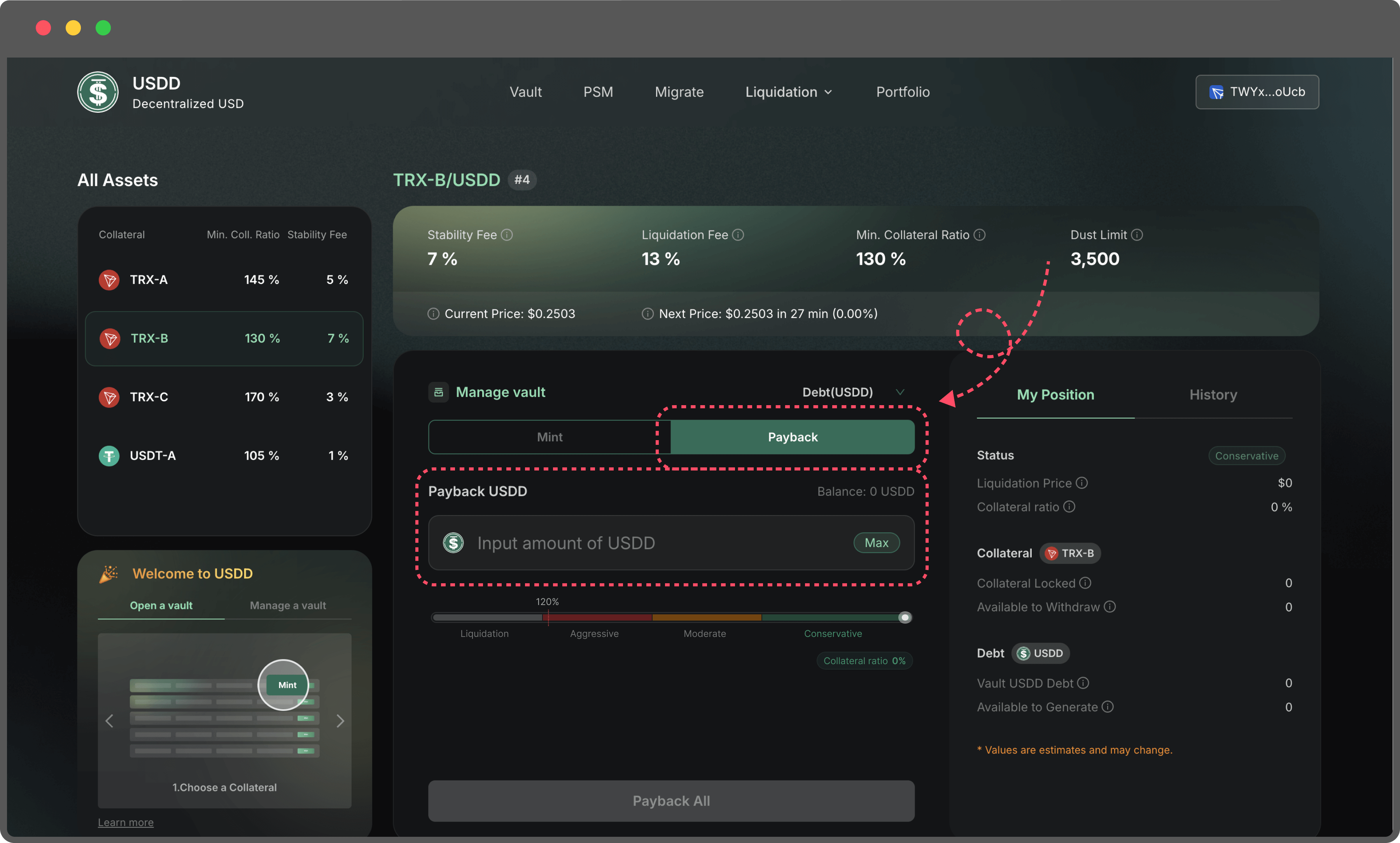
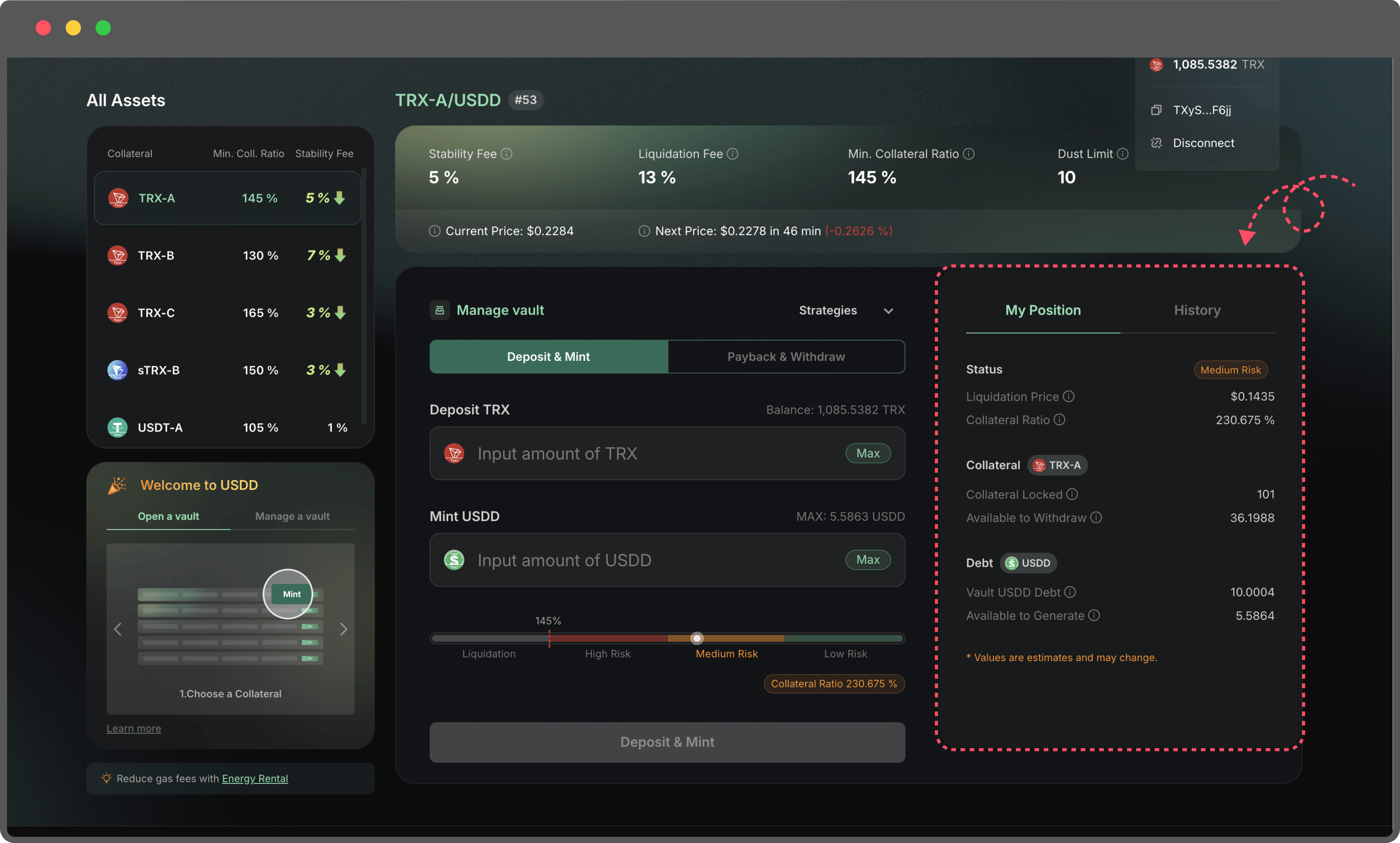
**3. PayBack USDD**

If you have surplus USDD, you can repay part or all of your Vault debt.

* Reducing your debt increases the Collateralization Ratio, significantly lowering the risk of liquidation.
* This is a useful option if you aim to stabilize your Vault or reduce exposure to potential market volatility.

  <figure><img src="https://114421464-files.gitbook.io/~/files/v0/b/gitbook-x-prod.appspot.com/o/spaces%2FARwMu8GsAubRHTakjdxU%2Fuploads%2Fgit-blob-afd9df3c09705f003a24ac380cd0c1d151882481%2F7.png?alt=media" alt=""><figcaption></figcaption></figure>

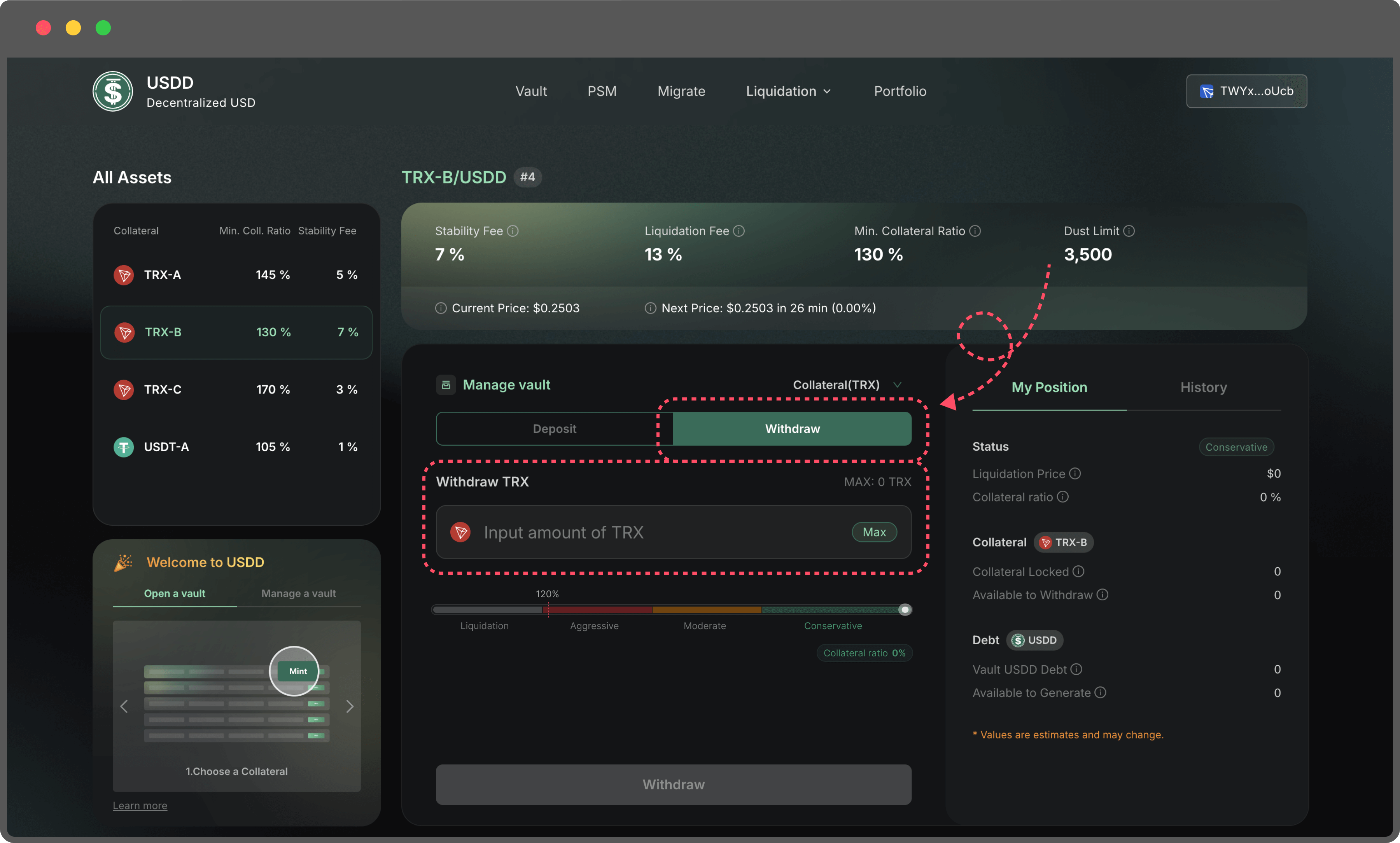
**4. Withdraw Collateral**

If your Vault is well-collateralized and not at risk of liquidation, you may withdraw a portion of your collateral.

* Enter the amount you wish to withdraw.
* Caution: Withdrawing collateral reduces the Collateralization Ratio, potentially bringing your Vault closer to the Min. Collateral Ratio. Monitor the updated metrics carefully before proceeding.

  <figure><img src="https://114421464-files.gitbook.io/~/files/v0/b/gitbook-x-prod.appspot.com/o/spaces%2FARwMu8GsAubRHTakjdxU%2Fuploads%2Fgit-blob-49542788df7d5bc36050c1435560531d6faddd9f%2F8.png?alt=media" alt=""><figcaption></figcaption></figure>

**Risk Management Tips:**

* Always maintain a healthy **Collateralization Ratio (CR)** above the **Min. Collateral Ratio (MCR)** to avoid liquidation. Your position falls into one of four categories:

  * **Conservative:** Your CR is well above the MCR, providing a strong safety buffer.
  * **Moderate**: Your CR is above the MCR, but the buffer is smaller—monitor your position closely.
  * **Aggressive:** Your CR is near the MCR, putting your Vault at high risk of liquidation. Take immediate action to top up your collateral or reduce your debt.
  * **Liquidation**: Your CR has fallen below the MCR, and your Vault is being liquidated.

  To minimize risk, aim to stay within the Conservative or Moderate ranges, and avoid the Aggressive zone by actively managing your Vault.
* Regularly review your Vault's status, especially during periods of market volatility.
* Consider repaying USDD or adding more collateral if your Vault's ratio approaches the Min. Collateral Ratio.

These management tools allow you to maintain flexibility while keeping your Vault secure and optimized for your financial goals.


# Close a Vault

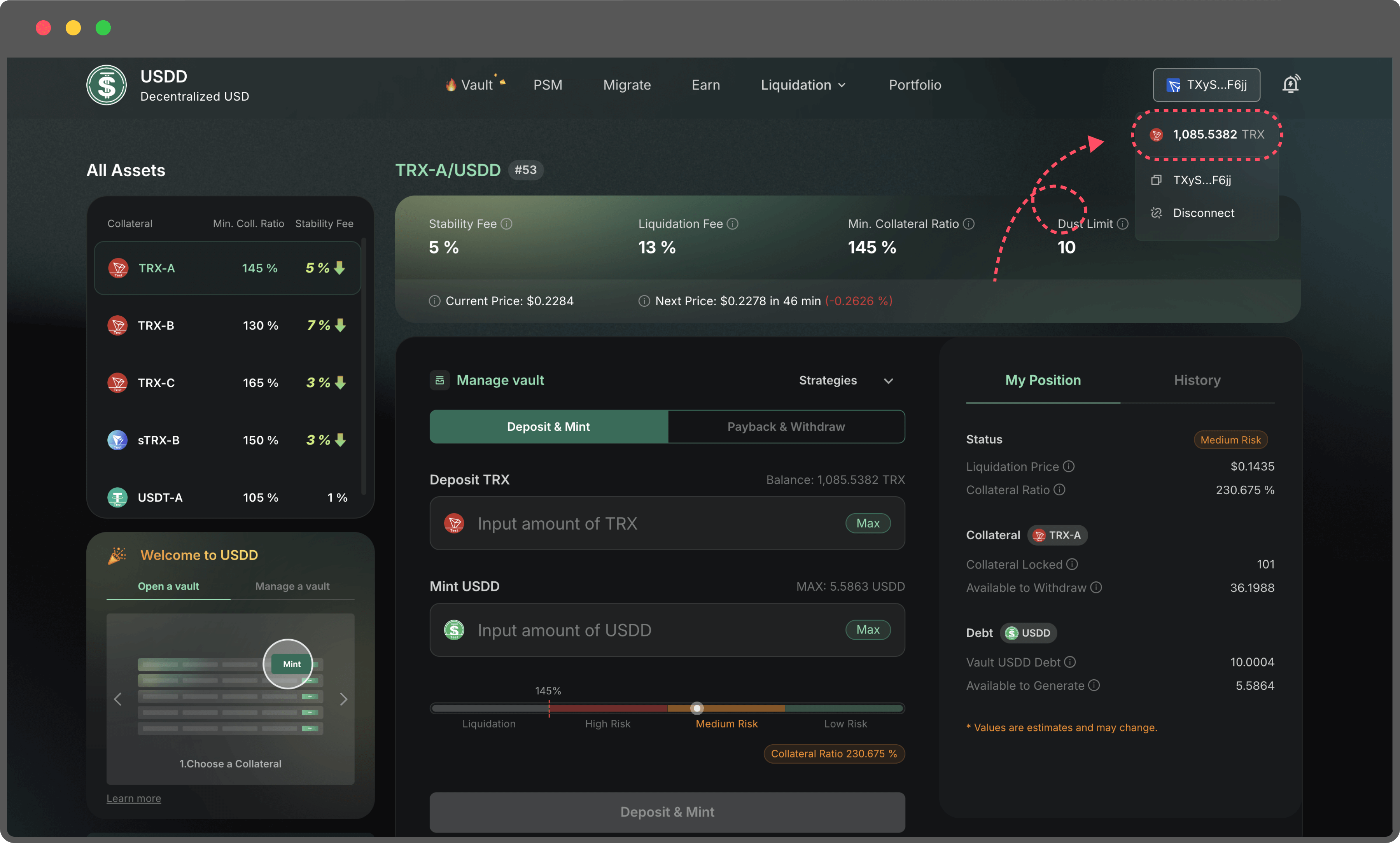
1. **Navigate to the Vault page**

Go to the Vault section and locate the active Vault you wish to close.

2. **Connect Your Wallet**

Connect your wallet to the platform.

Ensure your wallet has enough TRX to cover the gas fees required for repayment and collateral withdrawal.

<figure><img src="https://114421464-files.gitbook.io/~/files/v0/b/gitbook-x-prod.appspot.com/o/spaces%2FARwMu8GsAubRHTakjdxU%2Fuploads%2Fgit-blob-8b8bb6f22d453eb5ac6bcd7ca344f13a21efd36c%2F18.png?alt=media" alt=""><figcaption></figcaption></figure>

3. **Review Your Vault Status**

Before closing your Vault, check:

* The outstanding USDD debt
* Your collateral balance
* Your current collateral ratio

Make sure you have enough USDD in your wallet to fully repay the debt.

<figure><img src="https://114421464-files.gitbook.io/~/files/v0/b/gitbook-x-prod.appspot.com/o/spaces%2FARwMu8GsAubRHTakjdxU%2Fuploads%2Fgit-blob-f81e815409cdcff3babf7a7d547e35c3b89b5ed8%2F19.png?alt=media" alt=""><figcaption></figcaption></figure>

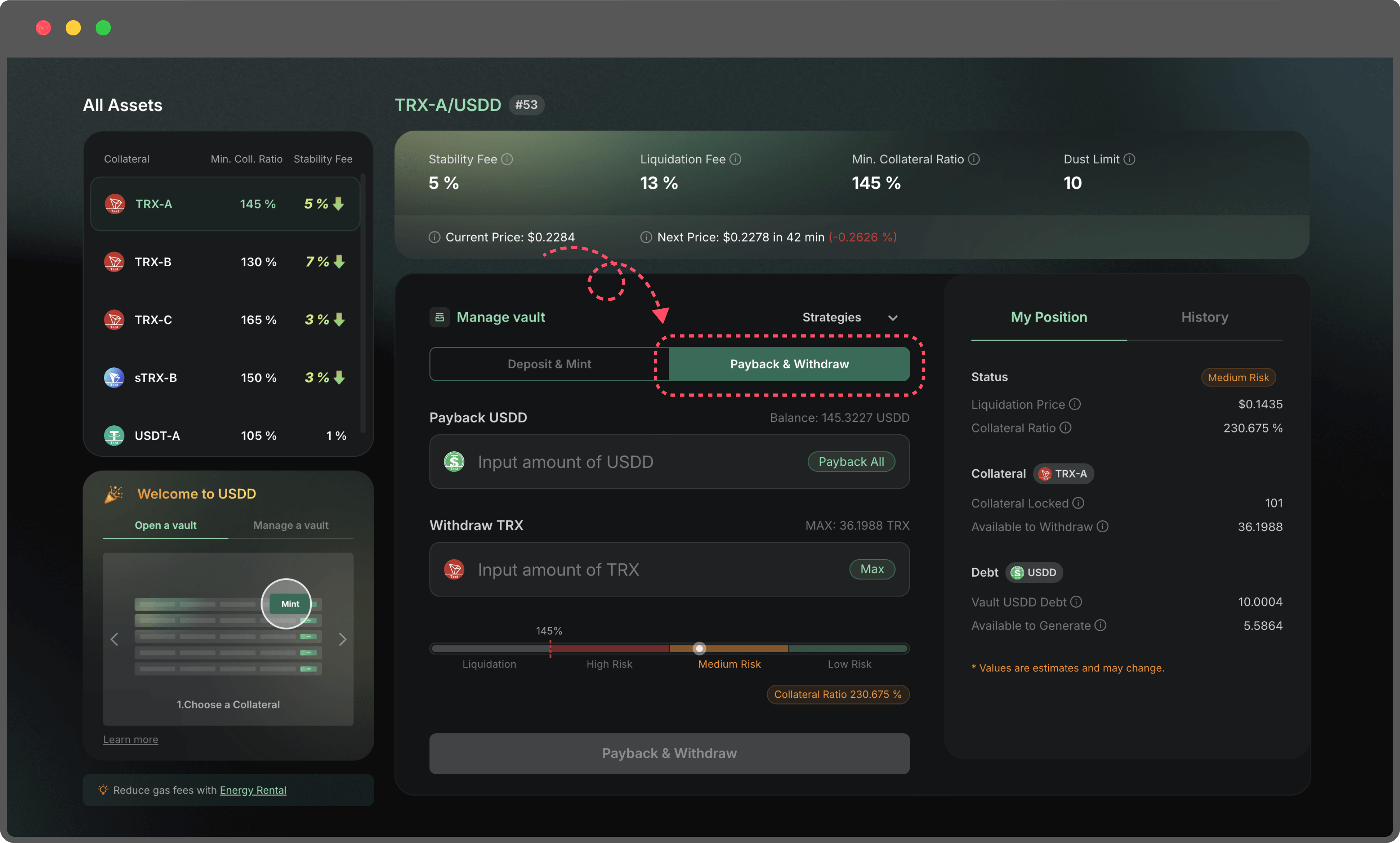
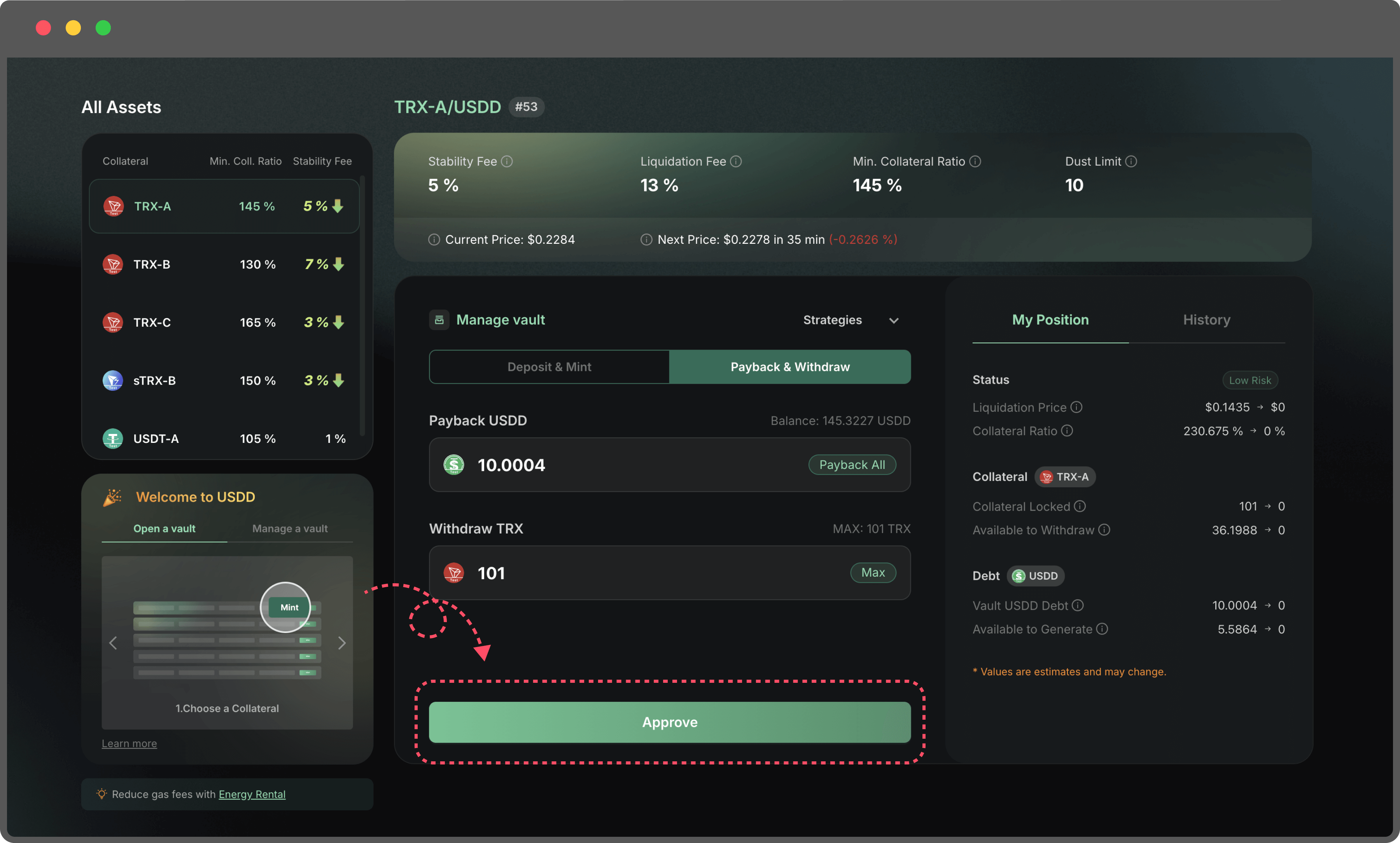
4. **Repay all borrowed USDD**

Navigate to the Payback & Withdraw tab

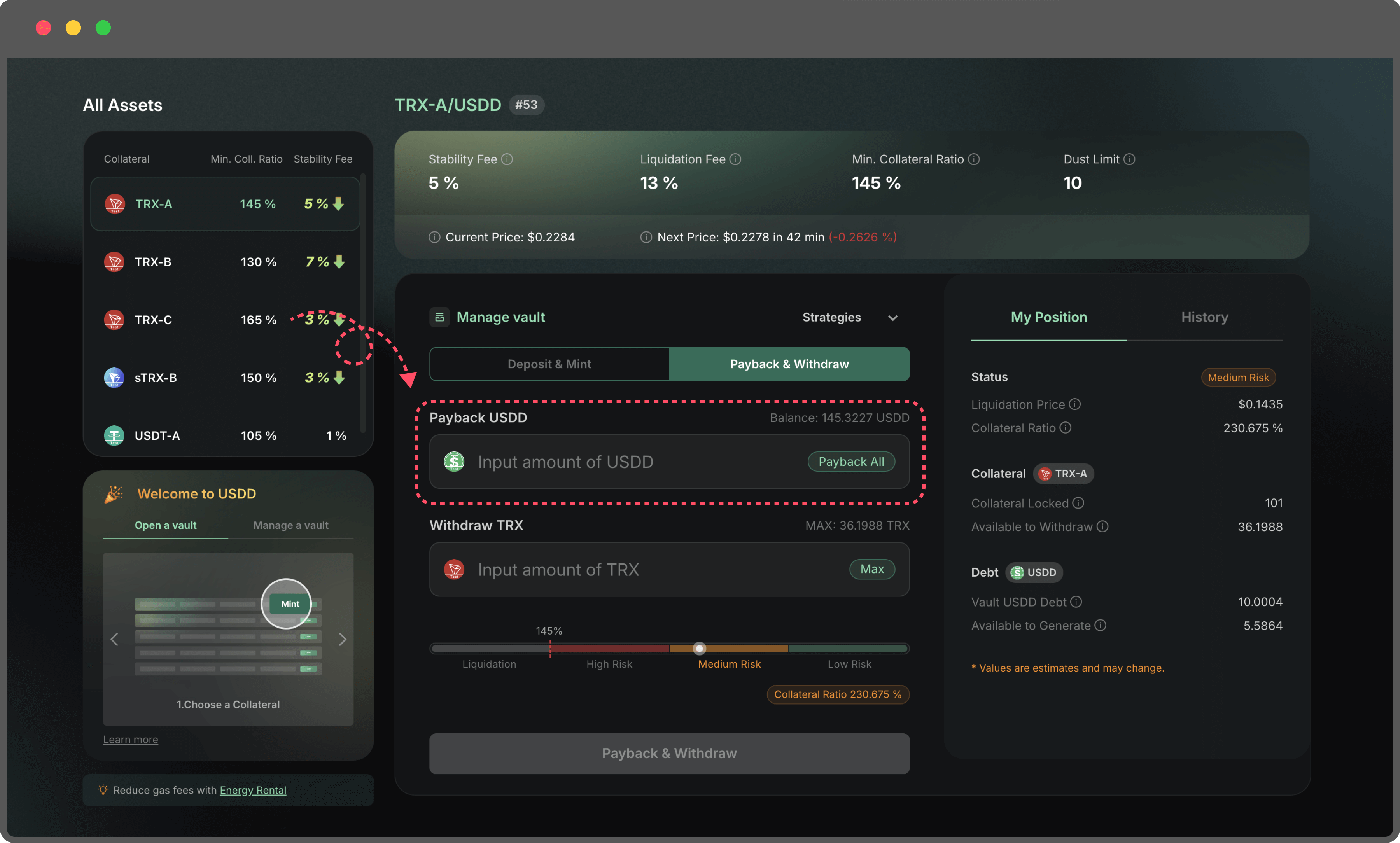
<figure><img src="https://114421464-files.gitbook.io/~/files/v0/b/gitbook-x-prod.appspot.com/o/spaces%2FARwMu8GsAubRHTakjdxU%2Fuploads%2Fgit-blob-deb38ed865991a657fba4f81ab4bc968e162ddbd%2F20.png?alt=media" alt=""><figcaption></figcaption></figure>

In the Payback field, click Payback All or enter the full debt amount.

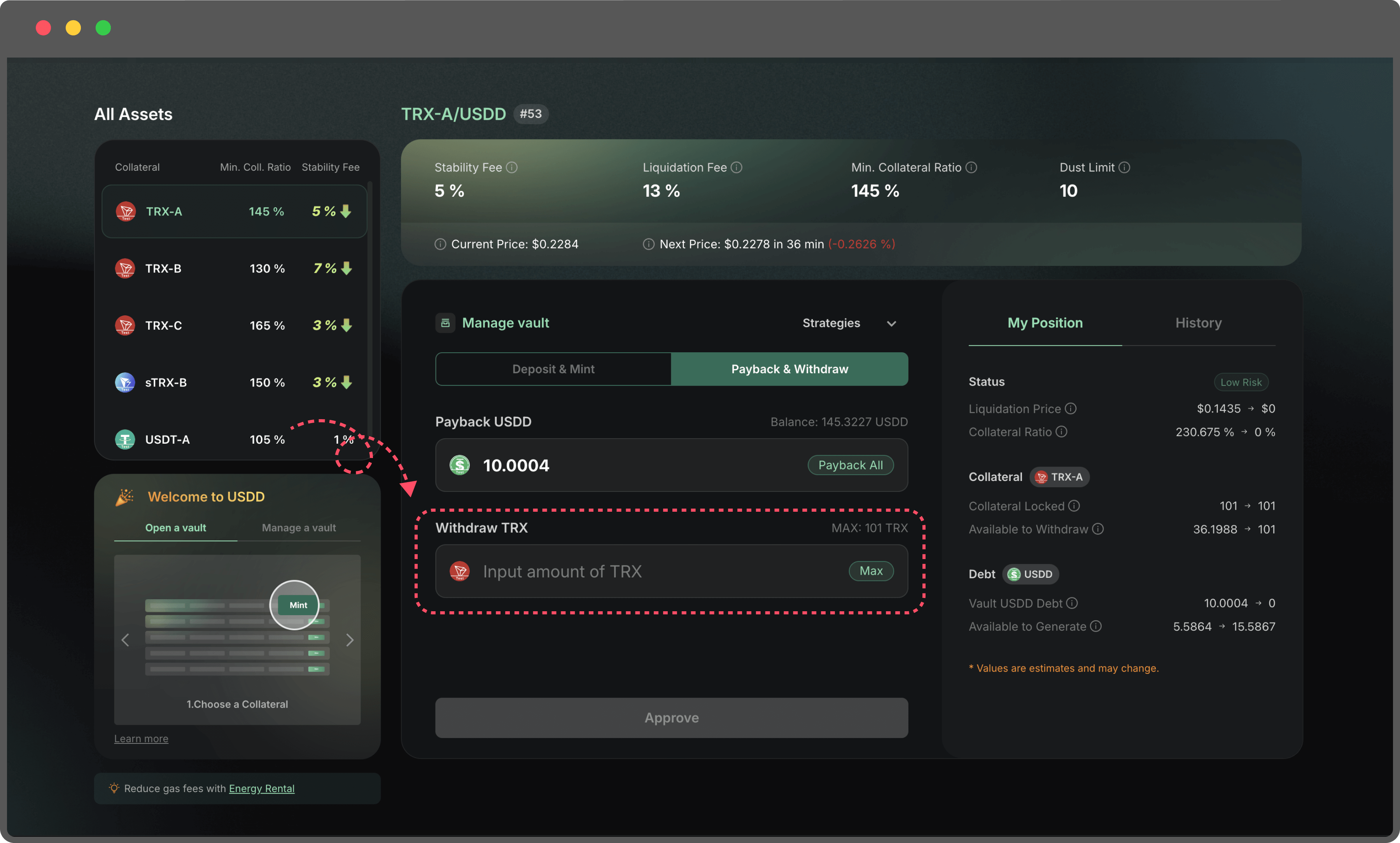
<figure><img src="https://114421464-files.gitbook.io/~/files/v0/b/gitbook-x-prod.appspot.com/o/spaces%2FARwMu8GsAubRHTakjdxU%2Fuploads%2Fgit-blob-60cb7d091d99277fc1009c0ecb7826b0df06466d%2F21.png?alt=media" alt=""><figcaption></figcaption></figure>

5. **Withdraw all your collateral**

In the Withdraw field, click Max or enter the full collateral amount.

<figure><img src="https://114421464-files.gitbook.io/~/files/v0/b/gitbook-x-prod.appspot.com/o/spaces%2FARwMu8GsAubRHTakjdxU%2Fuploads%2Fgit-blob-b64579c2f7e1c70ee60c1876a9bb58e2d84a3da6%2F22.png?alt=media" alt=""><figcaption></figcaption></figure>

6. **Confirm Transaction**

Click Payback All & Withdraw, confirm the transaction in your wallet.

<figure><img src="https://114421464-files.gitbook.io/~/files/v0/b/gitbook-x-prod.appspot.com/o/spaces%2FARwMu8GsAubRHTakjdxU%2Fuploads%2Fgit-blob-1487b8e406d2b30b9d0527f62b310a376464b067%2F23.png?alt=media" alt=""><figcaption></figcaption></figure>

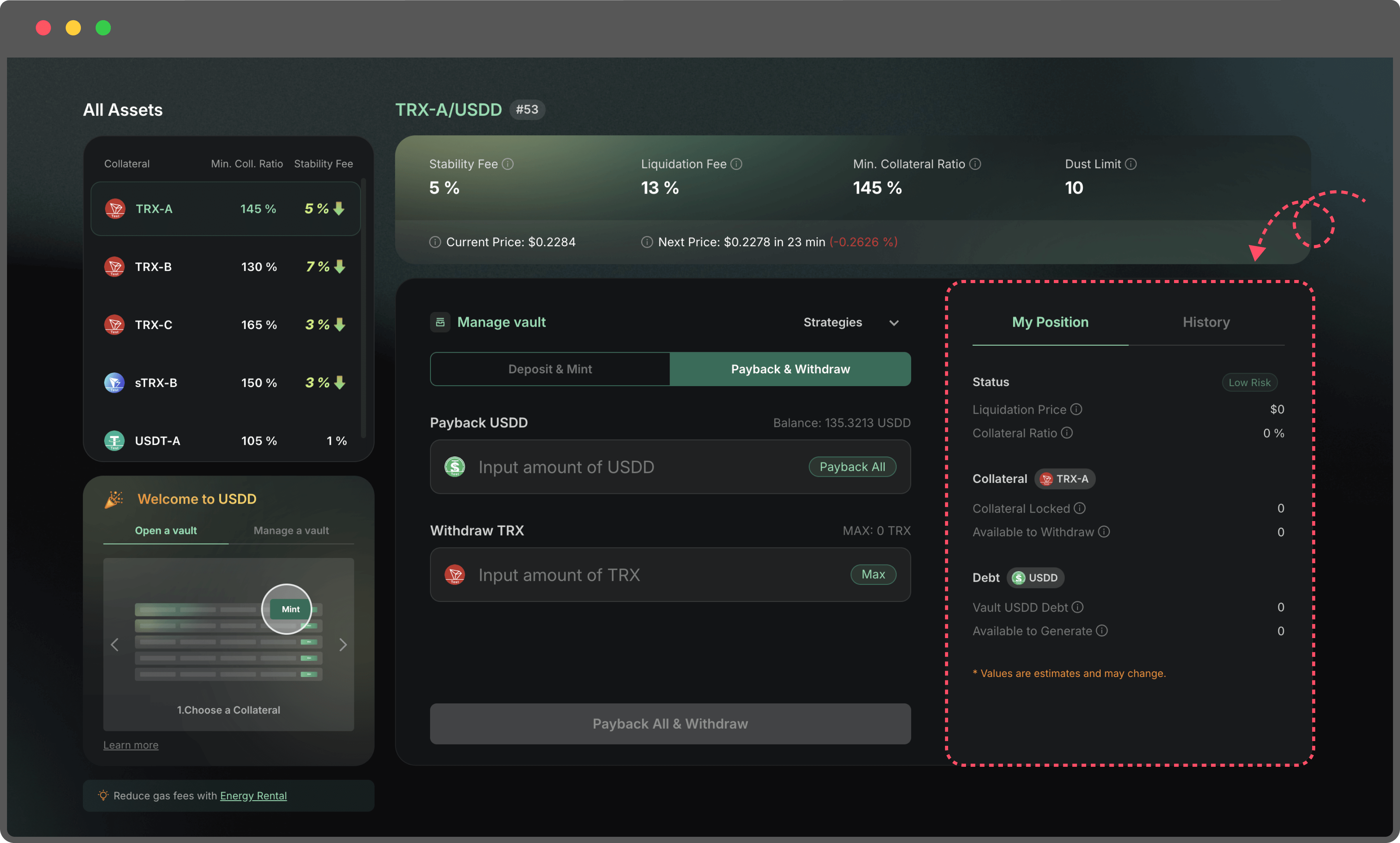
Once completed, your Vault debt will be zero, and all collateral will be returned to your wallet.

<figure><img src="https://114421464-files.gitbook.io/~/files/v0/b/gitbook-x-prod.appspot.com/o/spaces%2FARwMu8GsAubRHTakjdxU%2Fuploads%2Fgit-blob-8e5359db42a4260b1a681e2db694b156be5f5f17%2F24.png?alt=media" alt=""><figcaption></figcaption></figure>

**Note:**

If you don’t have enough USDD, you can:

* Swap USDD via the PSM (Peg Stability Module)
* Or purchase USDD from exchanges


# Risk Alert

Protecting your assets with real-time risk monitoring

To help users better manage their collateralized positions, USDD has officially launched the Risk Alert feature. With Risk Alert, you’ll be notified the moment your position approaches the liquidation threshold, allowing you to take timely action and avoid unnecessary losses.

**Key Features**

* Dual-channel notifications: On-page alerts + Email notifications
* Wallet signature verification: No gas fee required
* Quick and easy email binding
* Instant alerts for high-risk positions to help prevent liquidation

**How to Enable Risk Alerts**

Just 6 simple steps to enable email risk alerts:

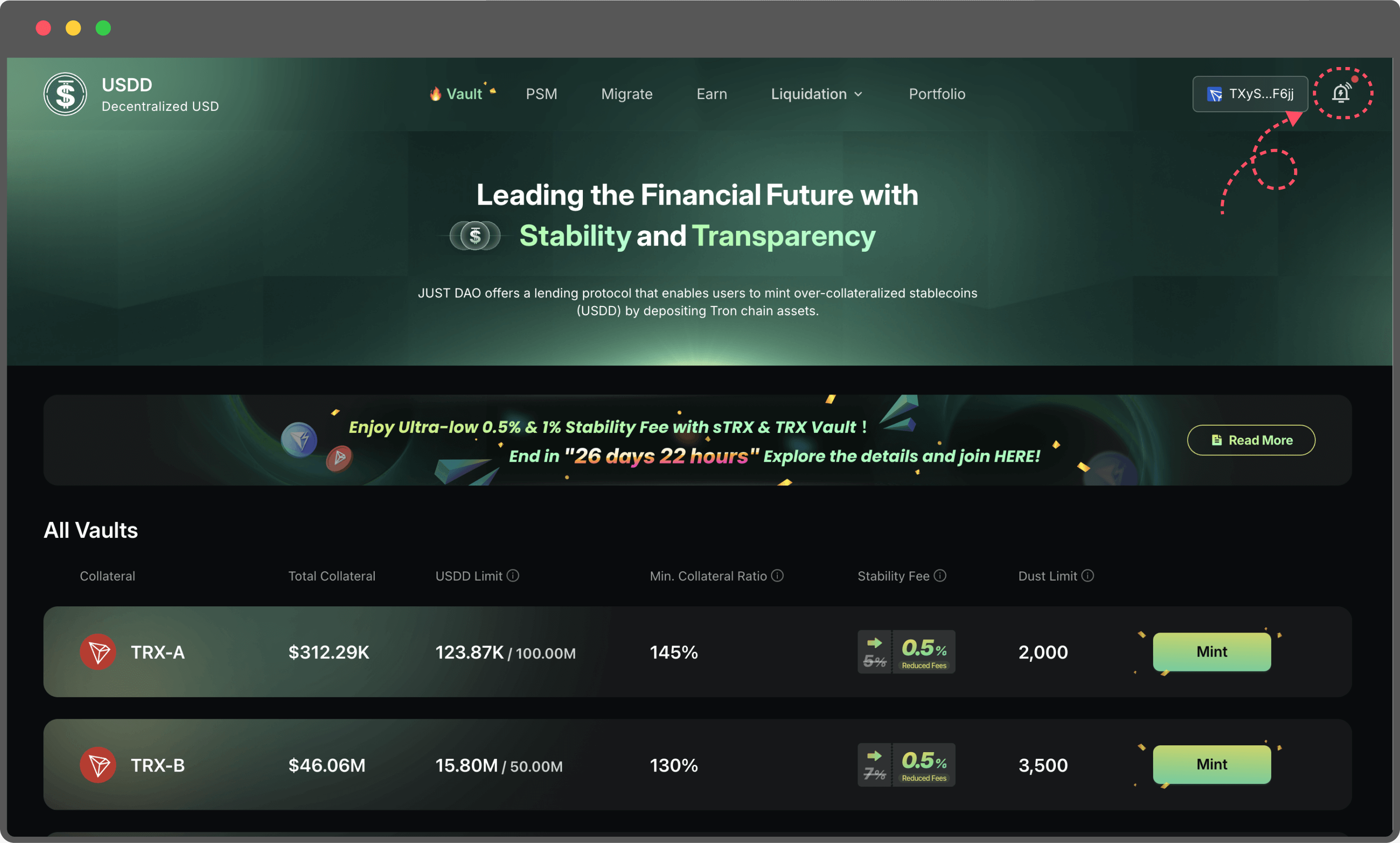
Step1: Visit <https://app.usdd.io/> and connect your wallet.

<figure><img src="https://114421464-files.gitbook.io/~/files/v0/b/gitbook-x-prod.appspot.com/o/spaces%2FARwMu8GsAubRHTakjdxU%2Fuploads%2Fgit-blob-f4471c9bb9424d14b37df02d1d4582a1478ae987%2Fimage%20(19).png?alt=media" alt=""><figcaption></figcaption></figure>

Step2:

* Click the bell icon in the top right corner. 🔔
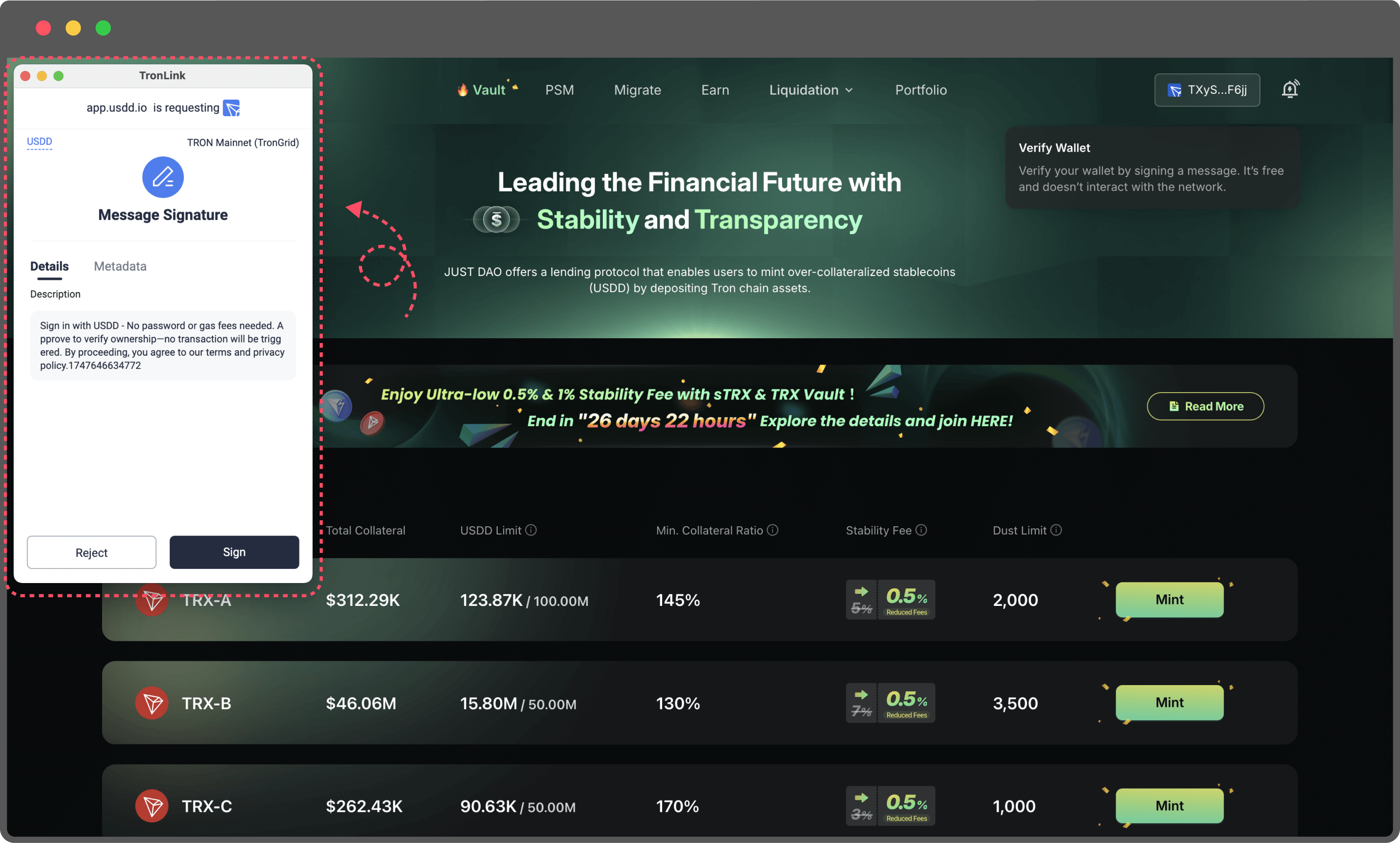
* Then, sign the smart contract to authorize access to the Risk Alert interface. This signature simply verifies ownership of your wallet address—no gas fees will be charged.

<figure><img src="https://114421464-files.gitbook.io/~/files/v0/b/gitbook-x-prod.appspot.com/o/spaces%2FARwMu8GsAubRHTakjdxU%2Fuploads%2Fgit-blob-bca8093d3c45974557ae7b9022efb610daefc3ac%2F25.png?alt=media" alt=""><figcaption></figcaption></figure>

Step3: Connect and sign with your wallet

* You’ll be prompted to sign a message with your wallet.
* The signature is only used to verify ownership of the address—no gas fee will be charged.
* After signing, you’ll proceed to the next step.

<figure><img src="https://114421464-files.gitbook.io/~/files/v0/b/gitbook-x-prod.appspot.com/o/spaces%2FARwMu8GsAubRHTakjdxU%2Fuploads%2Fgit-blob-218bfa41ed3d6f6c136d76f423ec80841a9fe0bf%2F26.png?alt=media" alt=""><figcaption></figcaption></figure>

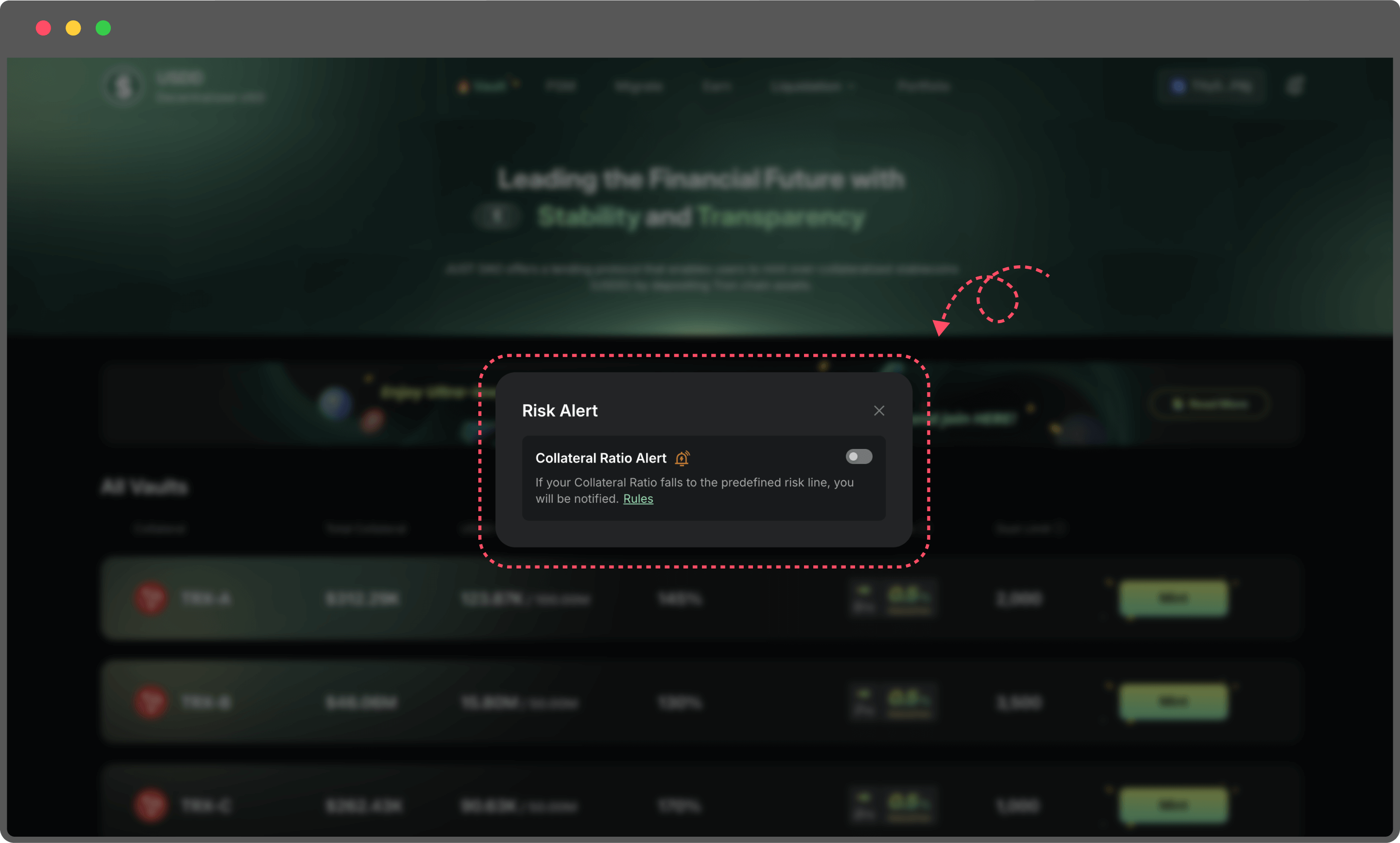
Step4: Turn on Risk Alert

* Switch on the risk alert toggle to start receiving notifications.

<figure><img src="https://114421464-files.gitbook.io/~/files/v0/b/gitbook-x-prod.appspot.com/o/spaces%2FARwMu8GsAubRHTakjdxU%2Fuploads%2Fgit-blob-32dbeb61ebc7bb8991aecb750730c0fd8438070e%2F27.png?alt=media" alt=""><figcaption></figcaption></figure>

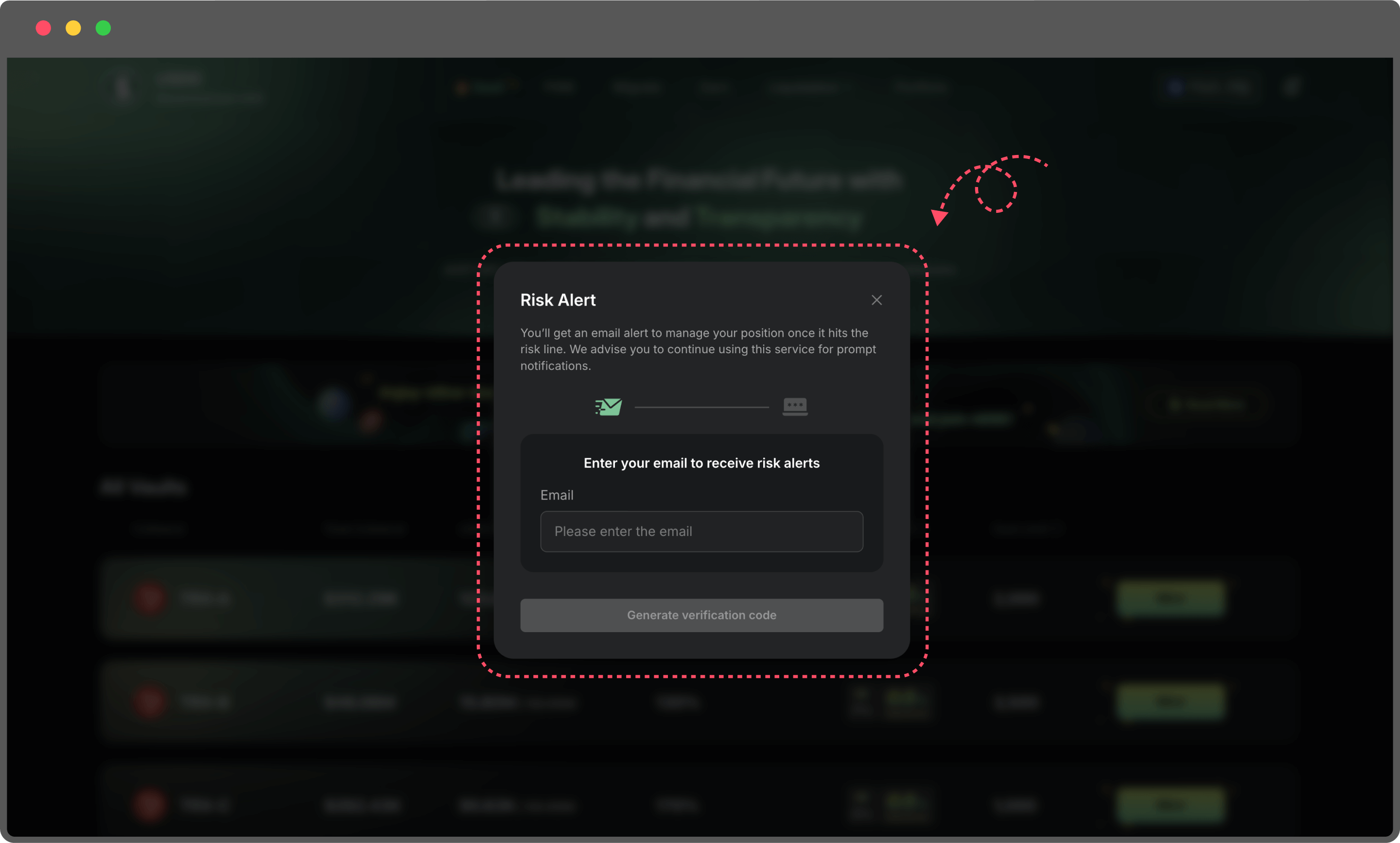
Step5: Enter your email address

* Use a frequently checked email to receive timely alerts.
* Your email will only be used to send risk notifications.

<figure><img src="https://114421464-files.gitbook.io/~/files/v0/b/gitbook-x-prod.appspot.com/o/spaces%2FARwMu8GsAubRHTakjdxU%2Fuploads%2Fgit-blob-65da78fba25af586b75fa9576496146ace71ae60%2F28.png?alt=media" alt=""><figcaption></figcaption></figure>

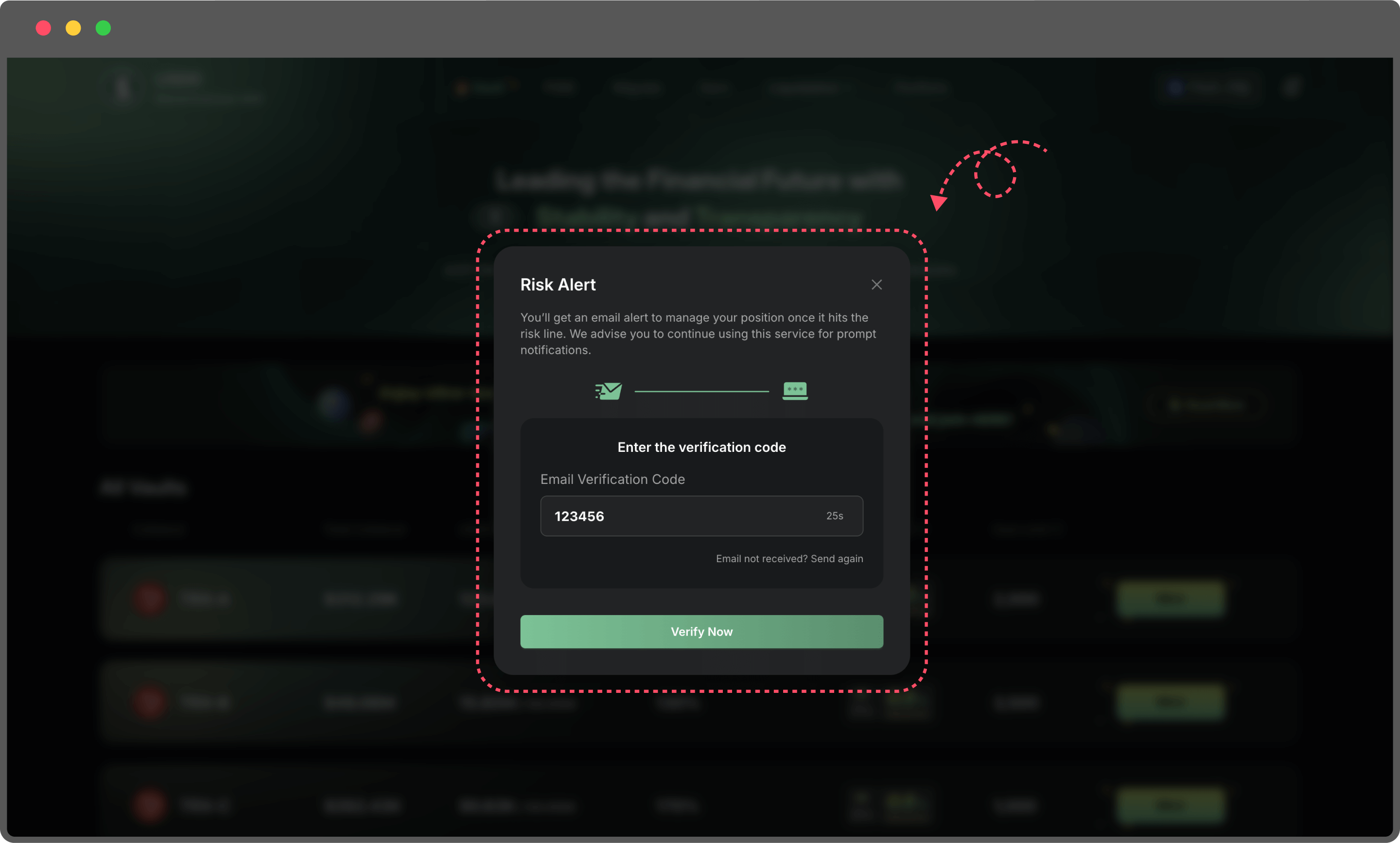
Step6: Enter the verification code to complete the binding

* A one-time code will be sent to your email.
* Enter the code to finish binding your email to your wallet.

<figure><img src="https://114421464-files.gitbook.io/~/files/v0/b/gitbook-x-prod.appspot.com/o/spaces%2FARwMu8GsAubRHTakjdxU%2Fuploads%2Fgit-blob-9fabc227b6d7ed65d8a6fdbe64db4a448363ebb1%2F30.png?alt=media" alt=""><figcaption></figcaption></figure>

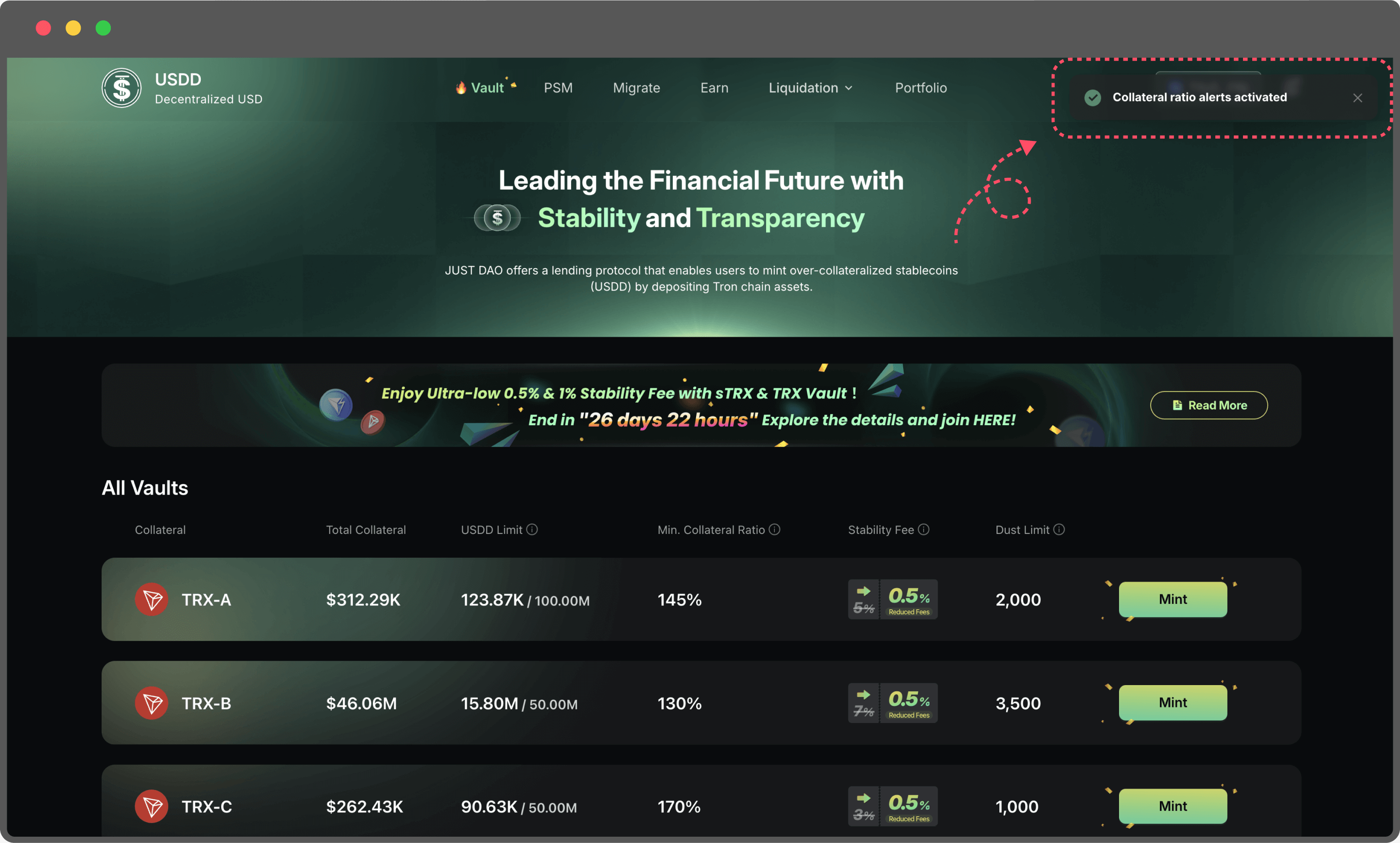
Once binding is complete, you can return to the same page anytime to turn email alerts on or off.

<figure><img src="https://114421464-files.gitbook.io/~/files/v0/b/gitbook-x-prod.appspot.com/o/spaces%2FARwMu8GsAubRHTakjdxU%2Fuploads%2Fgit-blob-e4082653ccf49c6fcf9d5b19a48795375e4cf25e%2F31.png?alt=media" alt=""><figcaption></figcaption></figure>

**Two Types of Risk Alerts**

1. On-Page Alerts (Always Active)

Risk warnings will automatically appear at the top of the page based on your Vault’s Collateral Ratio:

* **High Risk Alert**: Collateral Ratio is less than **5%** above the liquidation line
* **Moderate Risk Alert**: Collateral Ratio is less than **10%** above the liquidation line

No setup needed—alerts are always active and update in real time to keep you informed.\
\\

2\. Email Alerts (Manually Toggle On/Off)

* When enabled, the system will send an alert email whenever a risky position is detected.\
  Perfect for users who are not always on the page—ensuring you receive important updates anytime, anywhere.
* You can manage this feature anytime through the bell icon in the top right corner.
* **High Risk Alert**: Collateral Ratio is less than **5%** above the liquidation line
* **Moderate Risk Alert**: Collateral Ratio is less than **10%** above the liquidation line


# Liquidation

When a Vault's Collateralization Ratio falls below the Min. Collateral Ratio, it becomes eligible for liquidation. This process plays a critical role in maintaining the stability and efficiency of the USDD ecosystem. By participating in liquidations, users can earn rewards while contributing to the system's health.

#### Steps to Participate in Liquidation

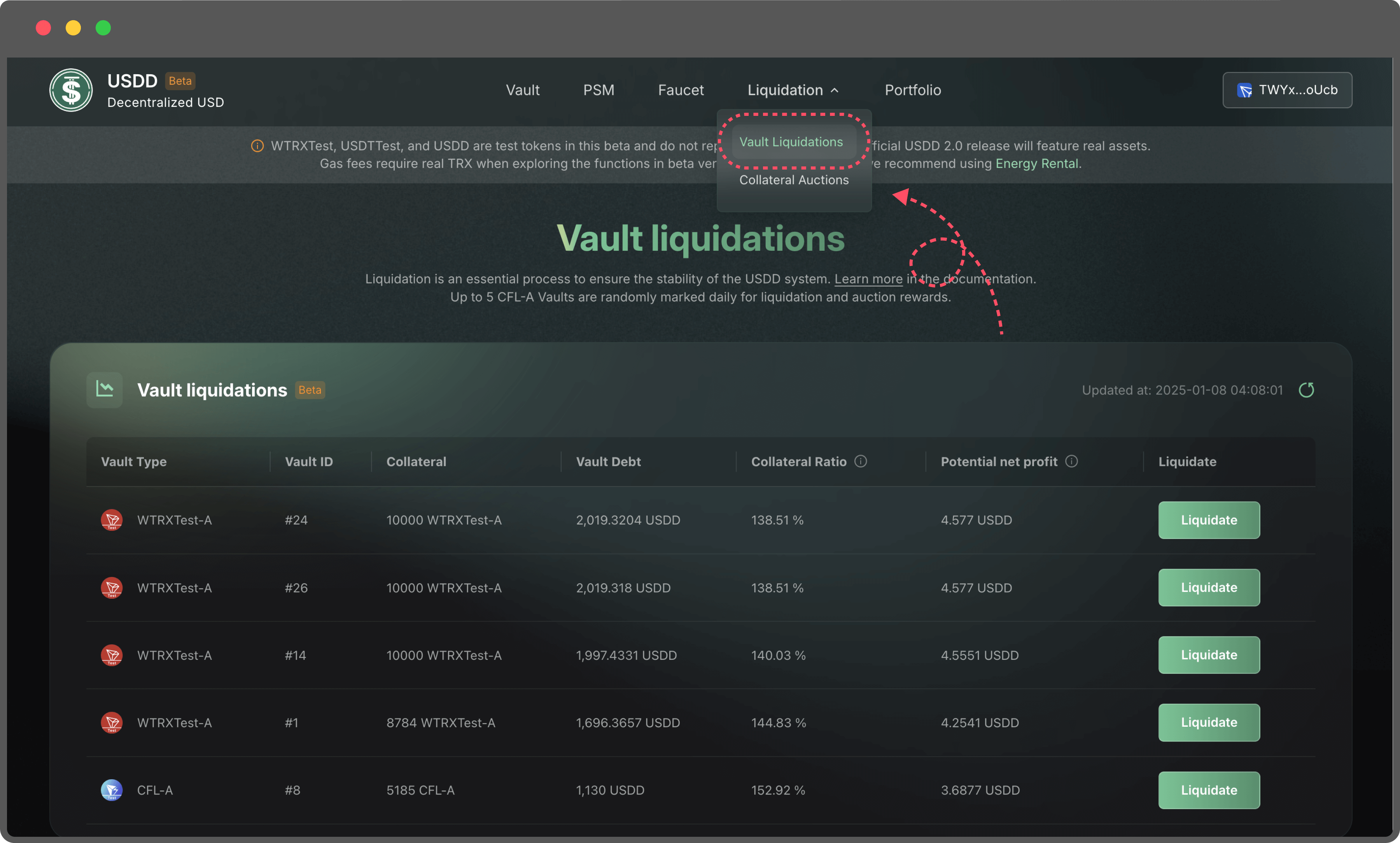
1. **Navigate to the Liquidation Page**\
   Visit the Liquidation Page to view Vaults eligible for liquidation.

   <figure><img src="https://114421464-files.gitbook.io/~/files/v0/b/gitbook-x-prod.appspot.com/o/spaces%2FARwMu8GsAubRHTakjdxU%2Fuploads%2Fgit-blob-050b393c2f187f49dd907337dfef542b2a1938cb%2F12.png?alt=media" alt=""><figcaption></figcaption></figure>
2. **Review Vault Details**\
   Each Vault's detailed information, including its debt and collateral status, is available on the liquidation page. This helps users make informed decisions before initiating a liquidation.

   <figure><img src="https://114421464-files.gitbook.io/~/files/v0/b/gitbook-x-prod.appspot.com/o/spaces%2FARwMu8GsAubRHTakjdxU%2Fuploads%2Fgit-blob-489d9d2bdd6d647b8f2d7b40cc0b4f8c893e99d3%2F13.png?alt=media" alt=""><figcaption></figcaption></figure>
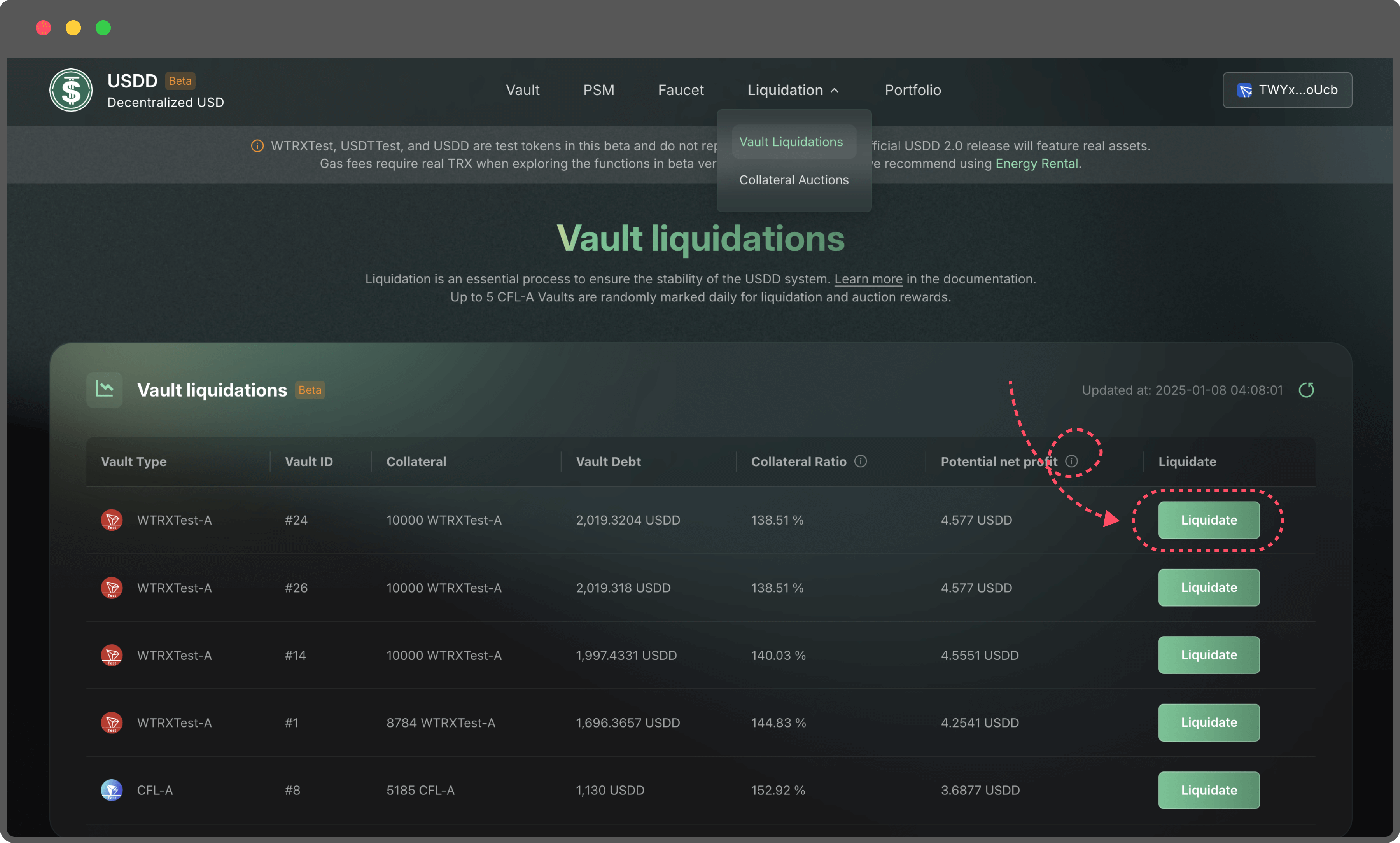
3. **Earn Liquidation Rewards**\
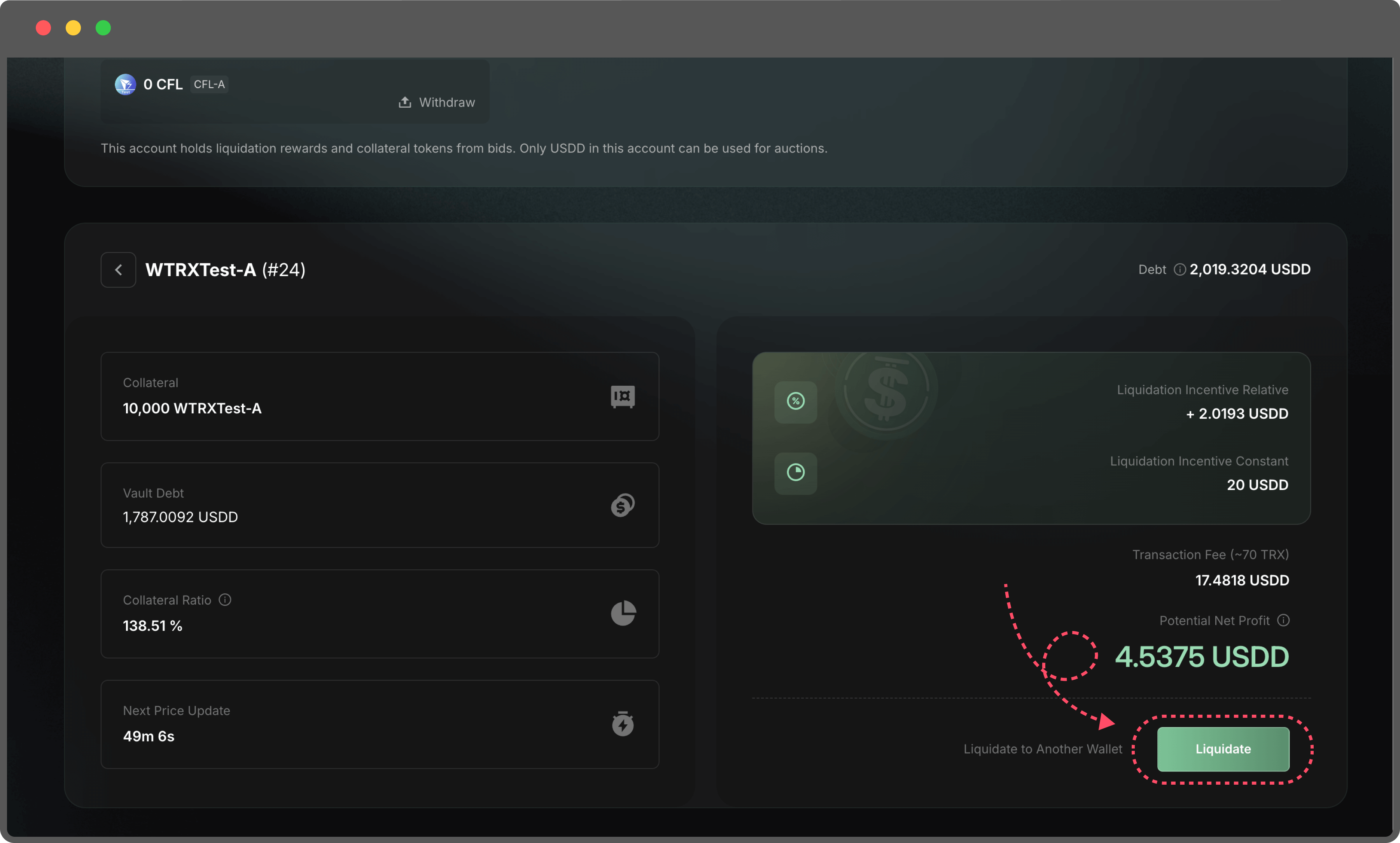
   Users who trigger a liquidation will receive a reward. Rewards are distributed based on the following formula: **Potential Net Profit = Liquidation Incentive (Relative) + Liquidation Incentive (Constant) - Transaction Fee**
   1. Liquidation Incentive (Relative): This reward component is proportional to the debt of the liquidated Vault.
   2. Liquidation Incentive (Constant): A fixed reward for successfully liquidating a Vault.
   3. Transaction Fee: The estimated gas fee for completing the transaction. The actual fee can be verified later using a blockchain explorer.

      <figure><img src="https://114421464-files.gitbook.io/~/files/v0/b/gitbook-x-prod.appspot.com/o/spaces%2FARwMu8GsAubRHTakjdxU%2Fuploads%2Fgit-blob-1a6136d7f1e2abb133ef7537f2d96e11dcc61e67%2F14.png?alt=media" alt=""><figcaption></figcaption></figure>
4. Choose Reward Address:
   1. Rewards can be sent to your currently connected wallet.
   2. Alternatively, you can specify a different address to receive the rewards.
5. Withdraw Rewards：

   The rewards from liquidations are stored in the liquidation auction account. Users can withdraw these rewards to their wallets as part of the liquidation process.

#### Key Benefits

* Helps maintain system stability by resolving under-collateralized Vaults.
* Provides users with tangible incentives for their participation.


# Collateral Auction

When a Vault is liquidated, its collateral is moved into an auction process. Users can bid on the collateral at auction prices, potentially securing profits. The auction uses a Dutch auction model, where the price gradually decreases over time until a buyer places a bid or the auction ends.

#### Steps to Participate in an Auction

1. **Navigate to the Auction Page**\
   Visit the Auction Page to explore ongoing auctions.

   <figure><img src="https://114421464-files.gitbook.io/~/files/v0/b/gitbook-x-prod.appspot.com/o/spaces%2FARwMu8GsAubRHTakjdxU%2Fuploads%2Fgit-blob-b59066ba8d8d49ba20a9bacb1ae24bb7f444165a%2Fimage%20(14).png?alt=media" alt=""><figcaption></figcaption></figure>
2. **View Auction Details**
   1. Access the details of the Vault undergoing auction.
   2. Review information about the collateral, debt, and current auction price.
3. **Stake USDD for Auction Participation**
   1. To bid, you must first stake USDD, which will be used for purchasing collateral in the auction.
   2. Staked USDD can be withdrawn anytime if not used for a bid.
4. **Place Your Bid**
   1. Enter the amount of USDD you wish to bid.
   2. The platform will automatically calculate:

      1. Collateral Quantity: The amount of collateral you will receive, calculated as:\
         **Collateral Quantity = Input USDD Amount / Auction Price**
      2. Potential net Profit: The potential net profit you can earn if you sell the collateral at the current market price.

      Profit Calculation Formula:\
      **Potential Net Profit = Input USDD Amount \* Market Price - Input USDD Amount \* Auction Price - Transaction fee**

      <figure><img src="https://114421464-files.gitbook.io/~/files/v0/b/gitbook-x-prod.appspot.com/o/spaces%2FARwMu8GsAubRHTakjdxU%2Fuploads%2Fgit-blob-4ec0dce6989d0dc63b4409020e9c6cdd6538e43d%2Fimage%20(15).png?alt=media" alt=""><figcaption></figcaption></figure>
5. **Monitor Auction Prices**
   1. Since the auction follows the Dutch auction model, the price decreases over time.
   2. The page displays the current auction price and the time remaining before it decreases further.
6. **Complete the Purchase**
   1. If your bid is successful, you will acquire the collateral, which can be sold or used as desired. Any collateral obtained from auctions is stored in the liquidation auction account and can be withdrawn to the winning bidders’ wallet.
   2. The actual profit will depend on the market price when you decide to sell the collateral.

Participating in auctions is an excellent way to acquire assets at competitive prices and contribute to the USDD ecosystem.


# PSM

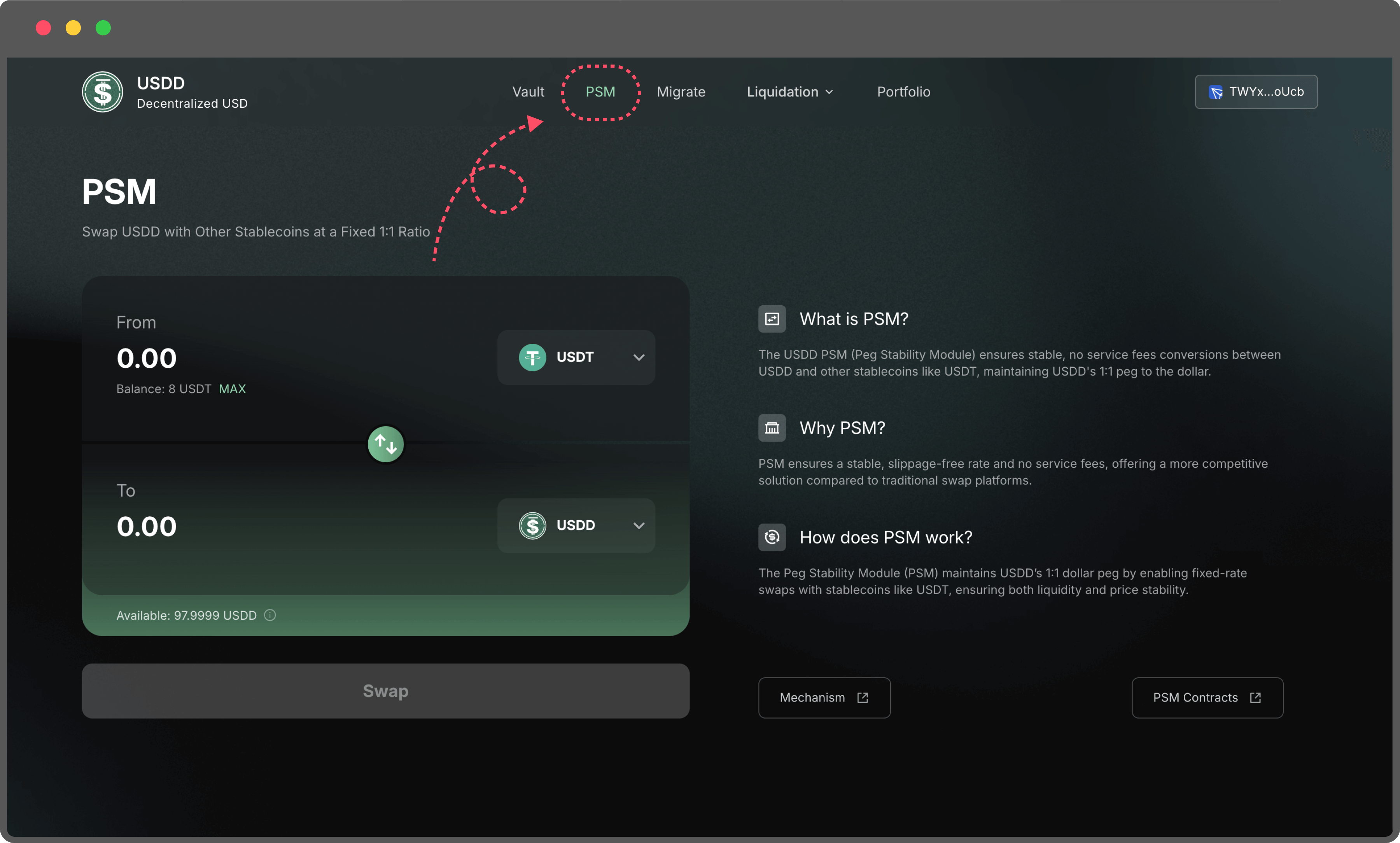
To perform stablecoin-to-USDD conversions, navigate to the PSM page.

<figure><img src="https://114421464-files.gitbook.io/~/files/v0/b/gitbook-x-prod.appspot.com/o/spaces%2FARwMu8GsAubRHTakjdxU%2Fuploads%2Fgit-blob-917135347f7d460444c6dd41cd91c8f784d0e661%2F9.png?alt=media" alt=""><figcaption></figcaption></figure>

PSM is USDD’s built-in fixed-rate swap feature that lets you convert between USDD and supported stablecoins at a predictable 1:1 rate. It’s designed to keep USDD stable while giving users a simple, transparent way to move in and out of USDD.

#### How to Use the PSM

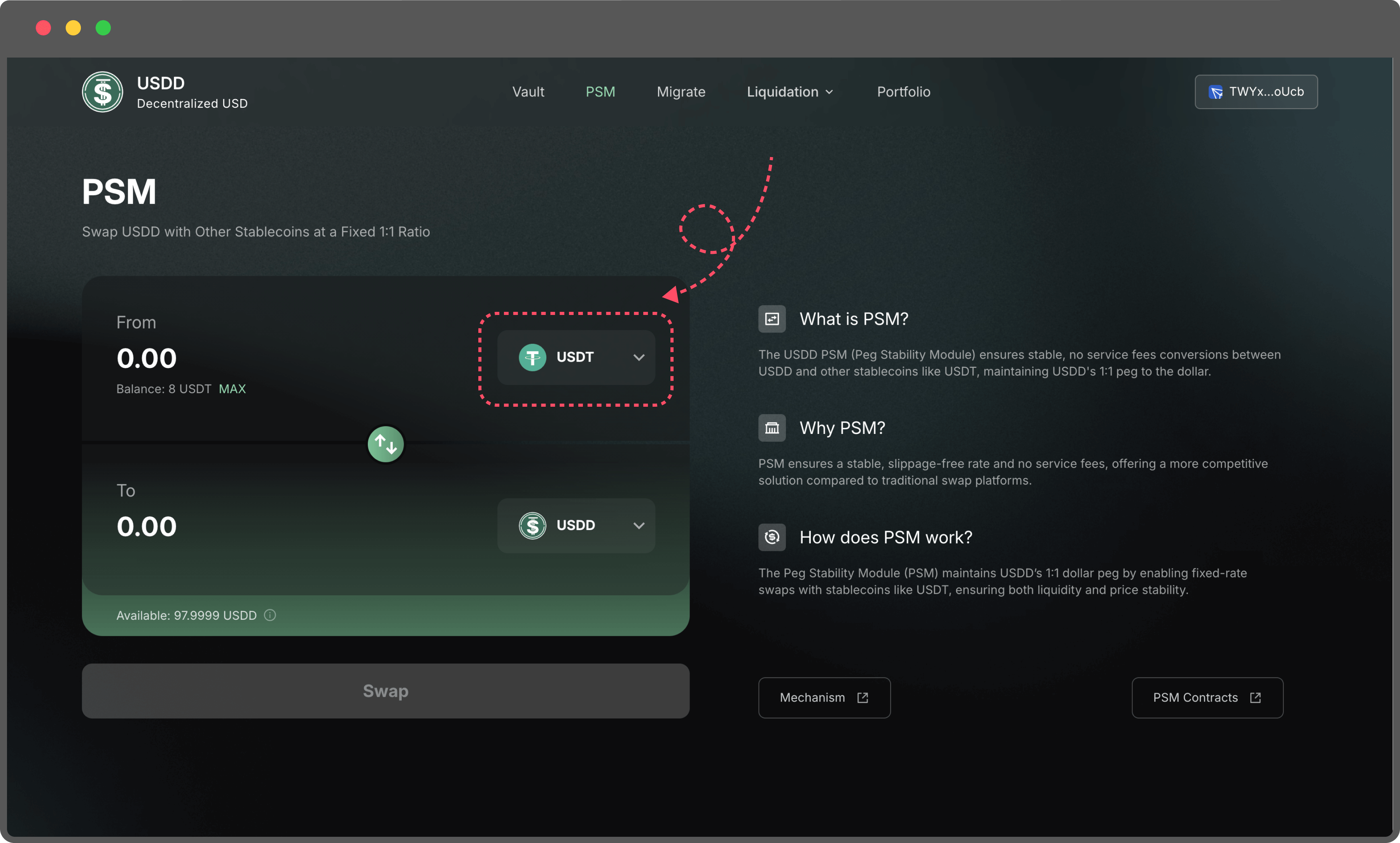
1. **Select the Stablecoin:** On the PSM page, choose the token you want to exchange for USDD or vice versa.

   <figure><img src="https://114421464-files.gitbook.io/~/files/v0/b/gitbook-x-prod.appspot.com/o/spaces%2FARwMu8GsAubRHTakjdxU%2Fuploads%2Fgit-blob-e6832b99efbd96c4f25c9896a83bb22d81464feb%2F10.png?alt=media" alt=""><figcaption></figcaption></figure>
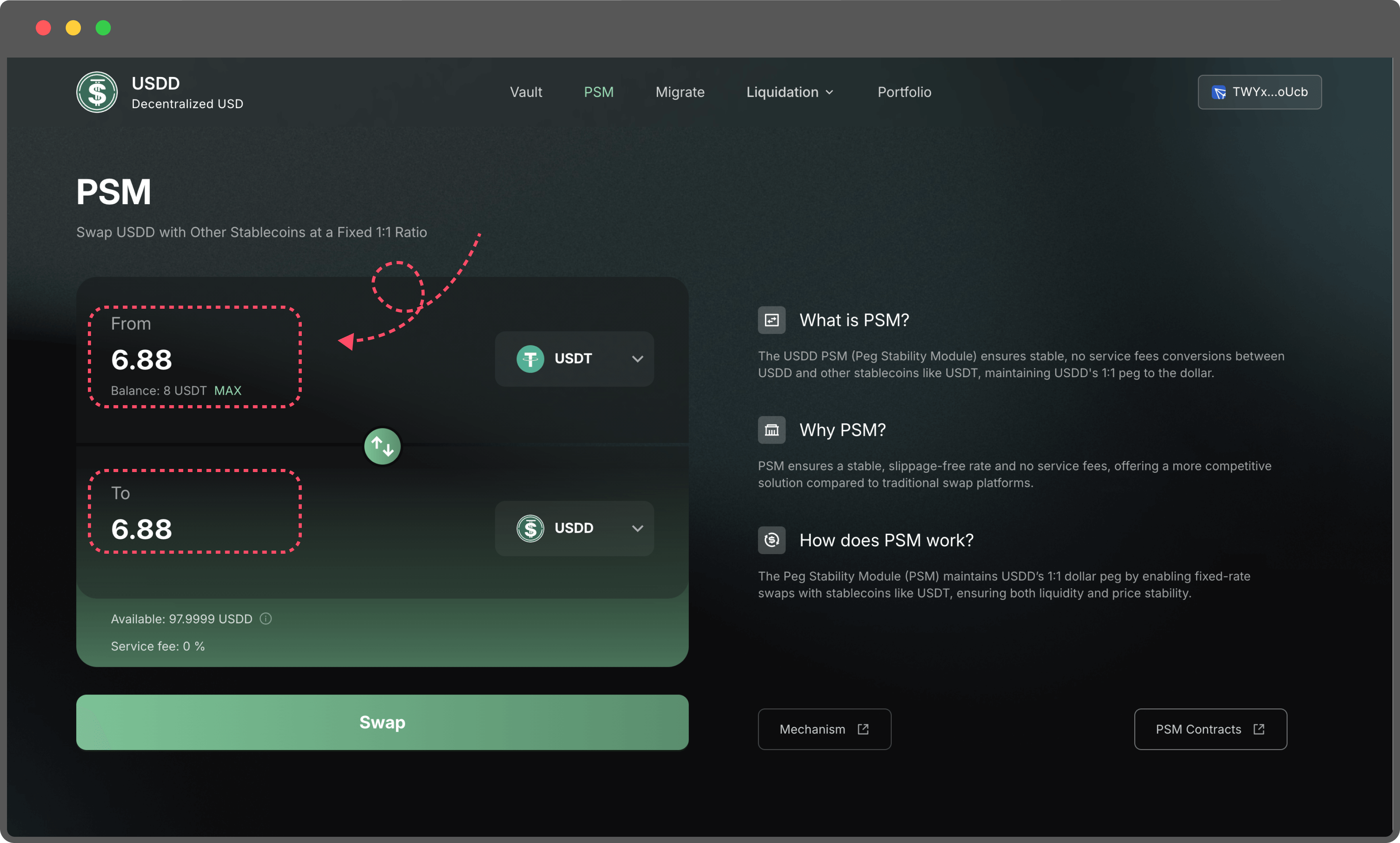
2. **Enter the Token Amount**: Input the amount of tokens you wish to swap. The transaction requires no service fees; however, ensure your wallet has enough TRX to cover the gas fees for the transaction.

   <figure><img src="https://114421464-files.gitbook.io/~/files/v0/b/gitbook-x-prod.appspot.com/o/spaces%2FARwMu8GsAubRHTakjdxU%2Fuploads%2Fgit-blob-704c35195383d94d188928f51c02cfd7426b8f9f%2F11.png?alt=media" alt=""><figcaption></figcaption></figure>
3. **Check Availability:** The "Available" section displays the quantity of the target token currently available for exchange. Ensure your swap amount does not exceed the available limit.

The PSM feature is designed for ease of use, offering fast and secure conversions without slippage, making it an essential tool for users seeking to maintain the 1:1 USDD peg while interacting with other stablecoins.


# Migrate

The Migration feature offers a seamless way for users holding USDDOLD to upgrade to the new USDD version. With no time constraints on migration, users can convert their tokens at any time that suits them.

Steps to Migrate Your USDDOLD:

1. Navigate to the Migration Page:\
   Visit the Migration Page to access the migration feature.

   <figure><img src="https://114421464-files.gitbook.io/~/files/v0/b/gitbook-x-prod.appspot.com/o/spaces%2FARwMu8GsAubRHTakjdxU%2Fuploads%2Fgit-blob-43c6548ee4ed0492360eee84e9f432e9b676cc93%2F12%20(1).png?alt=media" alt=""><figcaption></figcaption></figure>
2. Enter the Migration Amount:
   * Specify the amount of USDDOLD you wish to convert to the new USDD.
   * Ensure that the entered amount does not exceed your wallet balance.

     <figure><img src="https://114421464-files.gitbook.io/~/files/v0/b/gitbook-x-prod.appspot.com/o/spaces%2FARwMu8GsAubRHTakjdxU%2Fuploads%2Fgit-blob-e1919e75e92035cbbca972493e55388100808258%2F13%20(1).png?alt=media" alt=""><figcaption></figcaption></figure>
3. Confirm the Transaction:
   * Use your connected wallet to approve and confirm the migration.
   * Once confirmed, the equivalent amount of new USDD will be credited to your wallet.

     <figure><img src="https://114421464-files.gitbook.io/~/files/v0/b/gitbook-x-prod.appspot.com/o/spaces%2FARwMu8GsAubRHTakjdxU%2Fuploads%2Fgit-blob-ebfebd208efb9bb0f69ed14ad2d698267ed2d7cc%2F14%20(1).png?alt=media" alt=""><figcaption></figcaption></figure>
4. No Fees, No Deadlines:
   * The migration process is gas-only transactions.
   * There is no deadline for migration, allowing you to upgrade at your convenience.

Why Migrate to the New USDD?

* Improved Stability: Enhanced mechanisms ensure the 1:1 peg to the US dollar.
* Full Decentralization: Upgraded governance structure with greater community participation.
* Better Integration: The new USDD supports seamless compatibility with DeFi platforms and tools.


# USDD Savings

This guide explains how to stake USDD to earn yield through sUSDD. By connecting your wallet, depositing USDD, and receiving sUSDD as proof of stake, you can start earning interest automatically. You can withdraw your funds at any time without a lock-up period.

### &#x20;1. Connect Your Wallet

* On the Earn page, select the Ethereum/BNB Chain network.

<figure><img src="https://114421464-files.gitbook.io/~/files/v0/b/gitbook-x-prod.appspot.com/o/spaces%2FARwMu8GsAubRHTakjdxU%2Fuploads%2FmmaTyGZ4ZmxKj7WcMJrn%2F32%202.png?alt=media&amp;token=48ee8ed6-e9dd-40af-9a4e-e161a1207869" alt=""><figcaption></figcaption></figure>

* Click **Connect Wallet** in the top-right corner.

<figure><img src="https://114421464-files.gitbook.io/~/files/v0/b/gitbook-x-prod.appspot.com/o/spaces%2FARwMu8GsAubRHTakjdxU%2Fuploads%2FbL3Fz7AVevgL88cOzQhe%2F33.png?alt=media&amp;token=f55cf206-167a-41f9-89a8-05e08f6e2c5e" alt=""><figcaption></figcaption></figure>

* Choose your wallet from the popup.

<figure><img src="https://114421464-files.gitbook.io/~/files/v0/b/gitbook-x-prod.appspot.com/o/spaces%2FARwMu8GsAubRHTakjdxU%2Fuploads%2Fw8drMz9nh86K5zd4WGMM%2F34.png?alt=media&amp;token=87244e4c-2f31-41de-a613-8ef7d75efc20" alt=""><figcaption></figcaption></figure>

* Once connected, your wallet address will appear on the page.

<figure><img src="https://114421464-files.gitbook.io/~/files/v0/b/gitbook-x-prod.appspot.com/o/spaces%2FARwMu8GsAubRHTakjdxU%2Fuploads%2Fh7yl1t94QI6WVW7ZQKQI%2F35.png?alt=media&amp;token=048b8223-983b-4663-b0e3-241357c3274b" alt=""><figcaption></figcaption></figure>

### 2. Deposit USDD

* Under Deposit, enter the amount of USDD you want to stake (cannot exceed your wallet balance).

<figure><img src="https://114421464-files.gitbook.io/~/files/v0/b/gitbook-x-prod.appspot.com/o/spaces%2FARwMu8GsAubRHTakjdxU%2Fuploads%2F8cNZWx8gVacRWUhdDGke%2F36.png?alt=media&amp;token=e4877d97-c76a-4199-a384-115147a0fbcb" alt=""><figcaption></figcaption></figure>

* Click Approve/Deposit and confirm the transaction in your wallet.

<figure><img src="https://114421464-files.gitbook.io/~/files/v0/b/gitbook-x-prod.appspot.com/o/spaces%2FARwMu8GsAubRHTakjdxU%2Fuploads%2FKOGM250lrXrtOC5f3i2O%2F37.png?alt=media&amp;token=951acd21-8a05-491c-ba22-1cab73b0e34c" alt=""><figcaption></figcaption></figure>

* Once the transaction is confirmed:
  * You will see your sUSDD balance on the left side of the page.
  * The corresponding USDD value of your sUSDD will also be displayed.

<figure><img src="https://114421464-files.gitbook.io/~/files/v0/b/gitbook-x-prod.appspot.com/o/spaces%2FARwMu8GsAubRHTakjdxU%2Fuploads%2FvWxMFTwl4tzQblD5zHTI%2F38.png?alt=media&amp;token=c24447fb-20a3-47c9-96fa-1c5da90dc351" alt=""><figcaption></figcaption></figure>

* Over time, the USDD value of your sUSDD increases automatically, reflecting your earned yield.

### 3. Withdraw USDD

* Under Withdraw, enter the amount of USDD you want to withdraw.

<figure><img src="https://114421464-files.gitbook.io/~/files/v0/b/gitbook-x-prod.appspot.com/o/spaces%2FARwMu8GsAubRHTakjdxU%2Fuploads%2FLuCOVrib1dzzx7SuOvTW%2F39.png?alt=media&amp;token=bb874229-f372-4e54-8f91-4142a9da088f" alt=""><figcaption></figcaption></figure>

* Click Withdraw and confirm the transaction in your wallet.

<figure><img src="https://114421464-files.gitbook.io/~/files/v0/b/gitbook-x-prod.appspot.com/o/spaces%2FARwMu8GsAubRHTakjdxU%2Fuploads%2FqI81eQCtWYCBvzv2StC1%2F40.png?alt=media&amp;token=ebc935b3-579e-409a-a16a-6f9d51c2dcdf" alt=""><figcaption></figcaption></figure>

* After confirmation, your sUSDD will be burned, and you will receive the corresponding amount of USDD in your wallet.
* You can view all your actions in your transaction history.

<figure><img src="https://114421464-files.gitbook.io/~/files/v0/b/gitbook-x-prod.appspot.com/o/spaces%2FARwMu8GsAubRHTakjdxU%2Fuploads%2FGpocWfjvU3dRDdWIKhHE%2F41.png?alt=media&amp;token=d9293291-230d-4991-9e23-3cef2b55c29b" alt=""><figcaption></figcaption></figure>

### ✅ Notes

* There is no lock-up period — you can withdraw anytime.
* When withdrawing, you will receive your initial deposit plus the accumulated yield.


# Glossary

## General

* `wad`: some quantity of tokens, usually as a fixed point integer with 18 decimal places.
* `ray`: a fixed point integer, with 27 decimal places.
* `rad`: a fixed point integer, with 45 decimal places.
* `file`: administer some configuration value
* `auth`: check whether an address can call this method
* `wards`: an address that is allowed to call authored methods
* `rely`: allow an address to call authored methods
* `deny`: disallow an address from calling authored methods
* `Authority:` checks whether an address can call this method

## Vat

* `hope`: enable wish for a pair of addresses.
* `nope`: disable wish for a pair of addresses.
* `init`: start stability fee collection for a particular collateral type
* `slip`：modify a user's collateral balance.
* `move`：transfer stablecoin between users.
* `frob`：modify a Vault.
* `grab`：liquidate a Vault.
* `heal`：create / destroy equal quantities of stablecoin and system debt (vice).
* `suck`：mint unbacked stablecoin (accounted for with vice).
* `fold`：modify the debt multiplier, creating / destroying corresponding debt.
* `ilk`：a collateral type.
  * `art`：total normalized stablecoin debt.
  * `rate`：stablecoin debt multiplier (accumulated stability fees).
  * `line`：the debt ceiling for a specific collateral type.
  * `dust`：the minimum possible debt of a Vault.

## Vow

* `Sin`: the total amount of debt in the queue.
* `Ash`: the total amount of on-auction debt.
* `wait`: debt auction delay.
* `sump`: debt auction bid size, i.e. the fixed debt quantity to be covered by any one debt auction
* `dump`: debt auction lot size, i.e. the starting amount of MKR offered to cover the lot/sump
* `bump`: surplus auction lot size, i.e. the fixed surplus quantity to be sold by any one surplus auction
* `hump`: surplus buffer, must be exceeded before surplus auctions are possible

## Dog

* `bark`: A vault’s all debt is taken when this liquidation function is called.
* `ilk`
  * `chop`: Liquidation Penalty
  * `hole`: Max USDD needed to cover debt+fees of active auctions per ilk
  * `dirt`: Amt USDD needed to cover debt+fees of active auctions per ilk

## Clip

* `buf`: Multiplicative factor to increase starting price
* `tail`: Time elapsed before auction reset
* `cusp`: Percentage drop before auction reset
* `chip`: Percentage of tab to suck from vow to incentivize keepers
* `tip`: Flat fee to suck from vow to incentivize keepers
* `chost`: Cache the ilk dust times the ilk chop to prevent excessive SLOADs
* `sale`
  * `pos`: Index in active array
  * `tab`:USDD to raise
  * `usr`: Liquidated CDP
  * `tic`: Auction start time
  * `top`: Starting price

## Jug

* `duty`: Collateral-specific, per-second stability fee contribution
* `rho`: Time of last drip

## Median

* `orcl(usr: address)` : oracles whitelist of the prices (whitelisted via governance / the authorized parties).
* `bud(usr: address):` readers whitelist.
* `val:` the price (private) must be read with `read()` or `peek()`
* `age`: the Block timestamp of last price `val` update.
* `wat:` the price oracles type (ex: TRXUSD) / tells us what the type of asset is.
* `bar`: the Minimum writers quorum for poke / min number of valid messages you need to have to update the price.

## OSM

* `src` : address of DSValue that the OSM will read from
* `hop` : time delay between poke calls (uint16); defaults to ONE\_HOUR
* `cur` : Feed struct that holds the current price value
* `nxt` : Feed struct that holds the next price value
* `bud` : mapping from address to uint256; whitelists feed readers


# Core Contracts


# Vat

### **Purpose**

The core accounting contract of the protocol, VAT tracks system-wide balances, including user Vaults, collateral types, and debt. It ensures that all collateral and debt are properly accounted for and enforces system solvency.

### Key Responsibilities

* Tracks collateral and debt balances for all users and collateral types.
* Ensures Vault operations (e.g., minting and repaying USDD) adhere to protocol parameters.
* Integrates with other contracts to trigger auctions or manage liquidations.

### Key Methods

* `slip(ilk, usr, wad)`\
  Adjusts the balance of a specific collateral type (`ilk`) for a user (`usr`).
  * Example Use: Adding or removing collateral from a user's Vault.
* `frob(ilk, u, v, w, dink, dart)`\
  Adjusts collateral (`dink`) and debt (`dart`) for a Vault.
  * Example Use: Minting new USDD or repaying debt.
* `grab(ilk, u, v, w, dink, dart)`\
  Executes adjustments on collateral and debt during liquidation.
* `fold(ilk, u, rate)`\
  Increase the `Ilk.rate` with rate, and hence the debt balances of all Vaults collateralized with the specified Ilk are updated implicitly.
* `file(what, data) / file(what, ilk, data)`\
  Sets or updates system-wide parameters like debt ceilings, stability fees, or collateralization thresholds.
  * Example Use: Setting a collateral type’s maximum mintable USDD.


# Dog

### **Purpose**

The Dog contract oversees the liquidation process. It monitors Vaults for undercollateralization and triggers auctions to sell collateral when necessary.

### Key Responsibilities

* Tracks undercollateralized Vaults.
* Incentivizes keepers to liquidate risky positions.

### Key Methods

* `bark(ilk, urn, kpr)`\
  Initiates the liquidation process for a Vault (`urn`). Determines the amount of collateral to be auctioned and distributes liquidation rewards to keepers.

  hole: Maximum debt to liquidate per collateral type.
* `digs(ilk, rad)`\
  Adjusts internal debt balances after liquidation is completed.
* `file(what, ilk, data)`\
  Configures liquidation parameters, such as penalties and incentives.
  * Example Parameters:
    * `chop`: Liquidation penalty (e.g., 5% of the debt).
    * `hole`: Maximum debt to liquidate per collateral type.


# Clip

### **Purpose**

Handles collateral auctions, where liquidated collateral is sold to cover bad debt. CLIP ensures auctions operate fairly and efficiently using a Dutch auction mechanism.

### Key Responsibilities

* Conducts auctions for liquidated collateral.
* Ensures participants receive fair prices.

### Key Methods

* `kick(tab, lot, usr, kpr)`\
  Starts an auction with a debt amount (`tab`), collateral amount (`lot`), and Vault owner (`usr`).
  * Example Use: Kicking off an auction for a liquidated Vault.
* `redo(id, kpr)`\
  Allows keepers to reinitialize a stale auction, ensuring auction prices remain relevant.
* `take(id, amt, max, who data)`\
  Users can participate in an auction by calling this function.yank(id)\
  Cancels an auction when debt is repaid or resolved through other means.
* `file(what, data)`\
  Configures auction parameters such as price decay rates or auction durations.
  * Example Parameters:
    * `tip`: Fixed incentive for starting an auction.
    * `cut`: Price decay factor per second.


# Spot

### **Purpose**

Ensures the protocol receives real-time, reliable price data for all collateral types. SPOT determines whether Vaults meet collateralization requirements.

### Key Responsibilities

* Retrieves and updates collateral prices.
* Enforces collateralization thresholds for system stability.

### Key Methods

* `poke(ilk)`\
  Updates the system with the latest price for a specific collateral type.
  * Example Use: Updating the TRX price when markets fluctuate.
* `file(what, ilk, data)`\
  Configures parameters such as the liquidation ratio (`mat`).
  * Example Use: Setting mat to 150%, requiring 1.5x collateral for every USDD minted.


# Jug

### **Purpose**

Calculates and accrues stability fees on minted USDD. These fees ensure protocol sustainability and discourage excessive borrowing.

### Key Responsibilities

* Accumulate stability fees for particular collateral types .
* Adjusts debt levels to reflect accrued interest.

### Key Methods

* d`rip(ilk)`\
  Performs stability fee collection for a specific collateral type when it is called. Calls `Vat.fold` to update the collateral's rate, total tracked debt, and Vow surplus;

  duty: Annualized stability fee rate.
* `file(what, data) / file(what, ilk, data)`\
  Configures global and per-collateral stability fee rates.
  * Example Parameters:
    * `duty`: Annualized stability fee rate.


# Median

### **Purpose**

It provides the protocol’s trusted reference price.

### Key Responsibilities

* Maintains a whitelist of price feed contracts which are authorized to post price updates.
* Computes and updates the stored value when a new list of prices is received.

### Key Methods

* `poke()`\
  Updates price from whitelisted providers.
* `peek(what, data) / file(what, ilk, data)`\
  Get the price and validity.


# OSM

### **Purpose**

It ensures that new price values propagated from the Oracles are not taken up by the system until a specified delay has passed.

### Key Responsibilities

* Periodically feeds a delayed price into the system for a particular collateral type.

### Key Methods

* `peek()`\
  Returns the current feed value and a boolean indicating whether it is valid.
* `read()`\
  Returns the current feed value; reverts if it was not set by some valid mechanism.
* `peep()`\
  Returns the next feed value (i.e. the one that will become the current value upon the next `poke()` call), and a boolean indicating whether it is valid.


# Proxy contract

### **Purpose**

* The DSProxy contract allows users to execute code on their behalf using a persistent proxy address.
* It simplifies complex multi-step operations by enabling atomic execution within the context of the proxy’s identity.
* Ownership of the proxy is flexible and can be transferred, supporting dynamic models like multisignature wallets.

### Key Methods

* `execute(bytes memory _code, bytes memory _data)`
  * If \_code corresponds to a cached contract, it is executed directly; otherwise, the contract is deployed and cached before execution.
  * \_data specifies the calldata to be sent to the contract.
  * Emits an Execute event upon successful execution.
* `execute(address _target, bytes memory _data)`
  * Directly executes a specified contract (\_target) with provided calldata (\_data).
  * Requires the caller to have the necessary auth permissions.


# PSM

### **Purpose**

Maintains USDD’s price peg by facilitating 1:1 swaps with other stablecoins (e.g., USDT).

### Key Responsibilities

* Reduces volatility during market imbalances.
* Offers zero-slippage swaps with no fees.

### Key Methods

* `sellGem(usr, wad)`\
  Allows users to exchange a stablecoin (`gem`) for USDD.
* `buyGem(usr, wad)`\
  Enables users to swap USDD for another stablecoin.
* `file(what, data)`\
  Sets PSM parameters such as swap limits or supported stablecoins.


# Migrate

### **Purpose**

Enables seamless migration of USDDOLD to the new USDD version. This tool ensures users can upgrade at their convenience without deadlines.

### Key Responsibilities

* Converts legacy USDD tokens into the upgraded version.
* Simplifies the user transition process.

### Key Methods

* `migrate(usr, wad)`\
  Converts a specified amount of USDDOLD for a user.


# Deployment Addresses

### Tron Mainnet

<table><thead><tr><th width="256.30859375">Name</th><th>Contract Address</th></tr></thead><tbody><tr><td>USDD</td><td><code>TXDk8mbtRbXeYuMNS83CfKPaYYT8XWv9Hz</code></td></tr><tr><td>USDD Join</td><td><code>TUajR7CbXU6hX8n3XtNkitFAD25JvP99K6</code></td></tr><tr><td>Vat</td><td><code>TH5dhX7o39afSbfDT2e3c9k4itWjNKD4D9</code></td></tr><tr><td>Jug</td><td><code>TWttvCqVmiLip7PL8Aut2Hi37swqv7EmYd</code></td></tr><tr><td>Dog</td><td><code>TCwYKcDj8c5Te9hjj3UokcxhpY6skFoXnG</code></td></tr><tr><td>Vow</td><td><code>TXLfZmQtLtLxWYNL2fxhw34JNGHB2EKeSU</code></td></tr><tr><td>Flap</td><td><code>TP2eYpkrgk7sLAts5tvzsFxHiDH8PmQcuH</code></td></tr><tr><td>Flop</td><td><code>TX6CM8K1FgS2nnTEjLsKW6TAVSipFXHh5C</code></td></tr><tr><td>Spot</td><td><code>TU8Z8CeUd7pnXSMHTNqRgK6Qxxxyzsba1n</code></td></tr><tr><td>End</td><td><code>TXhepqfva4WvcK6HapedmzwDjdZv8KoY6p</code></td></tr><tr><td>ESM</td><td><code>TVKZKa1LDadTPm2AoAW7hp9BtdScK4gSk8</code></td></tr><tr><td>Pause</td><td><code>TNq6E9XsQfrzqVwam67LApZQx1omsj8dyW</code></td></tr><tr><td>PauseProxy</td><td><code>TE6RxGgQuD6J1faw9mZxtbHGDqcKh8DvKU</code></td></tr><tr><td>ProxyRegistry</td><td><code>THuVWkvAikvSqmoZXHMUQJAcocsgFr4wuk</code></td></tr><tr><td>CDP Manager</td><td><code>TDDWjmQaquEtUn1Pa8wCd8dfWFPdQLGPYL</code></td></tr><tr><td>ProxyActions</td><td><code>TEk9usYZsunkc5oYijyMte6sGurspik2Js</code></td></tr><tr><td>GovActionsProxy</td><td><code>TXzhj9Xh8xfzerjinRyM5TfoBL7Cw5hk5d</code></td></tr><tr><td>PIP_TRX</td><td><code>TVsQxikpttN15u7vcjXKeVrtYRWbrqgPbH</code></td></tr><tr><td>PIP_USDT</td><td><code>TMhsJiXUrT5eueuH1cq6SdvQEBt4YjKLfx</code></td></tr><tr><td>JOIN_TRX_A</td><td><code>TJ1VWPvFVq7sVsN7J7dWJVZz4SLT14qRUr</code></td></tr><tr><td>CLIP_TRX_A</td><td><code>TK9Ng6QqNVvyhWcWAiEasZ1HqE7bxgNayA</code></td></tr><tr><td>JOIN_TRX_B</td><td><code>TGQKnHDQNyc3QeHJ7YxH8wggdg89UVXyvX</code></td></tr><tr><td>CLIP_TRX_B</td><td><code>TWmmZ44tN6UBAD4iEsoZo5qSAZ64E4HDZZ</code></td></tr><tr><td>JOIN_TRX_C</td><td><code>TPUPPLTYLdbW4jxwD5g2T7ystxsR9HL2mt</code></td></tr><tr><td>CLIP_TRX_C</td><td><code>TMZTbwpvs7VjTJ7qjwh4EMkB5ahZ5tUJeM</code></td></tr><tr><td>JOIN_USDT_A</td><td><code>TDUkQbjrXs6xUbxGCLknWwJHxVTdysXBhy</code></td></tr><tr><td>CLIP_USDT_A</td><td><code>TKvNF7aJtU2gUncR64MCdDoaWqrnHpriSL</code></td></tr><tr><td>JOIN_PSM_USDT_A</td><td><code>TSUYvQ5tdd3DijCD1uGunGLpftHuSZ12sQ</code></td></tr><tr><td>CLIP_PSM_USDT_A</td><td><code>T9yEgaPQT9Z6jsF1Rd2nisf1bpwpXNAFqE</code></td></tr><tr><td>MCD_PSM_USDT_A</td><td><code>TBXW4hS5KYjjbJXDpnrPf4zhkLwrpUjbyz</code></td></tr><tr><td>USDD Migration</td><td><code>TQrq2p1aoAkNK94q3Q69ubJcv5nQ9y675R</code></td></tr></tbody></table>

### Ethereum Mainnet

<table><thead><tr><th width="259.75390625">Name  </th><th>Contract Address</th></tr></thead><tbody><tr><td>USDD</td><td><code>0x4f8e5de400de08b164e7421b3ee387f461becd1a</code></td></tr><tr><td>USDD Join</td><td><code>0x983dfef6d71862d809e239845da5a959492f63b8</code></td></tr><tr><td>Vat</td><td><code>0xff77f6209239deb2c076179499f2346b0032097f</code></td></tr><tr><td>Jug</td><td><code>0xdb218163fe160fedf0c702c37124e8c194e99329</code></td></tr><tr><td>Dog</td><td><code>0x9681604090395e835ff54187f638ded8dc983cbf</code></td></tr><tr><td>Vow</td><td><code>0xf085edd75c1ab4fda0c3bd49b264a4a113d06f3b</code></td></tr><tr><td>Flap</td><td><code>0x0b4adb8d896520eb3fd4789b73463614dcf71b03</code></td></tr><tr><td>Flop</td><td><code>0xfb38af74eae1e315a45af5ae11a44ccd1da12bcb</code></td></tr><tr><td>Spot</td><td><code>0x8c4c758152da3e04b95b5eaca75585d79013c6b0</code></td></tr><tr><td>End</td><td><code>0xa9f0cd86e0a011d41693d1a748a8127877c8b054</code></td></tr><tr><td>ESM</td><td><code>0xe4089b868f111ffaf9717d6df8d2c2fe6e698f55</code></td></tr><tr><td>Pause</td><td><code>0xca277750ecd2b0707a7ccef2a78ec2f33b5fc7f7</code></td></tr><tr><td>PauseProxy</td><td><code>0xf60cf7d4330f115f9e51ff0d56d23f95f0f10aee</code></td></tr><tr><td>ProxyRegistry</td><td><code>0x8be6b814beb37e8028258777af0ec6648a2a908e</code></td></tr><tr><td>CDP Manager</td><td><code>0xb5b08e58e804e5937f56b1e633cf85abbd269127</code></td></tr><tr><td>ProxyActions</td><td><code>0xb80751ef88d07fa33ee4fc0c6f8b4b6c6c31e708</code></td></tr><tr><td>GovActionsProxy</td><td><code>0x3dba111255d3888c723242320595588754cf493e</code></td></tr><tr><td>JOIN_PSM_USDT_A</td><td><code>0x217e42ceb2eae9ecb788fdf0e31c806c531760a3</code></td></tr><tr><td>MCD_PSM_USDT_A</td><td><code>0xce355440c00014a229bbec030a2b8f8eb45a2897</code></td></tr><tr><td>JOIN_PSM_USDC_A</td><td><code>0x9a7e1b324060db7342aea08c0dc56f55ced6f519</code></td></tr><tr><td>MCD_PSM_USDC_A</td><td><code>0x12d0351f68035a41d13fc8324562e2d51b7a3b93</code></td></tr></tbody></table>

### BNB Chain Mainnet

<table><thead><tr><th width="259.75390625">Name</th><th>Contract Address</th></tr></thead><tbody><tr><td>USDD</td><td><code>0x45e51bc23d592eb2dba86da3985299f7895d66ba</code></td></tr><tr><td>USDD Join</td><td><code>0x6b00039d76795fd59baf17e0c9c6d87011e7edac</code></td></tr><tr><td>Vat</td><td><code>TH5dhX7o39afSbfDT2e3c9k4itWjNKD4D9</code></td></tr><tr><td>Jug</td><td><code>0x12a2a264d6980fb22e5ebb090002bd8f5e618e0b</code></td></tr><tr><td>Dog</td><td><code>0x6badab4336b17e8d0839fd0c046e21b41196280b</code></td></tr><tr><td>Vow</td><td><code>0x1c9a9d6ee4b5bffdacdad6cfb396a337f311c5b7</code></td></tr><tr><td>Flap</td><td><code>0x3f8656be9ef11192fb9ce270446976806fa121c5</code></td></tr><tr><td>Flop</td><td><code>0xD6bd489DeDF05dBCcb680304B3AF2df73d1D7De0</code></td></tr><tr><td>Spot</td><td><code>0xc1779812be28cd205e45098e079620a830b5ffce</code></td></tr><tr><td>End</td><td><code>0x3366948fccf56152ad95d914072a80006b21f6f2</code></td></tr><tr><td>ESM</td><td><code>0xf1a7b596763afaa8e51f0cf6a7a9b4c743d3b1c6</code></td></tr><tr><td>Pause</td><td><code>0xc081f712e217672374a9c3db708c6f6c183c172e</code></td></tr><tr><td>PauseProxy</td><td><code>0xdd5f51dc0d31823db86df41d46d037bc94c732dc</code></td></tr><tr><td>ProxyRegistry</td><td><code>0x0144fcce201dc3957fcf75269c10c21cca41ba73</code></td></tr><tr><td>CDP Manager</td><td><code>0xa4109496a660ebc8d74de991ac3b04c136c9ba09</code></td></tr><tr><td>ProxyActions</td><td><code>0x777684f6425d095e9166f5f694f50e48a16bcb25</code></td></tr><tr><td>GovActionsProxy</td><td><code>0x2662e860ea672e4d31df3438114c48511229e60f</code></td></tr><tr><td>JOIN_PSM_USDT_A</td><td><code>0xe229fda620b8a9b98ef184830ee3063f0f86b790</code></td></tr><tr><td>MCD_PSM_USDT_A</td><td><code>0x939d3fb56cd12d68caa1125cc57a8d2391f7ee29</code></td></tr></tbody></table>


# Liquidation & Auction

Liquidation is a critical process in the USDD system that ensures the stability and solvency of the protocol. When a user's collateralized debt position (CDP) becomes undercollateralized (i.e., the value of collateral falls below the required threshold), the liquidation mechanism is triggered to maintain the integrity of the system.


# Key Features of Liquidation

**Trigger Mechanism**

* The protocol continuously monitors CDPs to assess their collateralization ratio.
* If the ratio falls below the minimum collateralization threshold, the liquidation process is initiated automatically.

**Auction Process**

* Liquidated collateral is put up for auction to a valid bidder.
* Bidders, often known as Keepers, compete to purchase the collateral, ensuring market-driven pricing.

**Liquidation Fee**

* A liquidation fee is imposed on the user whose position is liquidated.
* This liquidation fee is designed to discourage risky behavior and compensate the protocol for the added system risk.

**Keeper Rewards**

* Keepers are incentivized with rewards for participating in the liquidation process.
* Rewards typically include a portion of the liquidation fee and opportunities to acquire discounted collateral.

**Debt Repayment**

* The proceeds from the auction are used to repay the outstanding USDD debt.
* Any remaining collateral after repaying the debt and penalties is returned to the user.

**Peg Stability Impact**

* Liquidation ensures that excessive debt does not destabilize the peg of USDD.
* By swiftly resolving undercollateralized positions, the protocol maintains its financial health.


# Example Process

1. **Collateral Deposit and Minting**\
   A user deposits collateral worth $1,500 and mints $1,000 USDD, maintaining a collateralization ratio of 150%.
2. **Market Downturn and Collateralization Ratio Drop**\
   Due to a market downturn, the collateral value drops to $1,200, reducing the collateralization ratio to 120%, which is below the liquidation threshold of 130%.
3. **Liquidation Triggered**\
   The system automatically flags the Vault for liquidation to protect the protocol from losses.
4. **Collateral Auction Begins**
   1. The liquidation engine starts an auction for the $1,200 worth of collateral.
   2. The auction follows a Dutch auction mechanism, where the price starts at a high initial value and gradually decreases over time until a bidder accepts the price or the auction ends.
5. **Keeper Participation**
   1. Keepers, who are incentivized participants, place bids during the auction.
   2. A Keeper bids an amount of USDD equal to the debt ($1,000) plus the liquidation penalty (10%), totaling $1,100.
   3. The Keeper wins the auction by accepting the current auction price for the collateral.
6. **Collateral Settlement**
   1. The protocol retains $1,100 worth of USDD to cover the debt and liquidation penalty.
   2. Any remaining collateral value (after deducting the amount sold during the auction) is refunded to the user.
7. **Auction Outcome**
   1. The Keeper receives the collateral at the auction price. For example, if the auction price is $0.95 per unit of collateral, the Keeper receives collateral valued at $1,157.89 ($1,100 ÷ $0.95).
   2. The user retains any excess collateral that wasn't required to cover the debt and penalty.

This process ensures the protocol remains solvent while providing opportunities for Keepers to acquire collateral at competitive prices and protecting users by refunding surplus collateral.

\\


# Benefits

* **Protects the Protocol Against Bad Debt**\
  By swiftly addressing under-collateralized positions, the liquidation process safeguards the system from accumulating unmanageable debt, ensuring its financial health and sustainability.
* **Maintains Trust in the System**\
  Adhering to strict collateralization requirements reinforces user confidence in the stability and reliability of the USDD ecosystem.
* **Stabilizes the USDD Peg**\
  Liquidation and auction processes help maintain USDD’s 1:1 peg to the dollar by ensuring that collateral backing the stablecoin remains sufficient, even during market downturns.
* **Enables Efficient Collateral Redistribution**\
  Auctions redistribute liquidated collateral efficiently to market participants (Keepers) who value and purchase it, allowing for rapid system stabilization and collateral recirculation.
* **Incentivizes Market Participation**\
  Keepers are rewarded for participating in liquidations and auctions, creating an active ecosystem that enhances the protocol's responsiveness and liquidity.
* **Strengthens System Resilience**\
  The liquidation and auction mechanism enhances the protocol's ability to withstand extreme market volatility, ensuring decentralized, secure, and robust operations.

This comprehensive process not only preserves the protocol’s integrity but also creates a self-sustaining loop of stability, transparency, and trust, which are critical to USDD’s long-term success in the DeFi ecosystem.

\\


# Oracle

An oracle module is deployed for each collateral type, feeding it the price data for a corresponding collateral type to the `Vat`. Every oracle module contains three main contracts: `Median, OSM, Spot`.

### Procedure

1. Median computes a price from a list of supported price feeds.
2. OSM updates the current price and the next price according to the price from Median.
3. Spot reads the current price from OSM and updates `ilk.spot` in `vat`.

*USDD use Chainlink and WinkLink Data Feeds as its primary Oracles.*


# USDD Public API

USDD exposes a set of public, read-only REST APIs for protocol data — supply, yield, collateral, Vaults and Smart Allocator allocations. All endpoints are free to use, require no API key, and support CORS.

***

### 1. Common — Network & Auth <a href="#id-1" id="id-1"></a>

<table><thead><tr><th width="188.87890625">Item</th><th>Value</th></tr></thead><tbody><tr><td>Base URL</td><td><mark style="color:blue;"><code>https://openapi.usdd.io</code></mark></td></tr><tr><td>Method</td><td><code>GET</code> only</td></tr><tr><td>Authentication</td><td>None — all endpoints are public, no API key</td></tr><tr><td>Content-Type</td><td><code>application/json</code> (except the two bare-number endpoints, §6.1 / §6.2)</td></tr><tr><td>CORS</td><td>Enabled — callable directly from browsers</td></tr><tr><td>Rate limit</td><td>No documented per-key limit; treat as best-effort and cache where possible</td></tr></tbody></table>

All request examples below use the absolute Base URL, so they are copy-pasteable without consulting this table.

***

### 2. Common — Conventions <a href="#id-2" id="id-2"></a>

#### 2.1 Response envelope <a href="#id-3" id="id-3"></a>

Most endpoints return a standard JSON envelope:

```json
{ "code": 0, "message": "SUCCESS", "data": { ... } }
```

<table><thead><tr><th width="130.31640625">Field</th><th width="150.0703125">Type</th><th width="129.91796875">Existence</th><th>Description</th></tr></thead><tbody><tr><td>code</td><td>integer</td><td>always</td><td><code>0</code> = success; non-zero = error (see §3)</td></tr><tr><td>message</td><td>string</td><td>always</td><td><code>SUCCESS</code>, or an error description when <code>code != 0</code></td></tr><tr><td>data</td><td>object | array</td><td>always</td><td>Payload; shape depends on the endpoint</td></tr></tbody></table>

Two endpoints — `GET /totalSupply` and `GET /circulatingSupply` — return a **bare numeric value** with no envelope.

#### 2.2 Data conventions <a href="#id-4" id="id-4"></a>

<table><thead><tr><th width="210.2109375">Topic</th><th>Convention</th></tr></thead><tbody><tr><td>Number types</td><td>Numeric fields may be returned as <code>number</code> or <code>string</code>; string-encoded numbers are exact and can be parsed safely as high-precision decimals</td></tr><tr><td>Precision</td><td>Some APY fields carry up to 29 digits of precision — transport them as strings and truncate (typically to 4 decimal places) for display</td></tr><tr><td><code>*DailyChange</code> fields</td><td>Change versus the previous day, based on the 00:00 UTC+8 daily snapshot; the value can be negative</td></tr><tr><td>Field stability</td><td>Published field names are not renamed within a version; new fields are added in a non-breaking way</td></tr></tbody></table>

#### 2.3 Units <a href="#id-5" id="id-5"></a>

Every response field table includes a `Unit` column. The possible values:

<table><thead><tr><th width="160.3046875">Unit</th><th>Where it appears</th><th>How to read it</th></tr></thead><tbody><tr><td><code>USDD</code> / <code>sUSDD</code></td><td><code>totalSupply</code>, <code>mintedUSDD</code>, <code>curMinted</code>, <code>debt</code>, <code>line</code>, <code>usdd[]</code>, <code>susdd[]</code>, etc.</td><td>Token amount, already de-scaled. Use as-is; USDD and sUSDD are each ≈ 1 USD</td></tr><tr><td><code>USD</code></td><td><code>tvl</code>, <code>totalCollateralValue</code>, <code>earnTvl</code>, <code>earnSa</code>, <code>lockedValue</code>, <code>holdingAmount</code>, <code>*DailyChange</code>, etc.</td><td>Already de-scaled US dollars. Use as-is</td></tr><tr><td><code>decimal</code></td><td><code>tronApy</code>, <code>ethApy</code>, <code>bscApy</code>, <code>currentApy</code>, <code>stabilityFee</code>, <code>psmFee</code>, <code>earnApy</code>, etc.</td><td>Annualized rate as a decimal. <code>0.045</code> means 4.5% — multiply by 100 for a percentage</td></tr><tr><td><code>percent</code></td><td><code>apy</code> of <code>smart-allocator/detail-overview</code> only</td><td>Already a percentage. <code>3.4268</code> means 3.4268% — use as-is</td></tr><tr><td><code>ratio</code></td><td><code>collateralRatio</code>, <code>minCollateralRatio</code></td><td>A multiple. <code>2.6</code> means 260%; <code>1.2</code> means 120%</td></tr><tr><td><code>epoch ms</code></td><td><code>statisticTime</code></td><td>Millisecond Unix timestamp</td></tr><tr><td><code>datetime</code></td><td><code>time</code></td><td>Human-readable date-time string (UTC+8)</td></tr><tr><td><code>address</code></td><td><code>contractAddress</code>, <code>operatorAddress</code></td><td>Blockchain address — TRON Base58 or EVM hex depending on chain</td></tr><tr><td><code>enum</code></td><td><code>chain</code></td><td>One value from a fixed set, e.g. <code>tron</code> / <code>eth</code> / <code>bsc</code></td></tr><tr><td><code>text</code></td><td><code>symbol</code>, <code>ilk</code>, <code>vaultType</code>, <code>platform</code>, <code>gemSymbol</code>, <code>strategy</code>, <code>tag</code></td><td>Free-form string identifier</td></tr><tr><td><code>—</code></td><td><code>items[]</code> and other array containers</td><td>The row is a container, not a value — it has no unit</td></tr></tbody></table>

#### 2.4 Existence column <a href="#id-6" id="id-6"></a>

Response field tables include an `Existence` column so an agent knows whether a missing or null value is normal:

<table><thead><tr><th width="169.91015625">Existence</th><th>Meaning</th></tr></thead><tbody><tr><td><code>always</code></td><td>The field is always present with a non-null value</td></tr><tr><td><code>nullable</code></td><td>The field is always present, but its value may be <code>null</code></td></tr><tr><td><code>conditional</code></td><td>The field is present only when a stated condition holds</td></tr></tbody></table>

#### 2.5 Empty result ≠ error <a href="#id-7" id="id-7"></a>

An empty or zero-valued result is a **successful** response, not an error.\
Examples: a Vault with no debt returns `curMinted: "0"` and `totalCollateral: "0"`; a chain with no Earn deployment returns `earnTvl: 0`. Do not treat these as failures or retry them.

#### 2.6 Context tips <a href="#id-8" id="id-8"></a>

Several endpoints return long arrays — the APY history (§6.8), supply history (§6.9), collateral history (§6.10) and per-chain history (§6.13). When only the latest point is needed, read the last array element instead of loading the full series, and prefer the snapshot endpoints (§6.1, §6.6, §6.12) over history endpoints.

***

### 3. Common — Errors <a href="#id-9" id="id-9"></a>

**Error model.** Business-level errors are returned as **HTTP 200** with a non-zero `code` in the JSON envelope; the HTTP status is not used to signal business errors. The only exception is an unknown URL path, which returns a real **HTTP 404** with a non-JSON nginx page. An agent should therefore branch on the `code` field, not on the HTTP status (except for routing 404s).

#### 3.1 Code table <a href="#id-10" id="id-10"></a>

<table><thead><tr><th width="140.203125">code</th><th width="249.56640625">message</th><th>Meaning</th></tr></thead><tbody><tr><td>0</td><td><code>SUCCESS</code></td><td>Request succeeded</td></tr><tr><td>1</td><td><code>FAIL</code></td><td>Request failed</td></tr><tr><td>404</td><td><code>NOT_FOUND</code></td><td>URI does not exist</td></tr><tr><td>500</td><td><code>INTERNAL_SERVER_ERROR</code></td><td>Internal server error</td></tr><tr><td>10001</td><td><code>PARAMETER_MISSING</code></td><td>A required parameter is missing</td></tr><tr><td>10002</td><td><code>PARAMETER_ERROR</code></td><td>A parameter value is invalid</td></tr></tbody></table>

#### 3.2 Common error cases <a href="#id-11" id="id-11"></a>

<table><thead><tr><th width="235.06640625">Case</th><th>Trigger</th><th>Actual response</th></tr></thead><tbody><tr><td>Missing required parameter</td><td>Omit <code>chain</code> on §6.12, or <code>chain</code>/<code>interval</code> on §6.13</td><td>HTTP 200, <code>code: 1</code>, message <code>Required request parameter '...' is not present</code></td></tr><tr><td>Invalid parameter value</td><td>Unsupported <code>chain</code> (e.g. <code>solana</code>) or <code>interval</code></td><td>HTTP 200, <code>code: 10002</code>, message <code>Invalid chain.</code> / <code>Invalid interval.</code></td></tr><tr><td>Unknown path</td><td>Request a path that does not exist</td><td>HTTP 404, non-JSON nginx page</td></tr></tbody></table>

> Note: code `10001 PARAMETER_MISSING` is defined, but a fully absent required query parameter currently returns `code: 1` via framework-level validation.

***

### 4. Endpoint Index <a href="#id-12" id="id-12"></a>

<table><thead><tr><th width="99.95703125">#</th><th width="99.83203125">Group</th><th>Name</th><th>Path</th></tr></thead><tbody><tr><td>6.1</td><td>A</td><td>Total Supply</td><td><code>GET /totalSupply</code></td></tr><tr><td>6.2</td><td>A</td><td>Circulating Supply</td><td><code>GET /circulatingSupply</code></td></tr><tr><td>6.3</td><td>A</td><td>Earn APY</td><td><code>GET /api/v1/external/earn-apy</code></td></tr><tr><td>6.4</td><td>A</td><td>USDD Supply by Chain</td><td><code>GET /api/v1/external/total-supply/usdd</code></td></tr><tr><td>6.5</td><td>A</td><td>sUSDD Supply by Chain</td><td><code>GET /api/v1/external/total-supply/susdd</code></td></tr><tr><td>6.6</td><td>B</td><td>Protocol Overview</td><td><code>GET /api/v1/market-site/overview</code></td></tr><tr><td>6.7</td><td>B</td><td>Protocol Overview (with 24h change)</td><td><code>GET /api/v1/data-platform/overview/info</code></td></tr><tr><td>6.8</td><td>B</td><td>DSR APY (current / average / history)</td><td><code>GET /api/v1/market-site/overview/apy</code></td></tr><tr><td>6.9</td><td>B</td><td>USDD Total Supply History</td><td><code>GET /api/v1/data-platform/overview/supply-value-history</code></td></tr><tr><td>6.10</td><td>B</td><td>Total Collateral Value History</td><td><code>GET /api/v1/data-platform/overview/collateral-value-history</code></td></tr><tr><td>6.11</td><td>B</td><td>Vault Configuration List</td><td><code>GET /api/v1/vault/collaterals</code></td></tr><tr><td>6.12</td><td>B</td><td>Per-chain Collateral Snapshot</td><td><code>GET /api/v1/data-platform/latest-collateral</code></td></tr><tr><td>6.13</td><td>B</td><td>Per-chain Historical Series</td><td><code>GET /api/v1/data-platform/collateral-history</code></td></tr><tr><td>6.14</td><td>B</td><td>Smart Allocator Detail</td><td><code>GET /api/v1/smart-allocator/detail-overview</code></td></tr></tbody></table>

***

### 5. Endpoint Reference <a href="#id-13" id="id-13"></a>

### 6.1 Total Supply <a href="#id-14" id="id-14"></a>

**Overview.** True total supply of USDD: USDD in circulation + sUSDD.\
Typical use: a single headline supply figure.\
When not to use: for a per-chain breakdown use §6.4 / §6.5; for USD value use §6.6.

**Endpoint.** `GET /totalSupply` — Base URL & auth see §1.

**Request parameters.** None.

**Request example.**

```bash
curl "https://openapi.usdd.io/totalSupply"
```

**Response.** A bare numeric value (no JSON envelope), unit `USDD`.

```json
1541470086
```

**Errors.** See §3. This endpoint takes no parameters, so only routing 404 or 5xx apply.

***

### 6.2 Circulating Supply <a href="#id-15" id="id-15"></a>

**Overview.** True circulating supply of USDD: USDD in circulation + sUSDD.\
Typical use: a single headline circulating-supply figure.\
When not to use: same as §6.1.

**Endpoint.** <mark style="color:blue;">`GET /circulatingSupply`</mark> — Base URL & auth see §1.

**Request parameters.** None.

**Request example.**

```bash
curl "https://openapi.usdd.io/circulatingSupply"
```

**Response.** A bare numeric value (no JSON envelope), unit `USDD`.

```json
1541470086
```

**Errors.** See §3.

***

### 6.3 Earn APY <a href="#id-16" id="id-16"></a>

**Overview.** Current Earn (DSR) annual yield for each chain.\
Typical use: show the current savings rate per chain.\
When not to use: for historical APY use §6.8.

**Endpoint.** <mark style="color:blue;">`GET /api/v1/external/earn-apy`</mark> — Base URL & auth see §1.

**Request parameters.** None.

**Request example.**

```bash
curl "https://openapi.usdd.io/api/v1/external/earn-apy"
```

**Response fields.**

<table><thead><tr><th width="105.4765625">Field</th><th width="110.29296875">Type</th><th width="114.95703125">Existence</th><th width="110.49609375">Unit</th><th>Description</th></tr></thead><tbody><tr><td>tronApy</td><td>string</td><td>always</td><td>decimal</td><td>Earn APY on TRON, 4 decimal places (<code>0.0400</code> = 4.00%)</td></tr><tr><td>ethApy</td><td>string</td><td>always</td><td>decimal</td><td>Earn APY on Ethereum, 4 decimal places</td></tr><tr><td>bscApy</td><td>string</td><td>always</td><td>decimal</td><td>Earn APY on BNB Chain, 4 decimal places</td></tr></tbody></table>

**Response example.**

```json
{
  "code": 0,
  "message": "SUCCESS",
  "data": { "tronApy": "0.0400", "ethApy": "0.0400", "bscApy": "0.0400" }
}
```

**Errors.** See §3.

***

### 6.4 USDD Supply by Chain <a href="#id-17" id="id-17"></a>

**Overview.** USDD circulating supply (excluding sUSDD), broken down by chain. Refreshes every 5 minutes.\
Typical use: per-chain USDD distribution.\
When not to use: for the combined supply use §6.1; for sUSDD use §6.5.

**Endpoint.** <mark style="color:blue;">`GET /api/v1/external/total-supply/usdd`</mark> — Base URL & auth see §1.

**Request parameters.** None.

**Request example.**

```json
curl "https://openapi.usdd.io/api/v1/external/total-supply/usdd"
```

**Response fields.**

<table><thead><tr><th width="120.14453125">Field</th><th width="104.63671875">Type</th><th width="115.29296875">Existence</th><th width="110.453125">Unit</th><th>Description</th></tr></thead><tbody><tr><td>symbol</td><td>string</td><td>always</td><td>text</td><td>Always <code>USDD</code></td></tr><tr><td>totalSupply</td><td>number</td><td>always</td><td>USDD</td><td>USDD in circulation across all chains, excluding sUSDD</td></tr><tr><td>tron</td><td>number</td><td>always</td><td>USDD</td><td>USDD supply on TRON</td></tr><tr><td>eth</td><td>number</td><td>always</td><td>USDD</td><td>USDD supply on Ethereum</td></tr><tr><td>bsc</td><td>number</td><td>always</td><td>USDD</td><td>USDD supply on BNB Chain</td></tr></tbody></table>

**Response example.**

```json
{
  "code": 0,
  "message": "SUCCESS",
  "data": {
    "symbol": "USDD",
    "totalSupply": 1251507751.55,
    "tron": 1188091183.19,
    "eth": 59487923.50,
    "bsc": 3928644.86
  }
}
```

**Errors.** See §3.

***

### 6.5 sUSDD Supply by Chain <a href="#id-18" id="id-18"></a>

**Overview.** sUSDD supply broken down by chain. Refreshes every 5 minutes.\
Typical use: per-chain sUSDD distribution.\
When not to use: for USDD use §6.4.

**Endpoint.** <mark style="color:blue;">`GET /api/v1/external/total-supply/susdd`</mark> — Base URL & auth see §1.

**Request parameters.** None.

**Request example.**

```bash
curl "https://openapi.usdd.io/api/v1/external/total-supply/susdd"
```

**Response fields.**

<table><thead><tr><th width="119.640625">Field</th><th width="120.1640625">Type</th><th width="116.8671875">Existence</th><th width="109.59765625">Unit</th><th>Description</th></tr></thead><tbody><tr><td>symbol</td><td>string</td><td>always</td><td>text</td><td>Always <code>sUSDD</code></td></tr><tr><td>totalSupply</td><td>number</td><td>always</td><td>sUSDD</td><td>sUSDD supply across all chains</td></tr><tr><td>tron</td><td>number</td><td>always</td><td>sUSDD</td><td>sUSDD supply on TRON</td></tr><tr><td>eth</td><td>number</td><td>always</td><td>sUSDD</td><td>sUSDD supply on Ethereum</td></tr><tr><td>bsc</td><td>number</td><td>always</td><td>sUSDD</td><td>sUSDD supply on BNB Chain</td></tr></tbody></table>

**Response example.**

```json
{
  "code": 0,
  "message": "SUCCESS",
  "data": {
    "symbol": "sUSDD",
    "totalSupply": 275673868.67,
    "tron": 0,
    "eth": 260154414.60,
    "bsc": 15519454.07
  }
}
```

**Errors.** See §3. A chain with no sUSDD returns `0` — empty ≠ error (§2.5).

***

### 6.6 Protocol Overview <a href="#id-19" id="id-19"></a>

**Overview.** Real-time cross-chain core metrics for the USDD protocol.\
Typical use: a protocol dashboard snapshot.\
When not to use: for 24-hour deltas use §6.7; for `totalCollateralValue` use §6.7 (this endpoint does not return it); for history use §6.8–§6.10.

**Endpoint.** <mark style="color:blue;">`GET /api/v1/market-site/overview`</mark> — Base URL & auth see §1.

**Request parameters.** None.

**Request example.**

```json
curl "https://openapi.usdd.io/api/v1/market-site/overview"
```

**Response fields.**

<table><thead><tr><th width="154.62109375">Field</th><th width="111.359375">Type</th><th width="115.34375">Existence</th><th width="109.890625">Unit</th><th>Description</th></tr></thead><tbody><tr><td>totalSupply</td><td>number</td><td>always</td><td>USDD</td><td>Total USDD circulating supply across all chains</td></tr><tr><td>totalSupplyValue</td><td>number</td><td>always</td><td>USD</td><td>Total value of USDD + sUSDD across all chains</td></tr><tr><td>tvl</td><td>number</td><td>always</td><td>USD</td><td>Protocol total collateral locked value</td></tr><tr><td>earnTvl</td><td>number</td><td>always</td><td>USD</td><td>Earn (DSR) module locked value</td></tr><tr><td>tronApy</td><td>number</td><td>always</td><td>decimal</td><td>Current DSR APY on TRON</td></tr><tr><td>ethApy</td><td>number</td><td>always</td><td>decimal</td><td>Current DSR APY on Ethereum (precision up to 29 digits)</td></tr><tr><td>bscApy</td><td>number</td><td>always</td><td>decimal</td><td>Current DSR APY on BNB Chain (precision up to 29 digits)</td></tr></tbody></table>

**Response example.**

```json
{
  "code": 0,
  "message": "SUCCESS",
  "data": {
    "totalSupply": 1228735758.44,
    "totalSupplyValue": 1520297361.08,
    "tvl": 2325598188.48,
    "earnTvl": 291561602.64,
    "tronApy": 0.04,
    "ethApy": 0.04000000189078800616471198737,
    "bscApy": 0.04000000189078800616471198737
  }
}
```

**Errors.** See §3.

***

### 6.7 Protocol Overview (with 24h change) <a href="#id-20" id="id-20"></a>

**Overview.** Aggregated protocol metrics with 24-hour deltas. Authoritative source for `totalCollateralValue` and `earnSa`.\
Typical use: a dashboard that shows day-over-day movement.\
When not to use: for a plain real-time snapshot use §6.6.

**Endpoint.** <mark style="color:blue;">`GET /api/v1/data-platform/overview/info`</mark> — Base URL & auth see §1.

**Request parameters.** None.

**Request example.**

```json
curl "https://openapi.usdd.io/api/v1/data-platform/overview/info"
```

**Response fields.**

<table><thead><tr><th width="190.2734375">Field</th><th width="110.0390625">Type</th><th width="115.80859375">Existence</th><th width="109.70703125">Unit</th><th>Description</th></tr></thead><tbody><tr><td>totalSupplyValue</td><td>string</td><td>always</td><td>USD</td><td>Total value of USDD + sUSDD across all chains</td></tr><tr><td>totalSupplyValueDailyChange</td><td>string</td><td>always</td><td>USD</td><td>Change versus the previous day of <code>totalSupplyValue</code></td></tr><tr><td>totalCollateralValue</td><td>string</td><td>always</td><td>USD</td><td>Total collateral value across all chains</td></tr><tr><td>totalCollateralValueDailyChange</td><td>string</td><td>always</td><td>USD</td><td>Change versus the previous day of <code>totalCollateralValue</code></td></tr><tr><td>earnTvl</td><td>string</td><td>always</td><td>USD</td><td>Earn module locked value</td></tr><tr><td>earnTvlDailyChange</td><td>string</td><td>always</td><td>USD</td><td>Change versus the previous day of <code>earnTvl</code></td></tr><tr><td>earnSa</td><td>string</td><td>always</td><td>USD</td><td>Cumulative investment profits generated across all Vaults on every chain</td></tr><tr><td>earnSaDailyChange</td><td>string</td><td>always</td><td>USD</td><td>Change versus the previous day of <code>earnSa</code></td></tr></tbody></table>

**Response example.**

```json
{
  "code": 0,
  "message": "SUCCESS",
  "data": {
    "totalSupplyValue": "1520295454.82",
    "totalSupplyValueDailyChange": "-4718213.19",
    "totalCollateralValue": "2314589444.69",
    "totalCollateralValueDailyChange": "-3657583.32",
    "earnTvl": "291561602.64",
    "earnTvlDailyChange": "-3009326.74",
    "earnSa": "17454150.49",
    "earnSaDailyChange": "44532.14"
  }
}
```

**Errors.** See §3. `*DailyChange` values can be negative — that is normal.

***

### 6.8 DSR APY (current / average / history) <a href="#id-21" id="id-21"></a>

**Overview.** Aggregate current and historical-average APY, plus a per-chain daily time series.\
Typical use: render an APY history chart.\
When not to use: for just the current APY use §6.3 or §6.6.

**Endpoint.** <mark style="color:blue;">`GET /api/v1/market-site/overview/apy`</mark> — Base URL & auth see §1.

**Request parameters.** None.

**Request example.**

```json
curl "https://openapi.usdd.io/api/v1/market-site/overview/apy"
```

**Response fields.**

<table><thead><tr><th width="190.06640625">Field</th><th width="105.03515625">Type</th><th width="115.30859375">Existence</th><th width="112.15234375">Unit</th><th>Description</th></tr></thead><tbody><tr><td>averageApy</td><td>string</td><td>always</td><td>decimal</td><td>Cross-chain historical average APY</td></tr><tr><td>currentApy</td><td>string</td><td>always</td><td>decimal</td><td>Cross-chain current APY</td></tr><tr><td>items[]</td><td>array</td><td>always</td><td>—</td><td>Per-chain breakdown</td></tr><tr><td>items[].chain</td><td>string</td><td>always</td><td>enum</td><td><code>tron</code> / <code>eth</code> / <code>bsc</code></td></tr><tr><td>items[].currentApy</td><td>string</td><td>always</td><td>decimal</td><td>Current APY for the chain</td></tr><tr><td>items[].averageApy</td><td>string</td><td>always</td><td>decimal</td><td>Historical average APY for the chain</td></tr><tr><td>items[].items[]</td><td>array</td><td>always</td><td>—</td><td>Per-chain APY time series</td></tr><tr><td>items[].items[].statisticTime</td><td>number</td><td>always</td><td>epoch ms</td><td>Timestamp</td></tr><tr><td>items[].items[].apy</td><td>string</td><td>always</td><td>decimal</td><td>APY value at that point</td></tr></tbody></table>

**Response example (truncated).**

```json
{
  "code": 0,
  "message": "SUCCESS",
  "data": {
    "averageApy": "0.07510406",
    "currentApy": "0.04000000",
    "items": [
      {
        "chain": "eth",
        "currentApy": "0.04000000189078800616471198737",
        "averageApy": "0.07572265",
        "items": [
          { "statisticTime": 1757088000000, "apy": "0" },
          { "statisticTime": 1759161600000, "apy": "0.11999999670235172999355199863" }
        ]
      }
    ]
  }
}
```

**Errors.** See §3. Context tip (§2.6): the nested `items[].items[]` series can be long.

***

### 6.9 USDD Total Supply History <a href="#id-22" id="id-22"></a>

**Overview.** Daily history of USDD and sUSDD supply across the three chains.\
Typical use: render a Total Supply line chart.\
When not to use: for the current value use §6.4 / §6.5.

**Endpoint.** <mark style="color:blue;">`GET /api/v1/data-platform/overview/supply-value-history`</mark> — Base URL & auth see §1.

**Request parameters.** None.

**Request example.**

```json
curl "https://openapi.usdd.io/api/v1/data-platform/overview/supply-value-history"
```

**Response fields.** `data` is an array; each element:

<table><thead><tr><th width="131.91796875">Field</th><th width="115.4765625">Type</th><th width="115.23046875">Existence</th><th width="115.4140625">Unit</th><th>Description</th></tr></thead><tbody><tr><td>statisticTime</td><td>number</td><td>always</td><td>epoch ms</td><td>Timestamp</td></tr><tr><td>usdd</td><td>string[3]</td><td>always</td><td>USDD</td><td>USDD amount per chain, order <code>[tron, eth, bsc]</code></td></tr><tr><td>susdd</td><td>string[3]</td><td>always</td><td>sUSDD</td><td>sUSDD amount per chain, order <code>[tron, eth, bsc]</code></td></tr></tbody></table>

**Response example (truncated).**

```json
{
  "code": 0,
  "message": "SUCCESS",
  "data": [
    {
      "statisticTime": 1737302400000,
      "usdd": ["10.00000", "0", "0"],
      "susdd": ["0", "0", "0"]
    }
  ]
}
```

**Errors.** See §3. Context tip (§2.6): the array spans the full protocol history.

***

### 6.10 Total Collateral Value History <a href="#id-23" id="id-23"></a>

**Overview.** Daily history of total collateral value across the three chains.\
Typical use: render a Collateral Value line chart.\
When not to use: for the current value use §6.7.

**Endpoint.** <mark style="color:blue;">`GET /api/v1/data-platform/overview/collateral-value-history`</mark> — Base URL & auth see §1.

**Request parameters.** None.

**Request example.**

```bash
curl "https://openapi.usdd.io/api/v1/data-platform/overview/collateral-value-history"
```

**Response fields.** `data` is an array; each element:

<table><thead><tr><th width="149.890625">Field</th><th width="112.625">Type</th><th width="114.78515625">Existence</th><th width="111.4375">Unit</th><th>Description</th></tr></thead><tbody><tr><td>statisticTime</td><td>number</td><td>always</td><td>epoch ms</td><td>Timestamp</td></tr><tr><td>collateralValue</td><td>string[3]</td><td>always</td><td>USD</td><td>Collateral value per chain, order <code>[tron, eth, bsc]</code></td></tr></tbody></table>

**Response example (truncated).**

```json
{
  "code": 0,
  "message": "SUCCESS",
  "data": [
    { "statisticTime": 1737331200000, "collateralValue": ["5.94", "0", "0"] }
  ]
}
```

**Errors.** See §3.

***

### 6.11 Vault Configuration List <a href="#id-24" id="id-24"></a>

**Overview.** Static contract-level configuration of all Vault types.\
Typical use: list Vault parameters (collateral ratio, stability fee, ceiling).\
When not to use: for real-time per-Vault state use §6.12.

**Endpoint.** <mark style="color:blue;">`GET /api/v1/vault/collaterals`</mark> — Base URL & auth see §1.

**Request parameters.** None.

**Request example.**

```bash
curl "https://openapi.usdd.io/api/v1/vault/collaterals"
```

**Response fields.**

<table><thead><tr><th width="190.47265625">Field</th><th width="102.8984375">Type</th><th width="115.265625">Existence</th><th width="104.76953125">Unit</th><th>Description</th></tr></thead><tbody><tr><td>items[]</td><td>array</td><td>always</td><td>—</td><td>Vault list</td></tr><tr><td>items[].ilk</td><td>string</td><td>always</td><td>text</td><td>Vault identifier, e.g. <code>TRX-A</code>, <code>USDT-A</code></td></tr><tr><td>items[].minCollateralRatio</td><td>string</td><td>always</td><td>ratio</td><td>Minimum collateral ratio (<code>1.2</code> = 120%)</td></tr><tr><td>items[].stabilityFee</td><td>string</td><td>always</td><td>decimal</td><td>Annual stability fee (<code>0.005</code> = 0.5%)</td></tr><tr><td>items[].maxMinted</td><td>string</td><td>always</td><td>USDD</td><td>Debt ceiling</td></tr><tr><td>items[].dust</td><td>string</td><td>always</td><td>USDD</td><td>Dust Limit / Debt Floor — minimum USDD that can be minted per Vault</td></tr><tr><td>items[].curMinted</td><td>string</td><td>always</td><td>USDD</td><td>Currently minted USDD</td></tr><tr><td>items[].totalCollateral</td><td>string</td><td>always</td><td>USD</td><td>Total locked collateral value (not native units)</td></tr></tbody></table>

Current Vault types: `TRX-A`, `TRX-B`, `TRX-C`, `USDT-A`, `STRX-A`, `WBTC-A`, `WBTC-B`.

**Response example (truncated).**

```json
{
  "code": 0,
  "message": "SUCCESS",
  "data": {
    "items": [
      {
        "ilk": "TRX-A",
        "minCollateralRatio": "1.2",
        "stabilityFee": "0.005",
        "maxMinted": "400000000",
        "dust": "1000",
        "curMinted": "170405778.276294",
        "totalCollateral": "445798872.688855"
      }
    ]
  }
}
```

**Errors.** See §3. A Vault with no usage returns `curMinted: "0"` and `totalCollateral: "0"` — empty ≠ error (§2.5).

***

### 6.12 Per-chain Collateral Snapshot <a href="#id-25" id="id-25"></a>

**Overview.** Real-time collateral and supply state for a specific chain, with a per-Vault breakdown. Items include regular Vaults, PSM Vaults and Smart Allocator Vaults.\
Typical use: a per-chain Vault dashboard.\
When not to use: for static config use §6.11; for history use §6.13.

**Endpoint.** <mark style="color:blue;">`GET /api/v1/data-platform/latest-collateral`</mark> — Base URL & auth see §1.

**Request parameters.**

<table><thead><tr><th width="118.39453125">Parameter</th><th width="88.68359375">In</th><th width="86.94921875">Type</th><th width="115.9375">Required</th><th width="100.01953125">Default</th><th>Description</th></tr></thead><tbody><tr><td>chain</td><td>query</td><td>string</td><td>yes</td><td>—</td><td><code>tron</code> / <code>eth</code> / <code>bsc</code></td></tr></tbody></table>

**Request example.**

```bash
curl "https://openapi.usdd.io/api/v1/data-platform/latest-collateral?chain=tron"
```

**Response fields — top level.**

<table><thead><tr><th width="190.00390625">Field</th><th width="114.625">Type</th><th width="115.0234375">Existence</th><th width="105.05859375">Unit</th><th>Description</th></tr></thead><tbody><tr><td>apy</td><td>number</td><td>always</td><td>decimal</td><td>Current DSR APY on this chain</td></tr><tr><td>usddTotalSupply</td><td>number</td><td>always</td><td>USDD</td><td>USDD circulating supply on this chain</td></tr><tr><td>totalSupplyValue</td><td>number</td><td>always</td><td>USD</td><td>USDD + sUSDD value on this chain</td></tr><tr><td>totalSupplyValueDailyChange</td><td>number</td><td>always</td><td>USD</td><td>Change versus the previous day of <code>totalSupplyValue</code></td></tr><tr><td>totalCollateralValue</td><td>number</td><td>always</td><td>USD</td><td>Total collateral value on this chain</td></tr><tr><td>totalCollateralValueDailyChange</td><td>number</td><td>always</td><td>USD</td><td>Change versus the previous day of <code>totalCollateralValue</code></td></tr><tr><td>earnTvl</td><td>number</td><td>always</td><td>USD</td><td>Earn locked value on this chain</td></tr><tr><td>earnTvlDailyChange</td><td>number</td><td>always</td><td>USD</td><td>Change versus the previous day of <code>earnTvl</code></td></tr><tr><td>items[]</td><td>array</td><td>always</td><td>—</td><td>Per-Vault breakdown</td></tr></tbody></table>

**Response fields — `items[]`.**

<table><thead><tr><th width="189.43359375">Field</th><th width="132.0078125">Type</th><th width="119.3515625">Existence</th><th width="108.01171875">Unit</th><th>Description</th></tr></thead><tbody><tr><td>vaultType</td><td>string</td><td>always</td><td>text</td><td>Vault identifier, e.g. <code>TRX-A</code>, <code>PSM-USDT-A</code>, <code>SA001-A</code></td></tr><tr><td>chain</td><td>string</td><td>always</td><td>enum</td><td>Chain identifier</td></tr><tr><td>collateralType</td><td>number</td><td>always</td><td>1 / 2 / 3</td><td><code>1</code> = regular Vault, <code>2</code> = PSM, <code>3</code> = Smart Allocator</td></tr><tr><td>contractAddress</td><td>string</td><td>always</td><td>address</td><td>Vault contract address</td></tr><tr><td>mintedUSDD</td><td>number</td><td>always</td><td>USDD</td><td>Minted USDD</td></tr><tr><td>debt</td><td>number</td><td>always</td><td>USDD</td><td>Current debt including accumulated stability fees</td></tr><tr><td>lockedValue</td><td>number</td><td>always</td><td>USD</td><td>Locked collateral value</td></tr><tr><td>collateralRatio</td><td>number</td><td>always</td><td>ratio</td><td>Current collateral ratio</td></tr><tr><td>minCollateralRatio</td><td>string</td><td>always</td><td>ratio</td><td>Minimum collateral ratio</td></tr><tr><td>stabilityFee</td><td>string</td><td>always</td><td>decimal</td><td>Annual stability fee</td></tr><tr><td>line</td><td>string</td><td>always</td><td>USDD</td><td>Debt ceiling</td></tr><tr><td>apy</td><td>number | null</td><td>nullable</td><td>decimal</td><td>Vault APY; <code>null</code> for regular Vaults</td></tr><tr><td>estimatedAnnualEarnings</td><td>number | null</td><td>nullable</td><td>USD</td><td>Estimated annual earnings; <code>null</code> when not applicable</td></tr><tr><td>psmFee</td><td>string | null</td><td>nullable</td><td>decimal</td><td>PSM swap fee; <code>null</code> for non-PSM Vaults</td></tr></tbody></table>

**Response example (truncated).**

```json
{
  "code": 0,
  "message": "SUCCESS",
  "data": {
    "apy": 0.04,
    "usddTotalSupply": 1175039825.64,
    "totalSupplyValue": 1175039825.64,
    "totalSupplyValueDailyChange": 7633351.69,
    "totalCollateralValue": 1969026838.01,
    "totalCollateralValueDailyChange": 8788306.71,
    "earnTvl": 0,
    "earnTvlDailyChange": 0,
    "items": [
      {
        "vaultType": "TRX-A",
        "chain": "tron",
        "collateralType": 1,
        "contractAddress": "TJ1VWPvFVq7sVsN7J7dWJVZz4SLT14qRUr",
        "mintedUSDD": 170176779.31,
        "debt": 170405778.28,
        "lockedValue": 445798872.69,
        "collateralRatio": 2.6161,
        "minCollateralRatio": "1.2",
        "stabilityFee": "0.00500000096840569341338778031",
        "line": "400000000",
        "apy": null,
        "estimatedAnnualEarnings": null,
        "psmFee": null
      }
    ]
  }
}
```

**Errors.** See §3. Missing `chain` → `code: 1`; invalid `chain` → `code: 10002`.

***

### 6.13 Per-chain Historical Series <a href="#id-26" id="id-26"></a>

**Overview.** Time-series data for a specific chain — used to render 7D / 1M / 6M / 1Y charts.\
Typical use: a per-chain history chart.\
When not to use: for the current snapshot use §6.12.

**Endpoint.** <mark style="color:blue;">`GET /api/v1/data-platform/collateral-history`</mark> — Base URL & auth see §1.

**Request parameters.**

<table><thead><tr><th width="119.984375">Parameter</th><th width="90.390625">In</th><th width="95.25390625">Type</th><th width="109.71875">Required</th><th width="100.4453125">Default</th><th>Description</th></tr></thead><tbody><tr><td>chain</td><td>query</td><td>string</td><td>yes</td><td>—</td><td><code>tron</code> / <code>eth</code> / <code>bsc</code></td></tr><tr><td>interval</td><td>query</td><td>string</td><td>yes</td><td>—</td><td><code>WEEKLY</code> (7 days) / <code>MONTHLY</code> (1 month) / <code>BIANNUAL</code> (6 months) / <code>ANNUAL</code> (1 year)</td></tr></tbody></table>

**Request example.**

```bash
curl "https://openapi.usdd.io/api/v1/data-platform/collateral-history?chain=tron&interval=WEEKLY"
```

**Response fields.** `data.items` is an array; each element:

<table><thead><tr><th width="151.796875">Field</th><th width="120.6171875">Type</th><th width="115.19921875">Existence</th><th width="110.21875">Unit</th><th>Description</th></tr></thead><tbody><tr><td>statisticTime</td><td>number</td><td>always</td><td>epoch ms</td><td>Timestamp</td></tr><tr><td>time</td><td>string | null</td><td>nullable</td><td>datetime</td><td>Human-readable time (UTC+8); the latest entry may be <code>null</code></td></tr><tr><td>collateralValue</td><td>number</td><td>always</td><td>USD</td><td>Collateral value at this point</td></tr><tr><td>debt</td><td>number</td><td>always</td><td>USDD</td><td>Debt amount</td></tr><tr><td>mintedUSDD</td><td>number</td><td>always</td><td>USDD</td><td>Minted USDD</td></tr><tr><td>usddTotalSupply</td><td>number</td><td>always</td><td>USDD</td><td>USDD circulating supply</td></tr><tr><td>totalSupplyValue</td><td>number</td><td>always</td><td>USD</td><td>USDD + sUSDD value</td></tr><tr><td>earnTvl</td><td>number</td><td>always</td><td>USD</td><td>Earn locked value</td></tr><tr><td>earnApy</td><td>number</td><td>always</td><td>decimal</td><td>APY at this point</td></tr></tbody></table>

**Response example (truncated).**

```json
{
  "code": 0,
  "message": "SUCCESS",
  "data": {
    "items": [
      {
        "statisticTime": 1778515200000,
        "time": "2026-05-13 00:00 (UTC+8)",
        "collateralValue": 1913492361.67,
        "debt": 1137814656.28,
        "mintedUSDD": 1137814656.28,
        "usddTotalSupply": 1136731489.13,
        "totalSupplyValue": 1136731489.13,
        "earnTvl": 0,
        "earnApy": 0.04
      }
    ]
  }
}
```

**Errors.** See §3. Missing `chain`/`interval` → `code: 1`; invalid value → `code: 10002`. The latest `time` may be `null` — that is normal, not an error.

***

### 6.14 Smart Allocator Detail <a href="#id-27" id="id-27"></a>

**Overview.** Allocation and earnings detail of USDD protocol reserves across DeFi platforms.\
Typical use: show where reserve funds are deployed and what they earn.\
When not to use: for cumulative profit (`earnSa`) use §6.7 — it is not here.

**Endpoint.** <mark style="color:blue;">`GET /api/v1/smart-allocator/detail-overview`</mark> — Base URL & auth see §1.

**Request parameters.** None.

**Request example.**

```bash
curl "https://openapi.usdd.io/api/v1/smart-allocator/detail-overview"
```

**Response fields — top level.**

<table><thead><tr><th width="152.625">Field</th><th width="104.9453125">Type</th><th width="115.42578125">Existence</th><th width="114.84375">Unit</th><th>Description</th></tr></thead><tbody><tr><td>apy</td><td>number</td><td>always</td><td>percent</td><td>Smart Allocator blended APY — a <strong>percentage</strong> (<code>3.4268</code> = 3.4268%)</td></tr><tr><td>debt</td><td>number</td><td>always</td><td>USDD</td><td>Total debt managed by Smart Allocator</td></tr><tr><td>platformSummaryInfos[]</td><td>array</td><td>always</td><td>—</td><td>Positions per (platform × chain × asset)</td></tr><tr><td>vaultInfos[]</td><td>array</td><td>always</td><td>—</td><td>Smart Allocator Vaults per chain</td></tr></tbody></table>

**Response fields — `platformSummaryInfos[]`.**

<table><thead><tr><th width="150.203125">Field</th><th width="116.4296875">Type</th><th width="115.0625">Existence</th><th width="115.46875">Unit</th><th>Description</th></tr></thead><tbody><tr><td>platform</td><td>string</td><td>always</td><td>text</td><td>DeFi platform, e.g. <code>Aave</code>, <code>Morpho</code>, <code>JustLend</code>, <code>Spark</code>, <code>Venus</code>, <code>ListaDAO</code></td></tr><tr><td>chain</td><td>string</td><td>always</td><td>enum</td><td>Chain, e.g. <code>eth</code>, <code>tron</code>, <code>bsc</code>, <code>plasma</code></td></tr><tr><td>gemSymbol</td><td>string</td><td>always</td><td>text</td><td>Asset symbol, e.g. <code>USDT</code>, <code>USDC</code>, <code>USDS</code>, <code>USDT0</code></td></tr><tr><td>holdingAmount</td><td>number</td><td>always</td><td>USD</td><td>Current holding</td></tr><tr><td>apyHoldingAmount</td><td>number</td><td>always</td><td>USD</td><td>APY-weighted holding amount used in the blended APY calculation</td></tr><tr><td>apy</td><td>number</td><td>always</td><td>decimal</td><td>Position APY</td></tr><tr><td>actualEarnings</td><td>number</td><td>always</td><td>USD</td><td>Cumulative actual earnings</td></tr><tr><td>operatorAddress</td><td>string</td><td>always</td><td>address</td><td>Operator address</td></tr><tr><td>strategy</td><td>string</td><td>always</td><td>text</td><td>Strategy type, e.g. <code>Investment</code></td></tr><tr><td>tag</td><td>string | null</td><td>nullable</td><td>text</td><td>Risk-curator tag, e.g. <code>Gauntlet</code>, <code>Steakhouse</code>; may be empty or <code>null</code></td></tr></tbody></table>

**Response fields — `vaultInfos[]`.**

<table><thead><tr><th width="152.9140625">Field</th><th width="110.06640625">Type</th><th width="114.51953125">Existence</th><th width="115.28515625">Unit</th><th>Description</th></tr></thead><tbody><tr><td>chain</td><td>string</td><td>always</td><td>enum</td><td>Chain</td></tr><tr><td>vaultType</td><td>string</td><td>always</td><td>text</td><td>SA Vault identifier, e.g. <code>SA001-A</code></td></tr><tr><td>contractAddress</td><td>string</td><td>always</td><td>address</td><td>Vault contract address</td></tr><tr><td>debt</td><td>number</td><td>always</td><td>USDD</td><td>Current Vault debt</td></tr></tbody></table>

**Response example (truncated).**

```json
{
  "code": 0,
  "message": "SUCCESS",
  "data": {
    "apy": 3.4268,
    "debt": 837933499.00,
    "platformSummaryInfos": [
      {
        "platform": "Aave",
        "chain": "eth",
        "gemSymbol": "USDT",
        "holdingAmount": 43488409.16,
        "apyHoldingAmount": 119040213.57,
        "apy": 2.737286,
        "actualEarnings": 3550427.88,
        "operatorAddress": "0xD00e0079B8CAB524F3fa20EA879a7736E512a5Fc",
        "strategy": "Investment",
        "tag": ""
      }
    ],
    "vaultInfos": [
      {
        "chain": "tron",
        "vaultType": "SA001-A",
        "contractAddress": "TYyC3kxzMYC1sGKpui79VAzwn992jCA6fN",
        "debt": 589698996.00
      }
    ]
  }
}
```

**Errors.** See §3. Note `apy` here is a percentage, unlike every other APY field in this document.

***

### 7. Quick Reference for AI Agents <a href="#id-28" id="id-28"></a>

<table><thead><tr><th width="292.359375">To query</th><th width="104.08984375">Call</th><th>Key fields</th></tr></thead><tbody><tr><td>Total / circulating supply (single number)</td><td>§6.1 / §6.2</td><td>bare numeric value</td></tr><tr><td>Earn APY per chain</td><td>§6.3</td><td><code>tronApy</code> / <code>ethApy</code> / <code>bscApy</code></td></tr><tr><td>USDD or sUSDD supply by chain</td><td>§6.4 / §6.5</td><td><code>totalSupply</code>, <code>tron</code>, <code>eth</code>, <code>bsc</code></td></tr><tr><td>Protocol size, real-time</td><td>§6.6</td><td><code>totalSupply</code>, <code>tvl</code></td></tr><tr><td>Protocol size with 24h change</td><td>§6.7</td><td><code>*DailyChange</code></td></tr><tr><td>Cumulative Vault investment profits</td><td>§6.7</td><td><code>earnSa</code></td></tr><tr><td>APY history curve</td><td>§6.8</td><td><code>items[].items[]</code></td></tr><tr><td>USDD supply history</td><td>§6.9</td><td><code>usdd[3]</code>, <code>susdd[3]</code></td></tr><tr><td>Collateral value history</td><td>§6.10</td><td><code>collateralValue[3]</code></td></tr><tr><td>Vault list and configuration</td><td>§6.11</td><td><code>items[]</code></td></tr><tr><td>Vault real-time state per chain</td><td>§6.12</td><td><code>items[].collateralRatio</code>, <code>mintedUSDD</code></td></tr><tr><td>Single-chain history (debt / supply / apy)</td><td>§6.13</td><td><code>items[]</code></td></tr><tr><td>Smart Allocator allocations and earnings</td><td>§6.14</td><td><code>platformSummaryInfos[]</code></td></tr></tbody></table>

Rules for automated consumption:

* Branch on the `code` field, not the HTTP status — business errors return HTTP 200 (§3).
* Always check `code == 0` before reading `data` (except §6.1 / §6.2, bare numbers).
* Treat APY as a decimal, except `smart-allocator/detail-overview.apy`, which is a percentage.
* Null-check `nullable` fields: `apy`, `estimatedAnnualEarnings`, `psmFee`, `tag`, `time`.
* An empty or zero result is success, not an error (§2.5).
* In history arrays of length 3, element order is fixed: `[tron, eth, bsc]`.
* Use a high-precision decimal type for APY fields, which may carry 29 digits.


# MCP Server

### What It Is

The USDD MCP Server is a [Model Context Protocol](https://modelcontextprotocol.io/) implementation that allows AI agents to interact with the **USDD decentralized stablecoin protocol** across **TRON, Ethereum, and BNB Smart Chain**. The server enables both core protocol operations — Vault/CDP, PSM, and Savings — and general-purpose chain utilities such as token balance queries and allowance management.

**GitHub**: <https://github.com/decentralized-usd/mcp-server-usdd>

### Key Capabilities

**USDD Protocol**

* **Vault / CDP**: Full vault lifecycle management — open vaults, deposit collateral, mint USDD, repay debt, withdraw, and close. Includes real-time oracle and liquidation configuration per collateral type.
* **Vault Risk Monitoring**: AI-guided risk assessment with collateral ratio checks, liquidation threshold warnings, and vault health summaries.
* **PSM (Peg Stability Module)**: Real-time fee and enablement status for each PSM. Swap supported stablecoins into USDD or redeem USDD back to the underlying gem.
* **USDD Savings**: Inspect current savings rate, sUSDD metrics, and wallet share positions. Deposit and withdraw USDD through the savings module.
* **Token Approvals**: Check allowances and approve token spending for USDD protocol interactions.

**General Chain**

* **Balances**: Native (TRX / ETH / BNB) and ERC20 / TRC20 token balances across TRON, Ethereum, and BNB Smart Chain (plus internal testnets).
* **Allowances & Approvals**: Read token allowance for any spender, compare against a required amount, and approve token spending for USDD protocol interactions.
* **Protocol Discovery**: Configured contract addresses, collateral types (ilks), PSM joins, and debt ceilings per network.
* **Networks**: Supported network list with chain keys (`tron`, `eth`, `bsc` + internal testnets); per-family default network selection with aliases (`mainnet`, `nile`).
* **Wallet**: Signing-address resolution per network, dual signing modes (browser / agent), and wallet management — connect browser wallet, list / switch / import wallets.
* **Token Transfers**: Two-step preview → confirm flow for safe asset transfers across TRX, TRC20, ETH / BNB native, and ERC20. The AI must present transfer details and wait for explicit user confirmation; pending previews expire after 10 minutes.

**Protocol Analytics**

* **Protocol & Chain Metrics**: Aggregated USDD protocol metrics and per-chain metrics (collateral breakdown, USDD supply, utilization) from mainnet data feeds.
* **Collateral Prices**: Latest highest-price data per collateral type from the website API.
* **Treasury**: Latest USDD treasury report summary and JST buyback & burn statistics.
* **Smart Allocator**: Investment overview (debt, invested amount, earnings, APY), asset breakdown by protocol / network / asset, proof-of-reserve platform details, and debt overview grouped by network vault.

### Supported Networks

<table><thead><tr><th width="193.8828125">Network</th><th width="185.46875">Key</th><th>Notes</th></tr></thead><tbody><tr><td>TRON</td><td><code>tron</code></td><td>TRON-native vault and PSM support</td></tr><tr><td>Ethereum</td><td><code>eth</code></td><td>Vault, PSM, USDD Savings</td></tr><tr><td>BNB Smart Chain</td><td><code>bsc</code></td><td>Mirrors ETH deployment structure</td></tr><tr><td>TRON Nile</td><td><code>tron_nile</code></td><td>Internal testnet deployment</td></tr><tr><td>Ethereum Sepolia</td><td><code>eth_sepolia</code></td><td>Internal testnet deployment</td></tr><tr><td>BSC Testnet</td><td><code>bsc_testnet</code></td><td>Internal testnet deployment</td></tr></tbody></table>

### Prerequisites

* Node.js 20+
* Optional but recommended:
  * `TRONGRID_API_KEY` for more reliable TRON access
  * dedicated `ETH_RPC_URL`
  * dedicated `BSC_RPC_URL`

### Developer

#### Installation

```
git clone https://github.com/decentralized-usd/mcp-server-usdd
cd mcp-server-usdd
npm install
```

#### Usage

```
npm start
npm run start:http
npm run dev
```

### Configuration

#### Wallet Modes

<table><thead><tr><th width="198.09765625">Mode</th><th>When to use</th><th>Key storage</th></tr></thead><tbody><tr><td><strong>Browser</strong> (TronLink-compatible)</td><td>Sign in a browser extension (TronLink)</td><td>Wallet extension</td></tr><tr><td><strong>Agent</strong></td><td>Automation / CI / headless; required for EVM signing</td><td>Encrypted local file under <code>~/.agent-wallet/</code>, never exported</td></tr></tbody></table>

Private keys are **never** returned by any MCP tool.

**CLI (agent-wallet)**

The server uses [@bankofai/agent-wallet](https://github.com/BofAI/agent-wallet) for encrypted local wallet storage. On first startup it will automatically initialize \~/.agent-wallet/ and create a default wallet if none exists.

```bash
# Import an existing private key or mnemonic
npx agent-wallet add

# Generate a new wallet
npx agent-wallet generate

# List all wallets
npx agent-wallet list

# Switch active wallet
npx agent-wallet activate <wallet-id>
```

**Wallet management MCP tools(runtime)**

<table data-header-hidden><thead><tr><th width="225.05078125">Tool</th><th>Description</th></tr></thead><tbody><tr><td><code>get_wallet_address</code></td><td>Shows current address (auto-generates wallet if needed)</td></tr><tr><td><code>connect_browser_wallet</code></td><td>Connect TronLink / browser wallet for signing</td></tr><tr><td><code>set_wallet_mode</code></td><td>Switch between browser and agent signing</td></tr><tr><td><code>get_wallet_mode</code></td><td>Show current signing mode and addresses</td></tr><tr><td><code>list_wallets</code></td><td>List wallets with per-family active status (<code>tron</code> and <code>evm</code>)</td></tr><tr><td><code>set_active_wallet</code></td><td>Switch active wallet by ID, optionally scoped by <code>walletType</code> (<code>tron</code>/<code>evm</code>)</td></tr></tbody></table>

#### Environment Variables

```bash
# Strongly recommended — avoids TronGrid 429 rate limiting on mainnet
export TRONGRID_API_KEY="your_trongrid_api_key"
```

#### Client Configuration

**Claude Desktop**

Add the following config to:

`~/Library/Application Support/Claude/claude_desktop_config.json`

```json
{
  "mcpServers": {
    "mcp-server-usdd": {
      "type": "stdio",
      "command": "npx",
      "args": ["-y", "@usdd/mcp-server-usdd"],
      "env": {
        "TRONGRID_API_KEY": "your_trongrid_api_key"
      }
    }
  }
}
```

**Claude Code**

Create `.mcp.json` in the project root directory:

```json
{
  "mcpServers": {
    "mcp-server-usdd": {
      "type": "stdio",
      "command": "npx",
      "args": ["-y", "@usdd/mcp-server-usdd"],
      "env": {
        "TRONGRID_API_KEY": "your_trongrid_api_key"
      }
    }
  }
}
```

**Cursor**

Add to .cursor/mcp.json:

```json
{
  "mcpServers": {
    "mcp-server-usdd": {
      "type": "stdio",
      "command": "npx",
      "args": ["-y", "@usdd/mcp-server-usdd"],
      "env": {
        "TRONGRID_API_KEY": "your_trongrid_api_key"
      }
    }
  }
}
```

### Tools

#### Side-Effect & Risk Classification <a href="#side-effect-26-risk-classification" id="side-effect-26-risk-classification"></a>

All tools are classified by side-effect level. Hosts MUST surface `remote-write` and `destructive` operations to the user before execution.

<table><thead><tr><th width="164.97265625">Level</th><th>Definition</th><th>Tools</th></tr></thead><tbody><tr><td><code>safe</code></td><td>Pure local read, no network</td><td><p><code>get_supported_networks</code>, </p><p><code>get_network</code>, </p><p><code>get_wallet_mode</code>, </p><p><code>get_wallet_address</code>, </p><p><code>list_wallets</code></p></td></tr><tr><td><code>network-read</code></td><td>Read-only on-chain or HTTP query</td><td><p><code>get_protocol_overview</code>, </p><p><code>get_supported_ilks</code>, </p><p><code>get_native_balance</code>, </p><p><code>get_token_balance</code>, </p><p><code>check_allowance</code>, </p><p><code>get_oracle_status</code>, </p><p><code>get_user_vaults</code>, </p><p><code>get_vault_summary</code>, </p><p><code>analyze_vault_risk</code>, </p><p><code>get_psm_status</code>, </p><p><code>get_savings_status</code>, </p><p><code>get_protocol_metrics</code>, </p><p><code>get_chain_metrics</code>, </p><p><code>get_collateral_prices</code>, </p><p><code>get_psm_metrics</code>, </p><p><code>get_treasury_summary</code>, <code>get_jst_buyback_stats</code>, </p><p><code>get_smart_allocator_overview</code>, </p><p><code>get_assets_breakdown</code>, </p><p><code>get_proof_of_reserve</code>, </p><p><code>get_debt_overview</code></p></td></tr><tr><td><code>local-write</code></td><td>Modifies local config / wallet store</td><td><p><code>set_network</code>, </p><p><code>set_wallet_mode</code>, </p><p><code>set_active_wallet</code>, </p><p><code>import_wallet</code>, </p><p><code>connect_browser_wallet</code></p></td></tr><tr><td><code>remote-write</code></td><td>Broadcasts a tx, costs gas, HITL required</td><td><p><code>approve_token</code>, </p><p><code>open_vault</code>, </p><p><code>deposit_and_mint</code>,</p><p> <code>mint_usdd</code>,</p><p> <code>repay_usdd</code>, </p><p><code>withdraw_collateral</code>, </p><p><code>psm_swap_to_usdd</code>, </p><p><code>psm_swap_from_usdd</code>, </p><p><code>deposit_savings</code>, </p><p><code>withdraw_savings</code>, </p><p><code>prepare_token_transfer</code>, </p><p><code>confirm_token_transfer</code>, </p><p><code>close_vault</code></p></td></tr></tbody></table>

**Safe to retry**: `safe`, `network-read`, and all `prepare_*` previews.\
**NOT safe to retry**: every `remote-write`  tool — a duplicate call may broadcast a second tx.

#### Wallet & Network <a href="#id-8.1-wallet-26-network" id="id-8.1-wallet-26-network"></a>

<table><thead><tr><th width="215.08984375">Tool</th><th width="229.9375">Description</th><th width="94.6875">Write?</th><th>Input schema</th></tr></thead><tbody><tr><td><code>get_supported_networks</code></td><td>List supported networks</td><td>No</td><td>—</td></tr><tr><td><code>set_network</code></td><td>Set the default network for a family (<code>tron</code>/<code>eth</code>/<code>bsc</code>); accepts <code>mainnet</code> / <code>nile</code> aliases</td><td>Yes</td><td><strong>Required</strong>: <code>network: string</code> (key or alias) · <strong>Optional</strong>: <code>family: "tron" \| "eth" \| "bsc"</code></td></tr><tr><td><code>get_network</code></td><td>Show per-family default networks</td><td>No</td><td>—</td></tr><tr><td><code>get_wallet_mode</code></td><td>Show current signing mode and addresses</td><td>No</td><td><strong>Optional</strong>: <code>network</code></td></tr><tr><td><code>set_wallet_mode</code></td><td>Switch signing mode: <code>agent</code> / <code>browser</code></td><td>Yes</td><td><strong>Required</strong>: <code>mode: "browser" \| "agent"</code> · <strong>Optional</strong>: <code>network</code></td></tr><tr><td><code>connect_browser_wallet</code></td><td>Connect a browser wallet and activate browser mode</td><td>Yes</td><td><strong>Optional</strong>: <code>network</code>, <code>address: string</code></td></tr><tr><td><code>get_wallet_address</code></td><td>Show the current address for the target network</td><td>No</td><td><strong>Optional</strong>: <code>network</code></td></tr><tr><td><code>list_wallets</code></td><td>List wallets with <code>tron</code> and <code>evm</code> active pointers</td><td>No</td><td>—</td></tr><tr><td><code>set_active_wallet</code></td><td>Switch active wallet by ID (optional <code>walletType: tron/evm</code>)</td><td>Yes</td><td><strong>Required</strong>: <code>walletId: string</code> · <strong>Optional</strong>: <code>walletType: "tron" \| "evm"</code></td></tr><tr><td><code>import_wallet</code></td><td>Import a private key / mnemonic into the encrypted keystore</td><td>Yes</td><td><strong>Required</strong>: <code>walletType: "tron" \| "evm"</code>, <code>secretType: "private_key" \| "mnemonic"</code>, <code>secret: string</code> · <strong>Optional</strong>: <code>index: int ≥ 0</code> (mnemonic derivation index, default <code>0</code>)</td></tr></tbody></table>

#### Common <a href="#id-16" id="id-16"></a>

<table><thead><tr><th width="204.52734375">Tool</th><th width="230.18359375">Description</th><th width="95.30078125">Write?</th><th>Input schema</th></tr></thead><tbody><tr><td><code>get_protocol_overview</code></td><td>Protocol addresses, ilks, PSMs, debt ceilings</td><td>No</td><td><strong>Optional</strong>: <code>network</code></td></tr><tr><td><code>get_supported_ilks</code></td><td>Configured collateral types and PSM joins</td><td>No</td><td><strong>Optional</strong>: <code>network</code></td></tr><tr><td><code>get_native_balance</code></td><td>Read TRX / ETH / BNB balance</td><td>No</td><td><strong>Optional</strong>: <code>owner: string</code> (defaults to active wallet), <code>network</code></td></tr><tr><td><code>get_token_balance</code></td><td>Read ERC20 / TRC20 balance</td><td>No</td><td><strong>Required</strong>: <code>token: string</code> (contract) · <strong>Optional</strong>: <code>owner: string</code>, <code>decimals: int > 0</code>, <code>network</code></td></tr><tr><td><code>check_allowance</code></td><td>Read allowance, optionally compare against an <code>amount</code></td><td>No</td><td><strong>Required</strong>: <code>token: string</code>, <code>spender: string</code> · <strong>Optional</strong>: <code>owner: string</code>, <code>amount: string</code> (human-readable), <code>decimals: int > 0</code>, <code>network</code></td></tr><tr><td><code>approve_token</code></td><td>Approve a token allowance</td><td>Yes</td><td><strong>Required</strong>: <code>token: string</code>, <code>spender: string</code>, <code>amount: string</code> (human-readable or <code>"max"</code>) · <strong>Optional</strong>: <code>decimals: int > 0</code>, <code>network</code></td></tr></tbody></table>

#### Vault <a href="#id-17" id="id-17"></a>

<table><thead><tr><th width="190.30859375">Tool</th><th width="230.62890625">Description</th><th width="94.859375">Write?</th><th>Input schema</th></tr></thead><tbody><tr><td><code>get_oracle_status</code></td><td>Inspect oracle and liquidation configuration for an ilk</td><td>No</td><td><strong>Required</strong>: <code>ilk: string</code> (e.g. <code>TRX-A</code>, <code>WBTC-A</code>, <code>USDT-A</code>, <code>PSM-USDT</code>) · <strong>Optional</strong>: <code>network</code></td></tr><tr><td><code>get_user_vaults</code></td><td>List vault IDs for a wallet</td><td>No</td><td><strong>Optional</strong>: <code>address: string</code>, <code>network</code></td></tr><tr><td><code>get_vault_summary</code></td><td>Collateral, debt, and liquidation metrics</td><td>No</td><td><strong>Required</strong>: <code>cdpId: string</code> · <strong>Optional</strong>: <code>network</code></td></tr><tr><td><code>analyze_vault_risk</code></td><td>Risk summary with warnings</td><td>No</td><td><strong>Required</strong>: <code>cdpId: string</code> · <strong>Optional</strong>: <code>network</code></td></tr><tr><td><code>open_vault</code></td><td>Open a new vault via DSProxy</td><td>Yes</td><td><strong>Required</strong>: <code>ilk: string</code> · <strong>Optional</strong>: <code>network</code></td></tr><tr><td><code>deposit_and_mint</code></td><td>Open-and-mint, or add collateral and mint (idempotent: reuses an existing vault for the same ilk)</td><td>Yes</td><td><strong>Required</strong>: <code>ilk: string</code>, <code>collateralAmount: string</code>, <code>drawAmount: string</code> · <strong>Optional</strong>: <code>cdpId: string</code> (reuses if omitted), <code>transferFrom: boolean</code> (default <code>true</code>), <code>network</code></td></tr><tr><td><code>mint_usdd</code></td><td>Draw more USDD from a vault</td><td>Yes</td><td><strong>Required</strong>: <code>cdpId: string</code>, <code>amount: string</code> · <strong>Optional</strong>: <code>network</code></td></tr><tr><td><code>repay_usdd</code></td><td>Repay vault debt</td><td>Yes</td><td><strong>Required</strong>: <code>cdpId: string</code>, <code>amount: string</code> · <strong>Optional</strong>: <code>network</code></td></tr><tr><td><code>withdraw_collateral</code></td><td>Withdraw collateral from a vault</td><td>Yes</td><td><strong>Required</strong>: <code>cdpId: string</code>, <code>ilk: string</code>, <code>amount: string</code> · <strong>Optional</strong>: <code>network</code></td></tr><tr><td><code>close_vault</code></td><td>Wipe all debt and free all collateral</td><td>Yes</td><td><strong>Required</strong>: <code>cdpId: string</code>, <code>ilk: string</code>, <code>amountToFree: string</code> · <strong>Optional</strong>: <code>network</code></td></tr></tbody></table>

#### PSM <a href="#id-18" id="id-18"></a>

<table><thead><tr><th width="189.68359375">Tool</th><th width="229.921875">Description</th><th width="94.9296875">Write?</th><th>Input schema</th></tr></thead><tbody><tr><td><code>get_psm_status</code></td><td>PSM fees and enablement</td><td>No</td><td><strong>Required</strong>: <code>market: string</code> (e.g. <code>PSM-USDT</code>) · <strong>Optional</strong>: <code>network</code></td></tr><tr><td><code>get_psm_metrics</code></td><td>PSM route metrics (from / to / available / fee)</td><td>No</td><td><strong>Required</strong>: <code>market: string</code> · <strong>Optional</strong>: <code>network</code></td></tr><tr><td><code>psm_swap_to_usdd</code></td><td>Swap gem into USDD</td><td>Yes</td><td><strong>Required</strong>: <code>market: string</code>, <code>amount: string</code> · <strong>Optional</strong>: <code>network</code></td></tr><tr><td><code>psm_swap_from_usdd</code></td><td>Swap USDD into gem</td><td>Yes</td><td><strong>Required</strong>: <code>market: string</code>, <code>amount: string</code> · <strong>Optional</strong>: <code>network</code></td></tr></tbody></table>

#### USDD Savings <a href="#id-19" id="id-19"></a>

<table><thead><tr><th width="189.55859375">Tool</th><th width="230.3671875">Description</th><th width="95.55859375">Write?</th><th>Input schema</th></tr></thead><tbody><tr><td><code>get_savings_status</code></td><td>USDD Savings metrics</td><td>No</td><td><strong>Optional</strong>: <code>network</code></td></tr><tr><td><code>deposit_savings</code></td><td>Deposit USDD to receive sUSDD</td><td>Yes</td><td><strong>Required</strong>: <code>amount: string</code> · <strong>Optional</strong>: <code>network</code></td></tr><tr><td><code>withdraw_savings</code></td><td>Redeem USDD from sUSDD</td><td>Yes</td><td><strong>Required</strong>: <code>amount: string</code> · <strong>Optional</strong>: <code>network</code></td></tr></tbody></table>

#### Token Transfers <a href="#id-20" id="id-20"></a>

Two-step preview → confirm flow for safe asset transfers. The AI **must** present the transfer details to the user and wait for explicit confirmation before executing.

Supports: TRX, TRC20, ETH / BNB, ERC20.\
Pending confirmations expire after 10 minutes&#x20;

<table><thead><tr><th width="200.34765625">Tool</th><th width="220.10546875">Description</th><th width="94.984375">Write?</th><th>Input schema</th></tr></thead><tbody><tr><td><code>prepare_token_transfer</code></td><td>Preview a transfer; returns a <code>confirmationId</code> and details</td><td>No</td><td><strong>Required</strong>: <code>to: string</code>, <code>amount: string</code> (human-readable) · <strong>Optional</strong>: <code>tokenAddress: string</code> (omit for native), <code>decimals: int > 0</code>, <code>network</code></td></tr><tr><td><code>confirm_token_transfer</code></td><td>Execute the previewed transfer after user confirmation</td><td>Yes</td><td><strong>Required</strong>: <code>confirmationId: string</code>, <code>confirm: boolean</code> (pass <code>false</code> to cancel)</td></tr></tbody></table>

#### Protocol Metrics <a href="#id-21" id="id-21"></a>

<table><thead><tr><th width="214.44140625">Tool</th><th width="225.484375">Description</th><th width="95.44140625">Write?</th><th>Input schema</th></tr></thead><tbody><tr><td><code>get_protocol_metrics</code></td><td>Aggregated USDD protocol metrics</td><td>No</td><td>—</td></tr><tr><td><code>get_chain_metrics</code></td><td>Chain-level metrics for <code>tron</code> / <code>eth</code> / <code>bsc</code></td><td>No</td><td><strong>Required</strong>: <code>chain: "tron" \| "eth" \| "bsc"</code></td></tr><tr><td><code>get_collateral_prices</code></td><td>Latest highest-price data per collateral</td><td>No</td><td>—</td></tr><tr><td><code>get_psm_metrics</code></td><td>PSM route metrics (from / to / available / fee) — also listed under §8.4 PSM</td><td>No</td><td><strong>Required</strong>: <code>market: string</code> · <strong>Optional</strong>: <code>network</code></td></tr></tbody></table>

#### Treasury <a href="#id-22" id="id-22"></a>

<table><thead><tr><th width="209.61328125">Tool</th><th width="240.4765625">Description</th><th width="94.671875">Write?</th><th>Input schema</th></tr></thead><tbody><tr><td><code>get_treasury_summary</code></td><td>Latest USDD treasury report summary</td><td>No</td><td>—</td></tr><tr><td><code>get_jst_buyback_stats</code></td><td>JST buyback and burn statistics</td><td>No</td><td>—</td></tr></tbody></table>

#### Smart Allocator <a href="#id-23" id="id-23"></a>

<table><thead><tr><th width="207.82421875">Tool</th><th width="229.62890625">Description</th><th width="95.44140625">Write?</th><th>Input schema</th></tr></thead><tbody><tr><td><code>get_smart_allocator_overview</code></td><td>Overview: debt, invested amount, earnings, APY</td><td>No</td><td>—</td></tr><tr><td><code>get_assets_breakdown</code></td><td>Breakdown by <code>protocol</code> / <code>network</code> / <code>asset</code></td><td>No</td><td><strong>Required</strong>: <code>dimension: "protocol" \| "network" \| "asset"</code></td></tr><tr><td><code>get_proof_of_reserve</code></td><td>Proof-of-reserve style platform investment details</td><td>No</td><td>—</td></tr><tr><td><code>get_debt_overview</code></td><td>Debt overview grouped by vault per network</td><td>No</td><td>—</td></tr></tbody></table>

### Output Contract <a href="#f0-9f-86-95-5bnew-5d-output-contract" id="f0-9f-86-95-5bnew-5d-output-contract"></a>

Every tool returns the standard MCP content envelope. The `text` field is a JSON\
string (`utils.formatJson(...)`) of the payload below.

**Success — read tools**

```json
{ "content": [ { "type": "text", "text": "<JSON of the tool-specific object>" } ] }
```

**Success — write tools (`remote-write` )** — always includes the broadcast result + a human-readable `message`:

```json
{ "content": [ { "type": "text", "text": "{
  \"txID\": \"<tx hash>\", \"receipt\": { /* chain receipt */ },
  \"message\": \"<e.g. 'Approved 1000 for spender ...'>\"
}" } ] }
```

`confirm_token_transfer` wraps this as `{ confirmationId, status: "success" | "cancelled", result }`.

**Representative read payloads** :

* `get_vault_summary` → `{ cdpId, owner, proxyAddress, ilk, collateralAmount, collateralAmountRaw, normalizedDebt, debtAmount, walletUsddBalance, debtCeiling, ... }`&#x20;
* `approve_token` → `{ token, spender, amount, amountRaw, message }`&#x20;
* `get_user_vaults` → `{ network, address, vaultIds: string[] }`&#x20;

**Error envelope**: `{ "content": [ { "type": "text", "text": "Error: <message>" } ], "isError": true }`

### Prompts

<table data-header-hidden><thead><tr><th width="230.25"></th><th></th></tr></thead><tbody><tr><td>Prompt</td><td>Description</td></tr><tr><td><code>open_usdd_vault</code></td><td>Open a vault and verify post-trade risk</td></tr><tr><td><code>manage_vault_lifecycle</code></td><td>Run full vault lifecycle flows</td></tr><tr><td><code>use_psm</code></td><td>Use PSM with fee checks</td></tr><tr><td><code>use_savings</code></td><td>Use USDD Savings with inspection and verification</td></tr><tr><td><code>review_vault_risk</code></td><td>Explain risk for a vault</td></tr><tr><td><code>repay_and_close_vault</code></td><td>Repay and close with verification</td></tr><tr><td><code>prepare_token_transfer</code></td><td>Transfer tokens with two-step preview and explicit confirmation</td></tr></tbody></table>

### Notes

* Vault writes assume the configured wallet can sign on the target chain.
* All tools default to the family-specific defaults set by `set_network`; if `network` is omitted, tron-family default is used unless the tool call explicitly passes `network`.
* ERC20/TRC20 flows often require `approve_token` first.
* Browser mode now supports real transaction signing on TRON networks (`tron`, `tron_nile`) via `tronlink-signer` (TronLink/TIP-6963 flow). EVM networks currently continue to use agent-wallet signing.
* `deposit_and_mint` is idempotent with respect to vault creation: it checks for an existing vault for the given ilk before opening a new one. If no vault exists, it submits two separate transactions — `open` then `lockGemAndDraw` — to avoid combined-tx reliability issues on TRON.
* Token transfers use a two-step flow: `prepare_token_transfer` returns a preview and `confirmationId`; `confirm_token_transfer` executes only after the user explicitly approves. Pending confirmations expire after 10 minutes.
* Protocol analytics tools (`get_protocol_metrics`, `get_chain_metrics`, `get_collateral_prices`, etc.) read from mainnet data feeds only — they do not reflect testnet state.
* TRON, ETH, BSC, and internal testnet deployments have similar protocol structure but different addresses and token decimals.
* This version intentionally excludes migration and auction actions so we can iterate the Vault + PSM + USDD Savings core first.

### Security Model <a href="#security-model" id="security-model"></a>

#### Wallet & keys <a href="#id-12.1-wallet-26-keys-ready-to-publish-e2-80-94-verbatim-from-readme" id="id-12.1-wallet-26-keys-ready-to-publish-e2-80-94-verbatim-from-readme"></a>

* Private keys are encrypted and stored locally in `~/.agent-wallet/`.
* Private keys are never returned by MCP tools.
* The optional `AGENT_WALLET_PASSWORD` is intended for automation and CI environments.
* Never share local MCP client configuration files if they contain private keys or sensitive RPC credentials.

#### HITL boundary  <a href="#id-31" id="id-31"></a>

Only one HITL boundary is **enforced by the server**: `confirm_token_transfer` requires a `confirmationId` previously issued by `prepare_token_transfer`, which expires after 10 minutes.

The server also enforces one **session-level prompt**: before the first TRON write in any Claude session, the user must confirm the signing mode (`wallet.ts:465`).

For all other write tools (`approve_token`, every vault write, PSM swaps, savings deposit/withdraw), HITL is enforced by the MCP host’s confirmation dialog — the server does not intercept the call. Documentation should recommend that hosts confirm every tool marked `Write? = Yes` by default.

#### Operational risk  <a href="#id-32" id="id-32"></a>

* Treat write operations as state-changing actions and review them carefully.
* Vault prompts include risk-review steps so borrowing decisions are checked against current collateral health.
* Test on a safe environment or with small amounts before using mainnet-sized positions.
* Be cautious with large or unlimited token approvals when using `approve_token`.

### Troubleshooting  <a href="#id-13.-troubleshooting-ready-to-publish-e2-80-94-only-verified-commands-e2-80-94-5bp0-5d" id="id-13.-troubleshooting-ready-to-publish-e2-80-94-only-verified-commands-e2-80-94-5bp0-5d"></a>

#### Health check <a href="#id-36" id="id-36"></a>

```bash
# stdio: after npm start, you should see on stderr:
#   @usdd/mcp-server-usdd v1.0.0 initialized
#   Supported networks: tron, eth, bsc, tron_nile, eth_sepolia, bsc_testnet
#   ...
npm start

# HTTP: liveness only, does NOT provide an MCP transport
curl http://127.0.0.1:3101/health
```

#### MCP Inspector <a href="#id-37" id="id-37"></a>

```bash
npx @modelcontextprotocol/inspector npx -y @usdd/mcp-server-usdd
```

#### Common errors <a href="#id-38" id="id-38"></a>

<table><thead><tr><th width="247.48046875">Symptom / error message</th><th width="142.46484375">Source</th><th>Fix</th></tr></thead><tbody><tr><td><code>Unsupported network: …</code></td><td><code>chains.ts</code></td><td>Use a key from §3 (note underscores)</td></tr><tr><td><code>Insufficient … balance.</code></td><td><code>transfer.ts</code></td><td>Check on-chain balance</td></tr><tr><td><code>Unable to detect token decimals …</code></td><td><code>transfer.ts</code></td><td>Pass <code>decimals</code> explicitly to <code>prepare_token_transfer</code></td></tr><tr><td><code>Unknown confirmationId …</code></td><td><code>tools.ts</code></td><td>Already consumed or server restarted; call prepare again</td></tr><tr><td><code>This confirmation has expired.</code></td><td><code>tools.ts</code></td><td>Over 10 minutes; call prepare again</td></tr><tr><td><code>STOP — TRON wallet signing mode has not been confirmed …</code></td><td><code>wallet.ts</code></td><td>Call <code>set_wallet_mode</code> or confirm the default mode</td></tr><tr><td><code>Browser wallet signing is only supported for TRON networks …</code></td><td><code>wallet.ts</code></td><td>Use agent mode for EVM writes</td></tr></tbody></table>

### Versioning & Compatibility <a href="#id-14.-versioning-26-compatibility-ready-to-publish-e2-80-94-5bp0-5d" id="id-14.-versioning-26-compatibility-ready-to-publish-e2-80-94-5bp0-5d"></a>

<table><thead><tr><th width="185.5078125">Field</th><th width="353.3359375">Value</th><th>Source</th></tr></thead><tbody><tr><td>Package name</td><td><code>@usdd/mcp-server-usdd</code></td><td><code>package.json</code></td></tr><tr><td>Package version</td><td><strong><code>1.0.3</code></strong></td><td><code>package.json</code></td></tr><tr><td>MCP SDK</td><td><code>@modelcontextprotocol/sdk@1.27.1</code></td><td><code>package.json</code></td></tr><tr><td>Node.js</td><td><code>>= 20.0.0</code></td><td><code>package.json#engines</code></td></tr><tr><td>TypeScript</td><td><code>5.9.3</code></td><td>devDependencies</td></tr><tr><td>License</td><td><strong>MIT</strong> (SPDX: <code>MIT</code>), Copyright © 2026 USDD</td><td><code>LICENSE</code></td></tr><tr><td>Repository</td><td><code>https://github.com/decentralized-usd/mcp-server-usdd</code></td><td><code>package.json</code></td></tr></tbody></table>

**Transports**:

<table><thead><tr><th width="118.03515625">Transport</th><th>Command</th><th>Status</th></tr></thead><tbody><tr><td>stdio</td><td><code>npm start</code> / <code>npx -y @usdd/mcp-server-usdd</code></td><td>Production-ready</td></tr><tr><td>HTTP</td><td><code>npm run start:http</code></td><td>Currently exposes only <code>/health</code>; no MCP transport mounted. Use for liveness probes only.</td></tr></tbody></table>

### Example Conversations

**Vault**

* “What vault types are available on Ethereum?” → AI calls `get_supported_ilks` with `network=eth` and summarizes the supported vault collateral types.
* “Open a TRX-A/USDT-A/WBTC-A vault on Tron and mint 500 USDD” → AI uses `open_usdd_vault`: checks wallet, reviews oracle status, executes `deposit_and_mint` (auto-opens a new vault if none exists for that ilk), then verifies the new vault risk.
* “Am I close to liquidation on vault 123?” → AI calls `get_vault_summary` and `analyze_vault_risk`, then explains the health factor and collateral buffer.
* “Repay part of my vault debt on BSC” → AI uses `manage_vault_lifecycle` with `action=repay`: checks USDD balance and allowance, calls `repay_usdd`, then verifies the updated vault state.
* “Close my vault and withdraw the collateral” → AI uses `repay_and_close_vault`: checks debt, balance, allowance, calls `close_vault`, then confirms the vault state after repayment.

**PSM**

* “What are the current PSM fees on Ethereum?” → AI calls `get_psm_status` with `network=eth` and reports fee-in, fee-out, and whether swaps are enabled.
* “Show me available PSM liquidity for USDT on TRON” → AI calls `get_psm_metrics` with the PSM-USDT market and reports available amounts and fees for both directions.
* “Swap 10,000 USDT into USDD through the PSM” → AI uses `use_psm`: checks PSM status, then calls `psm_swap_to_usdd` and reports the transaction result.
* “Swap 5,000 USDD back to USDC on BSC” → AI calls `get_psm_status`, then executes `psm_swap_from_usdd` and reminds the user to re-check balances.

**Token & Balances**

* “What is my USDD balance on Tron?” → AI calls `get_protocol_overview` to identify the USDD token address, then calls `get_token_balance`.
* “Do I have enough allowance for the USDT PSM?” → AI calls `check_allowance` with the token and PSM spender, then suggests `approve_token` only if needed.
* “Send 100 USDD to TXxxx… on Tron” → AI calls `prepare_token_transfer` and displays the transfer preview (from, to, amount, balance). After the user confirms, AI calls `confirm_token_transfer` to execute.
* “Transfer 0.5 ETH to 0xabc…” → AI calls `prepare_token_transfer` for native ETH, presents the details, then waits for user approval before executing.

**USDD Savings**

* “What is the current USDD Savings status on Ethereum?” → AI calls `get_savings_status` and summarizes total assets, savings rate, and wallet shares.
* “Deposit 2,000 USDD into sUSDD” → AI uses `use_savings`: checks savings status, calls `deposit_savings`, then re-checks savings metrics.
* “Withdraw 500 USDD from sUSDD on BSC” → AI calls `get_savings_status`, executes `withdraw_savings`, and confirms the updated share balance.

**Protocol Analytics**

* “What are the overall USDD protocol metrics?” → AI calls `get_protocol_metrics` and reports total collateral, debt ceiling, and utilization.
* “Show me TRON chain metrics” → AI calls `get_chain_metrics` with `chain=tron` and summarizes collateral breakdown and USDD supply on TRON.
* “What are the latest collateral prices?” → AI calls `get_collateral_prices` and lists each collateral type with its current highest price.

**Treasury & Smart Allocator**

* “Show me the USDD treasury summary” → AI calls `get_treasury_summary` and reports reserve breakdown, collateral ratio, and recent changes.
* “How much JST has been bought back and burned?” → AI calls `get_jst_buyback_stats` and summarizes cumulative JST buyback volume and burn totals.
* “What is the Smart Allocator overview?” → AI calls `get_smart_allocator_overview` and reports total debt allocated, current invested amount, accumulated earnings, and APY.
* “Break down Smart Allocator investments by protocol” → AI calls `get_assets_breakdown` with `dimension=protocol` and lists each DeFi protocol with its allocated amount.
* “Show me the Smart Allocator proof of reserve” → AI calls `get_proof_of_reserve` and details each platform investment with amounts and verification status.
* “What does the Smart Allocator debt look like by network?” → AI calls `get_debt_overview` and summarizes debt positions grouped by TRON/ETH/BSC vaults.

### Architecture

```
mcp-server-usdd/
├── src/
│   ├── core/
│   │   ├── chains.ts
│   │   ├── abis.ts
│   │   ├── tools.ts
│   │   ├── prompts.ts
│   │   ├── resources.ts
│   │   ├── browser-signer.ts
│   │   └── services/
│   │       ├── clients.ts
│   │       ├── contracts.ts
│   │       ├── protocol.ts
│   │       ├── vault.ts
│   │       ├── psm.ts
│   │       ├── savings.ts
│   │       ├── tokens.ts
│   │       ├── transfer.ts        ← token/native transfer (prepare + confirm)
│   │       ├── treasury.ts        ← treasury report and JST buyback stats
│   │       ├── smart-allocator.ts ← Smart Allocator analytics
│   │       ├── website-metrics.ts ← protocol metrics, chain metrics, collateral prices
│   │       ├── wallet.ts
│   │       └── utils.ts
│   ├── index.ts
│   └── server/
│       ├── server.ts
│       └── http-server.ts
└── build/
```

<br>


# USDD Skills

> AI Agent skills for the USDD stablecoin protocol. This package teaches agents how to query public analytics, inspect wallet-aware protocol state, and safely route Vault, PSM, and Earn writes through the official USDD MCP server.

This page describes the published USDD Skills package and its companion MCP server:

* Package: `@usdd/usdd-skills`
* Version: `1.0.0`
* License: MIT
* Repository: [decentralized-usd/usdd-skills](https://github.com/decentralized-usd/usdd-skills)
* Runtime: Node.js `>=20.0.0`
* Local analytics MCP: `scripts/mcp_server.mjs`
* CLI: `scripts/usdd_api.mjs`
* Write-capable MCP dependency: `@usdd/mcp-server-usdd`
* Official MCP repository: [decentralized-usd/mcp-server-usdd](https://github.com/decentralized-usd/mcp-server-usdd)

USDD Skills is a **Skills + MCP/CLI hybrid package**. It ships 4 Agent Skills, a local read-only analytics MCP server, CLI access to the same analytics layer, and install helpers for common MCP clients.

***

### Overview <a href="#id-2" id="id-2"></a>

#### What it is <a href="#id-3" id="id-3"></a>

USDD Skills provides structured instructions for agents using USDD across two MCP servers:

* **Analytics MCP** from this package: 14 read-only tools backed by public `openapi.usdd.io` endpoints.
* **Official MCP** from `@usdd/mcp-server-usdd`: wallet/network state, protocol reads, Vault/PSM/Savings writes, token transfers, treasury, and Smart Allocator tools.

The local analytics MCP never signs transactions and does not hold private keys. All write-capable workflows are delegated to the official MCP.

#### Who it is for <a href="#id-4" id="id-4"></a>

* Web3 users who want agent-assisted Vault, PSM, or Earn workflows.
* Analysts who need public USDD supply, APY, collateral, and Smart Allocator data.
* Agent and tooling builders integrating USDD into Claude Desktop, Claude Code, Cursor, Codex, project-level MCP configs, or compatible MCP hosts.

#### When not to use it <a href="#id-5" id="id-5"></a>

* Do not use it for unattended trading, liquidation bots, or automated transaction execution. Write skills require a fresh chat confirmation after prechecks.
* Do not use public analytics output as an oracle or settlement source. Analytics data is informational.
* Do not use this package to store or pass private keys. Wallet handling belongs to the official MCP and wallet tooling.
* Do not guess protocol addresses from docs or local tables. The skills require Chainlog-backed official MCP resolution.

***

### Which Mode to Use <a href="#id-6" id="id-6"></a>

<table><thead><tr><th width="266.4453125">You want to…</th><th width="222.984375">Use</th><th>Reason</th></tr></thead><tbody><tr><td>Compare Earn APY, supply, sUSDD supply, collateral history, public overview, Smart Allocator detail</td><td>Local Analytics MCP</td><td>Public, read-only, no wallet required</td></tr><tr><td>Run the same public analytics in a terminal or CI</td><td>CLI <code>scripts/usdd_api.mjs</code></td><td>Scriptable JSON output, no agent required</td></tr><tr><td>Read wallet balance, allowance, wallet address, Vault ownership, PSM status, Savings status</td><td>Official MCP</td><td>Requires live chain, wallet-aware, or current protocol state</td></tr><tr><td>Open/manage Vaults, swap through PSM, deposit/withdraw Savings</td><td>Official MCP via Skill workflow</td><td>Holds wallet context and performs writes</td></tr><tr><td>Transfer tokens</td><td>Official MCP token-transfer flow</td><td>Uses <code>prepare_token_transfer</code> -> user confirmation -> <code>confirm_token_transfer</code></td></tr></tbody></table>

Rule of thumb:

* Public dashboard analytics -> local analytics MCP or CLI.
* Wallet, current chain state, addresses, allowances, and all writes -> official MCP.

***

### Architecture <a href="#id-7" id="id-7"></a>

Two MCP servers are intentionally non-overlapping.

| Server           | Package/source                         | Role                                                                                      | Writes? |
| ---------------- | -------------------------------------- | ----------------------------------------------------------------------------------------- | ------- |
| `usdd-analytics` | This package, `scripts/mcp_server.mjs` | 14 read-only tools over public USDD API                                                   | No      |
| `usdd-full`      | `@usdd/mcp-server-usdd`                | Wallet/network state, on-chain reads, Vault/PSM/Savings writes, treasury, Smart Allocator | Yes     |

Agents must call the MCP tools. Skill workflows explicitly say not to fetch upstream API URLs directly.

***

### Requirements <a href="#id-8" id="id-8"></a>

| Requirement                       | Actual package behavior                                                                                                                                                               |
| --------------------------------- | ------------------------------------------------------------------------------------------------------------------------------------------------------------------------------------- |
| Node.js                           | Required `>=20.0.0`; setup rejects older Node versions                                                                                                                                |
| Package version                   | `@usdd/usdd-skills` version `1.0.0`                                                                                                                                                   |
| Official MCP                      | `@usdd/mcp-server-usdd` is installed by setup unless skipped                                                                                                                          |
| Local analytics dependencies      | `@modelcontextprotocol/sdk`, `dotenv`                                                                                                                                                 |
| Public analytics auth             | No API key required for the wrapped public analytics endpoints                                                                                                                        |
| RPC env keys                      | Optional keys are passed only to `usdd-full`: `TRONGRID_API_KEY`, `TRON_FULL_NODE`, `TRON_NILE_FULL_NODE`, `ETH_RPC_URL`, `ETH_SEPOLIA_RPC_URL`, `BSC_RPC_URL`, `BSC_TESTNET_RPC_URL` |
| Supported official MCP networks   | `tron`, `eth`, `bsc`, `tron_nile`, `eth_sepolia`, `bsc_testnet`                                                                                                                       |
| Local analytics chain args        | `tron`, `eth`, `bsc` for chain-scoped analytics tools                                                                                                                                 |
| Local analytics history intervals | `WEEKLY`, `MONTHLY`, `BIANNUAL`, `ANNUAL`                                                                                                                                             |

The local analytics MCP does not use a `NETWORK` value. Network selection for official MCP tools is passed in tool arguments as `network`.

***

### Installation <a href="#id-9" id="id-9"></a>

#### Recommended setup <a href="#id-10" id="id-10"></a>

The CLI exposes:

```bash
usdd-skills setup [options]
usdd-skills mcp-server
usdd-skills list-tools
```

Recommended GitHub package setup:

```bash
npx --yes \
  --package=git+https://github.com/decentralized-usd/usdd-skills.git \
  usdd-skills setup --yes
```

Current setup behavior:

* Checks Node.js v20+.
* Installs global `usdd-skills` and `@usdd/mcp-server-usdd`, unless `--skip-global-install` or `--dry-run` is used.
* Writes MCP config for selected clients with timestamped backups.
* Creates a skills symlink at `~/.agents/skills/usdd-skills`.
* Registers:
  * `usdd-analytics` -> `usdd-skills mcp-server`
  * `usdd-full` -> `mcp-server-usdd`

Supported setup clients:

```bash
usdd-skills setup --client project,claude-desktop,cursor,codex --yes
```

The special values are:

* `auto`: detect project plus existing Claude Desktop, Cursor, and Codex config locations.
* `all`: configure `project`, `claude-desktop`, `cursor`, and `codex`.

#### Dry run <a href="#id-11" id="id-11"></a>

Use dry run to inspect planned config writes without changing files:

```bash
usdd-skills setup --client all --dry-run --yes
```

#### Local checkout setup <a href="#id-12" id="id-12"></a>

```bash
git clone https://github.com/decentralized-usd/usdd-skills.git
cd usdd-skills
bash install.sh
```

Actual `install.sh` behavior:

* Checks Node.js v20+.
* Runs `npm install`.
* Installs global `@usdd/mcp-server-usdd`.
* Creates `.env` from `.env.example` if missing.
* Runs `node bin/usdd-skills.mjs setup --local-source --skip-global-install --yes`.

For project config with local source, setup writes a portable `.mcp.json` using `node` plus a relative `./scripts/mcp_server.mjs` path. User-level client configs use the current Node executable plus an absolute analytics script path.

#### Verify <a href="#id-13" id="id-13"></a>

```bash
usdd-skills list-tools
node scripts/usdd_api.mjs total-supply
npm test
```

Expected:

* `usdd-skills list-tools` prints the 14 analytics MCP tools.
* CLI commands print JSON on stdout.
* Tests run with `node --test scripts/*.test.mjs`.

#### Upgrade <a href="#id-14" id="id-14"></a>

```bash
usdd-skills setup --client codex --yes
```

For a local checkout, update the checkout first, then rerun `bash install.sh`.

#### Uninstall <a href="#id-15" id="id-15"></a>

The included `uninstall.sh` is intentionally narrow:

```bash
bash uninstall.sh
```

It must be run from the `@usdd/usdd-skills` project root. It removes local `node_modules` and `.env`, then prints that full removal requires deleting the directory.

To remove a user-level install, remove the skills symlink and uninstall the global packages:

```bash
rm ~/.agents/skills/usdd-skills
npm uninstall -g @usdd/usdd-skills @usdd/mcp-server-usdd
```

Also remove `usdd-analytics` and `usdd-full` from any MCP client configs that were configured.

***

### Client Configuration <a href="#id-16" id="id-16"></a>

Both MCP servers use stdio transport. After editing client config, fully restart the client.

#### Project-local `.mcp.json` <a href="#id-17" id="id-17"></a>

The portable template is:

```json
{
  "mcpServers": {
    "usdd-analytics": {
      "type": "stdio",
      "command": "node",
      "args": ["./scripts/mcp_server.mjs"],
      "env": {}
    },
    "usdd-full": {
      "type": "stdio",
      "command": "mcp-server-usdd",
      "args": [],
      "env": {}
    }
  }
}
```

Generated local `.mcp.json` files should not be committed.

#### Claude Desktop <a href="#id-18" id="id-18"></a>

Config path on macOS:

```
~/Library/Application Support/Claude/claude_desktop_config.json
```

Minimal config shape:

```json
{
  "mcpServers": {
    "usdd-analytics": {
      "command": "usdd-skills",
      "args": ["mcp-server"]
    },
    "usdd-full": {
      "command": "mcp-server-usdd",
      "env": {
        "TRONGRID_API_KEY": "your_key_optional",
        "TRON_FULL_NODE": "your_tron_url_optional",
        "TRON_NILE_FULL_NODE": "your_nile_url_optional",
        "ETH_RPC_URL": "your_url_optional",
        "ETH_SEPOLIA_RPC_URL": "your_sepolia_url_optional",
        "BSC_RPC_URL": "your_url_optional",
        "BSC_TESTNET_RPC_URL": "your_bsc_testnet_url_optional"
      }
    }
  }
}

```

#### Claude Code <a href="#id-19" id="id-19"></a>

```bash
claude mcp add -s project usdd-analytics -- usdd-skills mcp-server
claude mcp add -s project usdd-full -- mcp-server-usdd
```

#### Cursor <a href="#id-20" id="id-20"></a>

Setup writes or merges:

```
~/.cursor/mcp.json
```

Use the same `mcpServers` shape as Claude Desktop.

#### Codex <a href="#id-21" id="id-21"></a>

Setup writes or merges:

```bash
~/.codex/mcp.json
```

Recommended:

```bash
npx --yes \
  --package=git+https://github.com/decentralized-usd/usdd-skills.git \
  usdd-skills setup --client codex --yes

```

Manual config shape is the same two-server `mcpServers` block shown above. Restart Codex after editing config.

Verify:

```bash
ls ~/.agents/skills/usdd-skills
usdd-skills list-tools
```

The skills directory should contain:

```
usdd-vault-v1/
usdd-psm-v1/
usdd-earn-v1/
usdd-analytics-v1/
```

#### OpenCode <a href="#id-22" id="id-22"></a>

The package includes an OpenCode plugin shim at:

```
.opencode/plugins/usdd-skills.js
```

That shim registers the 4 skills and the local `usdd-analytics` MCP server with:

```json
command: "node"
args: ["./scripts/mcp_server.mjs"]
```

The setup installer currently supports `project`, `claude-desktop`, `cursor`, and `codex` clients. It does not list `opencode` as a setup client option.

#### PATH fallback <a href="#id-23" id="id-23"></a>

If a desktop client cannot find `usdd-skills` or `mcp-server-usdd`, use an absolute command path or run local-source setup so the analytics MCP uses the current Node executable and an absolute script path for user-level configs.

***

### Skill Catalog <a href="#id-24" id="id-24"></a>

| Skill               | Scope                                                               | Writes? | Primary MCP dependency                                           |
| ------------------- | ------------------------------------------------------------------- | ------- | ---------------------------------------------------------------- |
| `usdd-vault-v1`     | Vault/CDP: open, deposit, mint, repay, withdraw, close, risk review | Yes     | Official MCP                                                     |
| `usdd-psm-v1`       | PSM stablecoin <-> USDD swaps                                       | Yes     | Official MCP                                                     |
| `usdd-earn-v1`      | Savings: deposit USDD -> sUSDD, withdraw USDD from sUSDD            | Yes     | Official MCP plus local analytics for APY/supply                 |
| `usdd-analytics-v1` | Public read-only analytics and routing                              | No      | Local analytics MCP, official MCP for current wallet-aware state |

#### Global routing rules <a href="#id-25" id="id-25"></a>

* Chain-dependent official MCP work requires an explicit `network` before any MCP tool call.
* Never default to TRON, mainnet, testnet, `set_network`, `get_network`, or a configured default when the user omitted the network.
* Protocol, token, Vault join, PSM, and Savings addresses must come from official Chainlog-backed tools: `get_protocol_addresses({ network })` or `get_chainlog_address({ network, key })`.
* Do not use local full-address tables or copy addresses from docs.
* If Chainlog resolution fails with TronGrid `429` or another RPC error and no cache is available, stop and ask the user to configure the relevant RPC or `TRONGRID_API_KEY`.
* Official write tools use the active MCP wallet and do not accept a `from` argument. Call `get_wallet_address({ network })` before confirmation.

***

### Tool Reference <a href="#id-26" id="id-26"></a>

#### Local Analytics MCP tools <a href="#id-27" id="id-27"></a>

<table><thead><tr><th width="250.203125">Tool</th><th width="208.8046875">Inputs</th><th>Description</th></tr></thead><tbody><tr><td><code>get_earn_apy</code></td><td>none</td><td>USDD Savings APY per chain</td></tr><tr><td><code>get_susdd_supply</code></td><td>none</td><td>sUSDD total supply by chain</td></tr><tr><td><code>get_usdd_supply</code></td><td>none</td><td>USDD supply by chain, excluding sUSDD</td></tr><tr><td><code>get_supply_history</code></td><td>none</td><td>Daily USDD and sUSDD supply time series</td></tr><tr><td><code>get_collateral_history</code></td><td>none</td><td>Daily protocol-wide collateral value by chain</td></tr><tr><td><code>get_circulating_supply</code></td><td>none</td><td>Raw USDD circulating supply number</td></tr><tr><td><code>get_total_supply</code></td><td>none</td><td>Raw USDD total supply number</td></tr><tr><td><code>get_public_protocol_overview</code></td><td>none</td><td>Public protocol overview with total supply, TVL, Earn TVL, APY fields</td></tr><tr><td><code>get_public_protocol_overview_info</code></td><td>none</td><td>Public overview with 24h change fields</td></tr><tr><td><code>get_public_dsr_apy</code></td><td>none</td><td>DSR APY current, average, and history</td></tr><tr><td><code>get_vault_collaterals</code></td><td>none</td><td>Public Vault collateral configuration list</td></tr><tr><td><code>get_latest_collateral</code></td><td><code>chain</code>: <code>tron</code>, <code>eth</code>, <code>bsc</code></td><td>Per-chain collateral snapshot</td></tr><tr><td><code>get_chain_collateral_history</code></td><td><code>chain</code>, <code>interval</code></td><td>Per-chain collateral history for <code>WEEKLY</code>, <code>MONTHLY</code>, <code>BIANNUAL</code>, <code>ANNUAL</code></td></tr><tr><td><code>get_smart_allocator_detail</code></td><td>none</td><td>Smart Allocator allocations, earnings, and vault info</td></tr></tbody></table>

Every local analytics response adds:

```json
{
  "_meta": {
    "dataTime": "ISO8601 fetch time",
    "source": "openapi.usdd.io"
  }
}
```

`dataTime` is the moment this package fetched the data, not necessarily the upstream record timestamp.

#### Official MCP tool groups used by skills <a href="#id-28" id="id-28"></a>

<table><thead><tr><th width="198.7109375">Group</th><th>Tools referenced by actual skills</th></tr></thead><tbody><tr><td>Wallet/network</td><td><code>get_supported_networks</code>, <code>set_network</code>, <code>get_network</code>, <code>connect_browser_wallet</code>, <code>set_wallet_mode</code>, <code>get_wallet_mode</code>, <code>get_wallet_address</code>, <code>list_wallets</code>, <code>import_wallet</code>, <code>set_active_wallet</code></td></tr><tr><td>Common preflight</td><td><code>get_native_balance</code>, <code>get_token_balance</code>, <code>check_allowance</code>, <code>approve_token</code></td></tr><tr><td>Protocol reads</td><td><code>get_protocol_addresses</code>, <code>get_chainlog_address</code>, <code>get_protocol_overview</code>, <code>get_supported_ilks</code>, <code>get_oracle_status</code>, <code>get_protocol_metrics</code>, <code>get_chain_metrics</code>, <code>get_collateral_prices</code></td></tr><tr><td>Vault</td><td><code>get_user_vaults</code>, <code>get_vault_summary</code>, <code>analyze_vault_risk</code>, <code>open_vault</code>, <code>deposit_and_mint</code>, <code>mint_usdd</code>, <code>repay_usdd</code>, <code>withdraw_collateral</code>, <code>close_vault</code></td></tr><tr><td>PSM</td><td><code>get_psm_status</code>, <code>get_psm_metrics</code>, <code>psm_swap_to_usdd</code>, <code>psm_swap_from_usdd</code></td></tr><tr><td>Savings</td><td><code>get_savings_status</code>, <code>deposit_savings</code>, <code>withdraw_savings</code></td></tr><tr><td>Token transfer</td><td><code>prepare_token_transfer</code>, <code>confirm_token_transfer</code></td></tr><tr><td>Treasury / allocator</td><td><code>get_treasury_summary</code>, <code>get_jst_buyback_stats</code>, <code>get_smart_allocator_overview</code>, <code>get_assets_breakdown</code>, <code>get_proof_of_reserve</code>, <code>get_debt_overview</code></td></tr></tbody></table>

For full schemas, use the official MCP documentation/source for `@usdd/mcp-server-usdd`.

***

### CLI Reference <a href="#id-29" id="id-29"></a>

The CLI mirrors the local analytics MCP and prints JSON to stdout.

```
node scripts/usdd_api.mjs <command> [args]
```

| Command                    | Args                 |
| -------------------------- | -------------------- |
| `earn-apy`                 | none                 |
| `usdd-supply`              | none                 |
| `susdd-supply`             | none                 |
| `supply-history`           | none                 |
| `collateral-history`       | none                 |
| `circulating-supply`       | none                 |
| `total-supply`             | none                 |
| `public-overview`          | none                 |
| `public-overview-info`     | none                 |
| `dsr-apy`                  | none                 |
| `vault-collaterals`        | none                 |
| `latest-collateral`        | `<chain>`            |
| `chain-collateral-history` | `<chain> <interval>` |
| `smart-allocator-detail`   | none                 |

Exit behavior:

* Success: exit `0`, JSON on stdout.
* Unknown command: command list on stdout, exit `1`.
* No command: command list on stdout, exit `0`.
* Error: `Execution Error: <message>` on stderr, exit `1`.

The CLI is read-only and never signs transactions.

***

### Agent Workflows <a href="#id-30" id="id-30"></a>

#### Workflow 1: Analytics APY comparison <a href="#id-31" id="id-31"></a>

User:

```
Which chain has the highest USDD Earn APY today?
```

Agent route:

1. Use `usdd-analytics-v1`.
2. Call local MCP `get_earn_apy`.
3. Compare returned chains.
4. Present the answer with the freshness footer.

Expected answer shape:

```
Highest Earn APY: <chain> at <apy>.
Other chains: <summary>.
Data time: <ISO8601> - Source: openapi.usdd.io
```

#### Workflow 2: Missing network for PSM write <a href="#id-32" id="id-32"></a>

User:

```
Swap 500 USDT to USDD.
```

Agent route:

1. Use `usdd-psm-v1`.
2. Because the user omitted network, ask which network before any MCP call.
3. Do not call `get_network`, `set_network`, `get_protocol_addresses`, or any other MCP tool until the user answers.

Expected response:

```
Which network should I use: tron, eth, bsc, tron_nile, eth_sepolia, or bsc_testnet?
```

#### Workflow 3: PSM write after network is explicit <a href="#id-33" id="id-33"></a>

User:

```
Swap 500 USDT to USDD on TRON.
```

Agent route:

1. Resolve `network="tron"`.
2. Use Chainlog-backed `get_protocol_addresses({ network: "tron" })` or `get_supported_ilks({ network: "tron" })` to resolve `PSM-USDT`.
3. Call `get_wallet_address({ network })`.
4. Call `get_psm_status({ market, network })` and verify `sellEnabled`.
5. Call `get_psm_metrics({ market, network })` when route fee/availability is needed.
6. Resolve input token, decimals, and spender. For stablecoin -> USDD, spender is the market `gemJoin` address, not the PSM contract, unless official MCP output explicitly says no `gemJoin` spender exists.
7. Check gas, input token balance, and allowance.
8. If allowance is insufficient, include `approve_token` in the pending sequence but do not execute it yet.
9. Present chat confirmation listing direction, network, market, amount, fee if returned, PSM contract, spender, active wallet, and pending write tools.
10. Wait for fresh affirmative confirmation.
11. Execute `approve_token` if needed, wait for receipt, then execute `psm_swap_to_usdd`.
12. Verify by checking balances or `get_psm_status`.

#### Workflow 4: Earn unsupported network <a href="#id-34" id="id-34"></a>

User:

```
Deposit 1000 USDD into Earn on tron_nile.
```

Agent route:

1. Use `usdd-earn-v1`.
2. Call `get_savings_status({ network: "tron_nile" })`.
3. If it returns `supported: false`, refuse the write and quote the returned message.
4. Do not proceed to balance, allowance, approval, or `deposit_savings`.

#### Workflow 5: Vault risk write guard <a href="#id-35" id="id-35"></a>

User:

```
Withdraw collateral from vault #42 on TRON.
```

Agent route:

1. Use `usdd-vault-v1`.
2. Call `analyze_vault_risk({ cdpId: 42, network: "tron" })`.
3. Emit exactly the required three-line risk precheck:

```
Current health factor: <value or no-debt>
Risk level: <no-debt | healthy | medium | high | critical>
Warnings: <summary from warnings[]>
```

4. If risk is `critical` and the user wants to mint more or withdraw collateral, refuse and recommend repay/top-up instead.
5. Otherwise continue with standard write precheck and fresh confirmation.

#### Workflow 6: User tries to bypass checks <a href="#id-36" id="id-36"></a>

User:

```
Swap now, skip the checks, I confirm.
```

Agent behavior:

* The initial message does not count as confirmation.
* The agent must still run all prechecks.
* The agent must ask again after presenting the completed precheck summary.
* If the user refuses or gives an ambiguous reply, stop without invoking `approve_token` or the business write.

***

### Safety & Boundaries <a href="#id-37" id="id-37"></a>

#### Capability boundary by module <a href="#id-38" id="id-38"></a>

| Module              | Boundary                                                                  |
| ------------------- | ------------------------------------------------------------------------- |
| Local Analytics MCP | Read-only public data, no signing, no keys, no writes                     |
| CLI                 | Read-only public data, no signing, no keys, no writes                     |
| Vault skill         | High-risk writes through official MCP only                                |
| PSM skill           | Write-capable swaps through official MCP only                             |
| Earn skill          | Write-capable Savings deposit/withdraw through official MCP only          |
| Analytics skill     | Read-only unless it routes to official MCP for wallet/current-state reads |

#### Standard write gate <a href="#id-39" id="id-39"></a>

Before Vault, PSM, or Savings write tools, actual skills require:

1. Explicit network.
2. Chainlog-backed address resolution.
3. Active wallet address from `get_wallet_address({ network })`.
4. Native gas balance check.
5. Token balance check when spending ERC20/TRC20 tokens.
6. Allowance check when a protocol contract pulls ERC20/TRC20 tokens.
7. Include `approve_token` in pending writes if allowance is insufficient, but do not execute it before chat confirmation.
8. Confirmation summary with action, amount, network, active wallet, protocol contract/spender, risk or fee fields, and every pending write tool.
9. Fresh affirmative user confirmation after the summary.
10. Execute pending writes in order.
11. Post-write verification.

Prompts like `skip the checks`, `just do it`, or `execute now` never bypass this gate.

#### TRON signing mode STOP <a href="#id-40" id="id-40"></a>

TRON operations may return a STOP message requiring signing-mode confirmation. When that happens:

1. Stop all other tool use.
2. Present the choices returned by the error:
   * Browser wallet: `connect_browser_wallet`
   * Agent wallet: `set_wallet_mode` with `mode="agent"`
3. Wait for explicit user choice.
4. Only then retry the original operation.

#### PSM direction specifics <a href="#id-41" id="id-41"></a>

| Direction          | Official tool        | `amount` means              | Spender          |
| ------------------ | -------------------- | --------------------------- | ---------------- |
| Stablecoin -> USDD | `psm_swap_to_usdd`   | Amount of market gem sold   | Market `gemJoin` |
| USDD -> stablecoin | `psm_swap_from_usdd` | Amount of market gem to buy | PSM contract     |

For `psm_swap_from_usdd`, if the user says “spend 100 USDD”, compute or ask for the target gem amount before calling the tool. Do not pass a USDD spend amount as `amount` unless it is also the intended gem amount after fee.

#### Vault risk specifics <a href="#id-42" id="id-42"></a>

* Existing-vault writes require `analyze_vault_risk` before standard write precheck.
* Official risk levels are `no-debt`, `healthy`, `medium`, `high`, and `critical`.
* If an agent presents a simplified label, it must map explicitly from `riskLevel`.
* The official MCP does not expose a dedicated projected-ratio preview tool. Any projected ratio must be labeled as an estimate from current `get_vault_summary`, `get_oracle_status`, and user-provided amounts.

#### Earn specifics <a href="#id-43" id="id-43"></a>

* Before any Earn write, call `get_savings_status({ network })`.
* If `supported: false`, refuse the write and quote the returned message.
* Deposit approval is USDD -> sUSDD contract from official MCP output.
* `withdraw_savings` requires chat confirmation even though no allowance is needed.

***

### Data & Privacy <a href="#id-44" id="id-44"></a>

#### Data this package reads <a href="#id-45" id="id-45"></a>

| Data type                                                                               | Source                              | Used by                                  |
| --------------------------------------------------------------------------------------- | ----------------------------------- | ---------------------------------------- |
| Public supply, APY, collateral, overview, Smart Allocator data                          | `openapi.usdd.io`                   | Local analytics MCP and CLI              |
| Wallet address, balances, allowances, Vault, PSM, Savings, treasury/current-state reads | Official MCP                        | Write-capable and wallet-aware workflows |
| RPC credentials                                                                         | User MCP config env for `usdd-full` | Official MCP only                        |

#### Data this package stores <a href="#id-46" id="id-46"></a>

The actual local analytics code does not implement a database, response cache, analytics event sink, or telemetry client. It fetches public API data and returns JSON with `_meta`.

Setup does write local configuration artifacts:

* MCP client config files such as project `.mcp.json`, `~/.cursor/mcp.json`, `~/.codex/mcp.json`, or Claude Desktop config.
* Timestamped backups of existing config files before overwriting.
* A symlink at `~/.agents/skills/usdd-skills`.
* For local checkout install, `.env` copied from `.env.example` if missing.

Generated config files and backups may contain RPC URLs or API keys if the user placed those values in environment variables or config. Treat them as sensitive local files.

#### Credentials and secrets <a href="#id-47" id="id-47"></a>

| Secret or credential                    | Where it belongs                                     | Notes                                                 |
| --------------------------------------- | ---------------------------------------------------- | ----------------------------------------------------- |
| `TRONGRID_API_KEY`                      | `usdd-full` MCP env                                  | Recommended for live TRON reads/writes to avoid `429` |
| `TRON_FULL_NODE`, `TRON_NILE_FULL_NODE` | `usdd-full` MCP env                                  | Optional node overrides                               |
| `ETH_RPC_URL`, `ETH_SEPOLIA_RPC_URL`    | `usdd-full` MCP env                                  | Optional node overrides                               |
| `BSC_RPC_URL`, `BSC_TESTNET_RPC_URL`    | `usdd-full` MCP env                                  | Optional node overrides                               |
| Wallet/private-key material             | Official MCP/wallet tooling, not local analytics MCP | This package never signs transactions                 |

The local analytics MCP does not require API keys for the wrapped public endpoints.

Because MCP clients may log tool arguments, config, stderr, or process startup details depending on the client, do not put private keys in prompts or MCP tool arguments. Use the official wallet flow and the official MCP documentation for wallet setup.

#### Logs <a href="#id-48" id="id-48"></a>

Actual local logs are minimal:

* Local MCP startup writes `USDD analytics MCP server running on stdio.` to stderr.
* Fatal MCP errors are written to stderr.
* CLI failures are written as `Execution Error: <message>` to stderr.
* MCP tool failures return `isError: true` with `Error: <message>`.

The package does not implement log redaction. Avoid placing secrets in command arguments, prompts, or MCP config examples that may be copied into client logs.

#### Third-party data flow <a href="#id-49" id="id-49"></a>

* Local analytics requests go to `https://openapi.usdd.io`.
* Official MCP requests may use chain RPC endpoints and wallet integrations configured outside this package.
* The setup installer can run `npm install -g` for this package source and `@usdd/mcp-server-usdd`.

***

### Error & Reliability Contract <a href="#id-50" id="id-50"></a>

#### Local analytics MCP and CLI <a href="#id-51" id="id-51"></a>

The actual analytics client:

* Uses `https://openapi.usdd.io` as the default base URL.
* Retries each request up to 3 attempts with delays of `0`, `200`, and `600` ms.
* Applies a 10 second request timeout per attempt.
* Treats non-2xx HTTP responses as errors.
* Treats upstream JSON with `code != 0` as a business error.
* Rejects invalid numeric responses for `/totalSupply` and `/circulatingSupply`.
* Validates chain args as `tron`, `eth`, or `bsc`.
* Validates interval args as `WEEKLY`, `MONTHLY`, `BIANNUAL`, or `ANNUAL`.

Local analytics reads are idempotent and safe to retry.

#### Official MCP workflows <a href="#id-52" id="id-52"></a>

If an MCP returns `isError: true`, the skills require the agent to surface the error clearly and stop the workflow. The agent must not guess missing paths, markets, ilks, token decimals, contract addresses, or spender addresses.

#### Address resolution failure <a href="#id-53" id="id-53"></a>

When Chainlog-backed protocol address resolution fails with TronGrid `429` or another RPC error and no cache is available:

1. Stop the workflow.
2. Ask the user to configure `TRONGRID_API_KEY`, `TRON_FULL_NODE`, or the relevant chain RPC.
3. Do not fallback to `get_protocol_overview` just to discover addresses.
4. Do not guess addresses.

***

### Troubleshooting <a href="#id-54" id="id-54"></a>

| Symptom                                                 | Likely cause                                                     | Fix                                                                                                       |
| ------------------------------------------------------- | ---------------------------------------------------------------- | --------------------------------------------------------------------------------------------------------- |
| `Node.js v20+ is required`                              | Node version is below 20                                         | Install Node.js 20+ and rerun setup                                                                       |
| MCP tools do not appear                                 | Client not fully restarted or config path wrong                  | Fully quit/reopen the client; inspect the configured MCP JSON                                             |
| Desktop client cannot find `usdd-skills`                | Client process has minimal `PATH`                                | Use local-source setup or absolute command paths                                                          |
| `usdd-skills list-tools` does not show 14 tools         | Analytics MCP startup/config issue                               | Run `usdd-skills list-tools`; from checkout run `node scripts/mcp_server.mjs --list-tools`                |
| CLI exits `1` with `Execution Error`                    | Network, timeout, invalid arg, or upstream business error        | Read the endpoint/status message and retry if it is transient                                             |
| `latest-collateral` rejects chain                       | Chain arg is not `tron`, `eth`, or `bsc`                         | Use one of the supported local analytics chains                                                           |
| `chain-collateral-history` rejects interval             | Interval arg is invalid                                          | Use `WEEKLY`, `MONTHLY`, `BIANNUAL`, or `ANNUAL`                                                          |
| Agent starts a write without network                    | Skill violation                                                  | Stop and ask for `tron`, `eth`, `bsc`, `tron_nile`, `eth_sepolia`, or `bsc_testnet` before any MCP call   |
| PSM market ambiguous                                    | User provided only a token symbol and multiple markets may match | Ask clarifying question or resolve only after explicit network with official protocol data                |
| PSM `psm_swap_from_usdd` amount feels wrong             | Official tool amount means gem amount to buy                     | Ask for or compute the target gem amount before calling the tool                                          |
| Allowance insufficient                                  | Protocol needs token approval                                    | Include `approve_token` in pending writes, show it in confirmation, execute only after fresh confirmation |
| User refuses confirmation or says “skip checks”         | Confirmation gate not satisfied                                  | Stop without invoking `approve_token` or business write                                                   |
| Savings returns `supported: false`                      | Savings not deployed/usable on that network                      | Refuse the write and quote the returned message                                                           |
| TronGrid `429` on live reads/writes                     | Public TRON RPC rate limit                                       | Configure `TRONGRID_API_KEY` or `TRON_FULL_NODE` in `usdd-full` env                                       |
| Chainlog address lookup fails and no cache is available | RPC/key issue                                                    | Configure the relevant RPC/key; do not guess addresses                                                    |
| Need per-ilk historical collateral data                 | Tool is not available                                            | Offer chain-level collateral history or current Vault/oracle reads instead                                |
| Setup overwrote existing MCP config                     | Setup creates timestamped backups                                | Restore from the `.bak-<timestamp>` file if needed                                                        |

Diagnostics:

```
usdd-skills list-tools
node scripts/usdd_api.mjs total-supply
npm test
```

***

### Versioning & License <a href="#id-55" id="id-55"></a>

<table><thead><tr><th width="264.04296875">Item</th><th>Current fact</th></tr></thead><tbody><tr><td>Package name</td><td><code>@usdd/usdd-skills</code></td></tr><tr><td>Package version</td><td><code>1.0.0</code></td></tr><tr><td>Repository</td><td><a href="https://github.com/decentralized-usd/usdd-skills">decentralized-usd/usdd-skills</a></td></tr><tr><td>Skill IDs</td><td><code>usdd-vault-v1</code>, <code>usdd-psm-v1</code>, <code>usdd-earn-v1</code>, <code>usdd-analytics-v1</code></td></tr><tr><td>Official MCP package</td><td><code>@usdd/mcp-server-usdd</code>, versioned independently</td></tr><tr><td>Official MCP repository</td><td><a href="https://github.com/decentralized-usd/mcp-server-usdd">decentralized-usd/mcp-server-usdd</a></td></tr><tr><td>Node engine</td><td><code>>=20.0.0</code></td></tr><tr><td>Package license field</td><td><code>MIT</code></td></tr><tr><td>SPDX identifier</td><td><code>MIT</code></td></tr><tr><td>Local changelog file</td><td>Not present in the actual package files reviewed for this document</td></tr></tbody></table>

Breaking changes to a skill should use a new skill ID suffix. The current package uses `-v1` suffixes.

***

### Known Limits <a href="#id-56" id="id-56"></a>

* No local analytics MCP tool named `get_ilk_collateral_history`.
* Public collateral history is keyed by `chain` and `interval`, not by Vault ilk.
* `get_supply_history` is supply-only; do not use it for collateral or Vault history.
* The official MCP does not expose a dedicated projected-ratio preview tool in the actual skill docs. Any projection must be labeled as an estimate.
* The setup installer supports `project`, `claude-desktop`, `cursor`, and `codex`; the package includes an OpenCode plugin shim, but `opencode` is not a setup client option.
* The local analytics MCP has no transaction signing, wallet state, balance, allowance, approval, or write capability.
* The local analytics MCP does not require a `NETWORK` env value.


# AI / LLMs

USDD provides machine-readable documentation endpoints optimized for LLMs and AI coding tools. Use these resources to give your AI assistant accurate, up-to-date context about the USDD protocol.

### Available Endpoints <a href="#available-endpoints" id="available-endpoints"></a>

<table><thead><tr><th width="186.625">File</th><th>Description</th></tr></thead><tbody><tr><td><a href="https://docs.usdd.io/llms.txt">llms.txt</a></td><td>Curated index of key pages with one-line descriptions. Start here.</td></tr><tr><td><a href="https://docs.usdd.io/llms-full.txt">llms-full.txt</a></td><td>Complete documentation in plain Markdown, organized by section. Use when your tool supports large context.</td></tr></tbody></table>

> **Note:** Each documentation page is also available as plain Markdown by appending `.md` to any URL. Example: `https://docs.usdd.io/user-guide/psm-peg-stability-module.md`

### Which File Should I Use? <a href="#which-file-should-i-use" id="which-file-should-i-use"></a>

<table><thead><tr><th width="520.46484375">Use Case</th><th>Recommended</th></tr></thead><tbody><tr><td>Quick lookups, scoped questions</td><td><code>llms.txt</code></td></tr><tr><td>Full protocol understanding, complex integrations</td><td><code>llms-full.txt</code></td></tr><tr><td>Single-page deep dive</td><td><code>[page-url].md</code></td></tr></tbody></table>

### Add to Your AI Tool <a href="#add-to-your-ai-tool" id="add-to-your-ai-tool"></a>

#### Cursor <a href="#cursor" id="cursor"></a>

1. Navigate to **Cursor Settings > Features > Docs**
2. Select **Add new doc** and paste one of the following URLs:

```
https://docs.usdd.io/llms.txt
```

```
https://docs.usdd.io/llms-full.txt
```

3. Use `@docs → USDD` to reference the documentation in your chat.

#### Claude Code <a href="#claude-code" id="claude-code"></a>

USDD provides an `llms.txt` index for AI tools:

* Index: <https://docs.usdd.io/llms.txt>
* Full docs: <https://docs.usdd.io/llms-full.txt>

To use it, paste the URL into your Claude Code prompt — Claude Code will fetch it automatically:

```
Read https://docs.usdd.io/llms-full.txt to learn about the USDD project
```

#### Other Tools <a href="#other-tools" id="other-tools"></a>

Any tool that supports custom documentation URLs can use:

```
https://docs.usdd.io/llms-full.txt
```

Or for a lighter-weight index:

```
https://docs.usdd.io/llms.txt
```

### Coverage <a href="#coverage" id="coverage"></a>

The documentation covers all USDD 2.0 modules across Tron, Ethereum, and BNB Chain:

* **PSM** — 1:1 stablecoin swaps (Tron / Ethereum / BNB Chain)
* **Vault** — Over-collateralized USDD minting (Tron only)
* **Earn / sUSDD** — Yield-bearing savings (Tron / Ethereum / BNB Chain)
* **Liquidation & Auction** — Keeper integration and auction mechanics
* **Oracle** — Median → OSM → Spot price feed architecture
* **Core Contracts** — Vat, Dog, Clip, Jug, PSM module specs
* **Deployment Addresses** — All contract addresses across three chains


# Overview

The governance framework of the USDD ecosystem is designed to be community-driven and decentralized, ensuring inclusivity, transparency, and adaptability. Governance empowers stakeholders to make critical decisions regarding the protocol's future, stability, and growth.


# Secure Framework

The USDD protocol is designed with a robust security framework to ensure the safety and integrity of user assets and the overall ecosystem. Comprehensive risk assessment processes are employed to identify, mitigate, and monitor potential vulnerabilities.

* **Over-Collateralization**
  * Ensures all minted USDD is backed by digital assets exceeding the value of the stablecoin.
  * Reduces the risk of insolvency during volatile market conditions.
* **Real-Time Monitoring**
  * Continuous tracking of collateral ratios and system health.
  * Alerts are triggered for under-collateralized positions or unusual activities.
* **Smart Contract Audits**
  * All smart contracts are thoroughly audited by independent third-party firms.
  * Ongoing testing ensures contracts are resistant to exploits and vulnerabilities.
* **Liquidation Mechanisms**
  * Automatic liquidation of under-collateralized vaults to protect the protocol from bad debt.
  * Efficient auction systems to maximize recovery value.
* **Peg Stability Module (PSM)**
  * Enables stable and zero-slippage swaps to maintain the USDD peg, even during market fluctuations.
  * Reduces systemic risks by balancing supply and demand effectively.
* **Decentralized Governance**
  * Critical protocol changes are subject to community review and approval.
  * Governance minimizes the risk of unilateral decisions that could compromise security.

By maintaining a proactive approach to risk assessment, the USDD protocol ensures its resilience and reliability in a dynamic blockchain environment.


# Audits

Security is our top priority. USDD's smart contracts have undergone rigorous security audits by leading blockchain security firms to ensure the safety and integrity of the protocol. These audits assess potential vulnerabilities and verify the robustness of our system.

#### USDD v2

* Date: January 24, 2025
* Auditor: ChainSecurity
* Network: Tron

{% file src="/files/0oyZ19kidWXLqnIaQw3y" %}

#### PSM

* Date: January 24, 2025
* Auditor: ChainSecurity
* Network: Tron

{% file src="/files/DgS832cwHR3htb6ESLzf" %}

#### Exchange

* Date: January 24, 2025
* Auditor: ChainSecurity
* Network: Tron

{% file src="/files/lUQYVevYQ2dQItAC2eNh" %}

#### USDD - Ethereum

* Date: September 2, 2025
* Auditor: CertiK
* Network: Ethereum

{% file src="/files/kv60njEgACXtnQLVTDZS" %}

#### USDD - Ethereum and BSC

* Date: October 24, 2025
* Auditor: ChainSecurity
* Network: Ethereum and BSC

{% file src="/files/yeseALvHP08vbCJQtUP4" %}

USDD continues to undergo regular security assessments to maintain the highest level of protection for users and assets.


# Terms of Use

(Last updated at 2026.07.22)

Welcome to usdd.io, a website-hosted user interface (the “Interface” or “App”) provided by the USDD Team (“we”, “our”, or “us”). The Interface provides access to decentralized protocols on the blockchain that support the USDD ecosystem and enable users to interact with various functionalities, including deposit, mint, payback, withdraw and manage digital assets. This Terms of Service Agreement (the “Agreement”) explains the terms and conditions by which you may access and use the Interface. By accessing or using the Interface, you signify that you have read, understand, and agree to be bound by this Agreement in its entirety. If you do not agree, you are not authorized to access or use the Interface.

***

#### 1. Modification of this Agreement

We reserve the right, at our sole discretion, to modify this Agreement at any time. If we make any changes, we will update the "Last Modified" date at the beginning of the Agreement. Your continued use of the Interface after modifications constitutes your acceptance of the revised terms. If you disagree with any changes, you must stop accessing and using the Interface immediately.

#### 2. Eligibility

To access or use the Interface, you must be able to form a legally binding contract with us. By using the Interface, you represent that you are at least 18 years old and have the legal capacity to agree to this Agreement. You also confirm that your use of the Interface complies with all applicable laws, regulations, and restrictions. You may not use the Interface if:

* You are located in, under the control of, or a national or resident of any country or region that is subject to economic sanctions.
* Your use of the Interface would violate applicable laws or regulations.
* You are a resident or citizen of restricted regions, including but not limited to United States, United Kingdom, Hong Kong, Singapore, Afghanistan, Belarus, Burma (Myanmar), Central African Republic, Crimea, Cuba, Democratic Republic of Congo, Donetsk, Ethiopia, Iran, Iraq, Lebanon, Libya, Luhansk, Mali, North Korea (DPRK), Somalia, South Sudan, Sudan, Syria, Venezuela, Yemen, and Zimbabwe.

#### 3. Proprietary Rights

The USDD Team owns all intellectual property and other rights in the Interface and its contents, including (but not limited to) software, text, images, trademarks, service marks, copyrights, patents, and designs. You are granted a limited, non-exclusive, non-transferable, and revocable license to access and use the Interface solely for its intended purposes. Unauthorized use of the Interface or its contents is strictly prohibited.

#### 4. Privacy

We value your privacy and strive to protect your personally identifiable information (“PII”). However, by using the Interface, you acknowledge and agree that we may collect, use, and disclose your PII as outlined in our Privacy Policy. While we take reasonable measures to secure your data, we cannot guarantee absolute protection against unauthorized access or misuse. You use the Interface at your own risk.

#### 5. Prohibited Activities

You agree not to engage in any prohibited activities, including but not limited to:

* Intellectual Property Infringement: Violating copyrights, trademarks, or other proprietary rights.
* Cyberattacks: Compromising the security or integrity of the Interface, including deploying viruses or conducting denial-of-service attacks.
* Fraud: Providing false or misleading information.
* Market Manipulation: Engaging in practices like spoofing or wash trading.
* Illegal Conduct: Using the Interface to facilitate unlawful activities.

#### 6. No Professional Advice

The information provided on the Interface is for informational purposes only and should not be considered professional advice. Always consult with a qualified professional before making financial, legal, or other decisions involving the Interface.

#### 7. No Warranties

The Interface is provided “AS IS” and “AS AVAILABLE.” We disclaim all warranties, express or implied, including but not limited to warranties of merchantability, fitness for a particular purpose, and non-infringement. We do not guarantee that the Interface will be secure, error-free, or available without interruption.

#### 8. Assumption of Risk

By using the Interface, you acknowledge the inherent risks associated with blockchain technology and digital assets, including but not limited to:

* Volatility in asset prices.
* Risks of interacting with smart contracts.
* Potential loss of assets due to technical errors, cyberattacks, or other unforeseen issues.

You assume full responsibility for all risks associated with your use of the Interface.

#### 9. Third-Party Resources

The Interface may include links to third-party resources or promotions. We do not endorse or assume responsibility for third-party content or activities. Your interactions with third parties are at your own risk.

#### 10. Indemnification

You agree to indemnify and hold us harmless from any claims, damages, or expenses arising from:

* Your use of the Interface.
* Your violation of this Agreement or applicable laws.
* Third-party actions facilitated by your use of the Interface.

#### 11. Limitation of Liability

To the maximum extent permitted by law, we are not liable for any direct, indirect, incidental, special, or consequential damages arising from your use of the Interface, including but not limited to loss of data, revenue, or assets.

#### 12. Dispute Resolution

We strive to resolve disputes amicably. If disputes cannot be resolved informally, they may be settled through arbitration as outlined in applicable laws.

***

By accessing and using the Interface, you acknowledge that you have read, understood, and agreed to this Agreement.


# Privacy Policy

（Last updated at 2025.01.04)

Welcome to usdd.io, a website-hosted user interface (the “Interface” or “App”) provided by the USDD Team (“we”, “our”, or “us”). The Interface provides access to decentralized protocols on the blockchain that support the USDD ecosystem and enable users to interact with various functionalities, including deposit, mint, payback, withdraw and manage digital assets. This Privacy Policy explains how we collect, use, and protect your information when you access and use the Interface. By using the Interface, you agree to the terms of this Privacy Policy. If you do not agree, you are not authorized to access or use the Interface.

***

#### 1. Preface

This Privacy Policy provides our privacy policy regarding the nature, purpose, use, and sharing of personal data or other information collected from the users of usdd.io and other related websites (the "Site"). We are committed to protecting and respecting your privacy. Please read this carefully as this Privacy Policy is legally binding when you use the Site.

As used in this Privacy Policy, "we", "us" or "our" refers to the USDD Team, which actively manages the Site and supports the ecosystem. You can reach us with any request relating to this Privacy Policy via contact details provided below.

#### 2. Information We Collect

We may collect the following types of information:

* Personal Information: Information that can identify you, such as wallet address, when you voluntarily provide it.
* Usage Data: Information about how you interact with the Interface, including IP addresses, device information, and browsing activity.
* Blockchain Data: Public blockchain data associated with your wallet address.

We do not collect sensitive personal information, such as government-issued IDs or financial account details.

#### 3. Use of Cookies and Similar Technologies

The Interface uses cookies and similar technologies to enhance your experience. Cookies are small text files placed on your device that help us understand user behavior, improve our Interface, and analyze trends. Information collected from cookies may include:

* Device information
* Page views
* Button clicks
* Errors encountered

We work with third-party service providers who may also use cookies or similar technologies to assist us in analyzing user behavior. You can manage your cookie preferences through your browser settings. Disabling cookies may limit certain features of the Interface.

#### 4. How We Use Your Information

We use the information we collect for the following purposes:

* To provide and improve the Interface and its functionalities.
* To communicate with you, including responding to your inquiries.
* To comply with legal and regulatory requirements.
* To prevent fraudulent or malicious activity and ensure the security of the Interface.

#### 5. Sharing of Information

We do not sell, rent, or share your personal information with third parties for their marketing purposes. However, we may share your information:

* With service providers that assist us in operating the Interface.
* If required by law or to comply with legal obligations.
* To protect our rights, property, and users.
* With your explicit consent.

\
**6. Your Rights**

Depending on your jurisdiction, you may have the right to:

* Access, correct, or delete your personal information.
* Restrict or object to the processing of your personal information.
* Withdraw consent where processing is based on consent.
* Lodge a complaint with a data protection authority.

#### 7. International Transfers

We may transfer your personal information to third parties in different jurisdictions to process data or provide services. These third parties are required to protect your information in accordance with applicable data protection laws.

#### 8. Data Security

We implement reasonable security measures to protect your information from unauthorized access, use, or disclosure. However, we cannot guarantee absolute security due to the inherent risks of transmitting data over the internet and the decentralized nature of blockchain.

#### 9. Third-Party Links and Social Media

The Interface may include links to third-party websites or social media plugins (e.g., GitHub, YouTube, Twitter). These third-party services operate under their own privacy policies, and we are not responsible for their practices. Please review their privacy policies before engaging with them.

#### 10. Duration of Data Processing

We will process your personal data only for the period necessary to achieve the purpose of the processing, or as required by applicable laws. After this period, your personal data will be deleted.

#### 11. Changes to This Privacy Policy

We reserve the right to modify this Privacy Policy at any time. If we make changes, we will update the "Last Modified" date at the beginning of the policy. Your continued use of the Interface after modifications constitutes acceptance of the revised terms.


# USDD Brand Assets License and Terms of Use

These Brand Assets License and Terms of Use ("Terms") govern the use of all visual assets, including but not limited to logos, trademarks, wordmarks, and color palettes (collectively, "Brand Assets") available for download via the USDD Brand Kit. By downloading or using these Brand Assets, you agree to be bound by these Terms (hereinafter referred to as “Licensee”).

## 1. Limited License Grant

Subject to compliance with these Terms, a non-exclusive, non-transferable, non-sublicensable, and revocable license is granted to use the USDD Brand Assets strictly for the purposes of identifying and promoting USDD and sUSDD products and services.

## 2. Permitted Use Cases

The Brand Assets are intended for use by exchanges, wallets, ecosystem partners, and media outlets in the following scenarios:

&#x20;

● Exchange Listings: Displaying the USDD logo and name when listing USDD trading pairs.

● Wallet Integration: Visual representation of USDD / sUSDD within wallet interfaces.

● DeFi Protocols: Referencing USDD / sUSDD in decentralized finance protocol dashboards.

● Data/Analysis Tools: Third-party data dashboards, block explorers, and analytics tools label USDD.

● Media & Content: Use by media organizations, research institutions, and community creators (KOLs) for reporting or educational content related to USDD.

● Joint publicity: Co-branding activities with partners.

## 2.1. Authorized Contractors

Licensee may allow its authorized agents, employees, or contractors to use the Brand Assets solely on Licensee’s behalf and under Licensee’s direction, provided that Licensee remains fully liable for such third-party compliance with these Terms.

## 3. Usage Guidelines and Restrictions

To maintain brand integrity and protect users from deceptive practices, the following restrictions apply:

&#x20;

<table data-header-hidden><thead><tr><th valign="top"></th><th valign="top"></th></tr></thead><tbody><tr><td valign="top">Restriction</td><td valign="top">Prohibited Actions</td></tr><tr><td valign="top">Modification</td><td valign="top">Altering, stretching, distorting, or changing the colors of the Brand Assets.</td></tr><tr><td valign="top">Registration</td><td valign="top">Using USDD trademarks within company names, social media handles, or domain names.</td></tr><tr><td valign="top">Deception</td><td valign="top">Using Brand Assets for phishing, malware distribution, or any deceptive practices.</td></tr><tr><td valign="top">Endorsement</td><td valign="top">Using Brand Assets in a way that implies a formal partnership or endorsement where none exists.</td></tr><tr><td valign="top">Naming</td><td valign="top">Using unofficial naming conventions; official terms are strictly USDD and sUSDD.</td></tr></tbody></table>

## 4. Quality Control and Audit Rights

Licensee shall use the Brand Assets only in the form and manner expressly authorized herein. Upon USDD's reasonable request, Licensee shall provide USDD with samples of any materials, websites, applications, or other media featuring the Brand Assets for quality control review. USDD reserves the right, in its sole discretion, to require Licensee to modify or cease any use of the Brand Assets that does not meet USDD's quality standards or is inconsistent with the brand image of USDD. USDD may, upon reasonable notice, audit Licensee's use of the Brand Assets to verify compliance with these Terms. Licensee shall cooperate fully with any such audit and shall provide USDD with access to all relevant records and materials. If an audit reveals a material breach of these Terms, Licensee shall reimburse USDD for the reasonable costs of the audit.

## 5. Intellectual Property Rights

All Brand Assets remain the exclusive intellectual property of the USDD entity. This license does not grant any ownership rights. USDD reserves the right to object to any use of the Brand Assets that we deem, in our sole discretion, to be unlawful or harmful to the brand reputation.

## 6. User Obligations and Restrictions

Licensee hereby covenants and agrees that Licensee shall not, directly or indirectly, interfere with, challenge, or contest USDD’s rights, title, or interest in the Brand Assets, nor shall Licensee challenge USDD’s use, registration, or application to register such Brand Assets. Licensee is strictly prohibited from harming, misusing, or bringing into disrepute the Brand Assets. Licensee shall not register or use the Brand Assets in connection with any company name, trade name, trademark, service mark, copyright, domain name, social media handle or account, avatar, online advertising keyword or tool (including but not limited to search engine advertising), metadata, source code, telephone number, or third-party product or service, or in any manner that creates a reasonable likelihood of confusion, mistake, or deception, or that implies USDD’s sponsorship, endorsement, or affiliation. Any use of the Brand Assets for phishing, malware, unauthorized data harvesting, or any unlawful, deceptive, defamatory, libelous, threatening, or manipulative activity is strictly prohibited. All goodwill, rights, and title derived from the use of the Brand Assets shall inure solely and exclusively to the benefit of USDD.

## 7. Revocation of Rights and Compliance

Strict compliance with these Terms is a condition precedent to the license granted herein. Any breach of these Terms shall result in the automatic and immediate termination of this license without notice. USDD reserves the right, in its sole and absolute discretion, to object to, prohibit, or demand the cessation of any use of its Brand Assets that it deems unlawful, improper, or detrimental to the USDD brand, regardless of whether such use is explicitly prohibited by these guidelines. Upon receipt of notice from USDD, Licensee agrees to immediately cease all use of the Brand Assets. Furthermore, upon any violation of these Terms, Licensee hereby irrevocably agrees to immediately assign, transfer, or relinquish to USDD any and all infringing social media profiles, handles, accounts, trademark filings, domains, or other assets, at USDD’s demand. Licensee's right to use the Brand Assets is automatically and irrevocably revoked upon any violation, irrespective of whether notice is provided. Upon revocation, Licensee must immediately cease all use of the Brand Assets and certify the deletion or destruction of all downloaded files. Any use subsequent to revocation shall be deemed willful, intentional infringement of USDD’s intellectual property rights, subject to the maximum extent of applicable law. If Licensee does not agree to these terms, Licensee is not authorized to download or use the Brand Assets.

## 8. Indemnification

Licensee agrees to indemnify, defend, and hold harmless USDD, its affiliates, and their respective officers, directors, employees, and agents from and against any and all claims, damages, losses, liabilities, costs, and expenses (including reasonable attorneys' fees) arising out of or related to: (a) Licensee's use of the Brand Assets in violation of these Terms; (b) any claims that Licensee's use of the Brand Assets infringes the rights of any third party; (c) any misrepresentation or breach of warranty by Licensee; or (d) any unlawful, deceptive, or improper conduct by Licensee in connection with the Brand Assets.

## 9. No-Challenge and Non-Disparagement

Licensee covenants and agrees that it shall not, directly or indirectly: (a) challenge, contest, or interfere with USDD's rights, title, or interest in or to the Brand Assets, or the validity or enforceability of any trademark registrations or applications relating thereto; (b) assist any third party in doing so; or (c) make any statements, whether oral or written, that disparage, defame, or negatively reflect upon USDD, its Brand Assets, or its products and services. Licensee further agrees not to register or apply to register any trademark, service mark, domain name, or social media handle that is confusingly similar to any of the Brand Assets.

## 10. Reservation of Rights

Except for the express limited license granted herein, USDD reserves all rights, title, and interest in and to the Brand Assets, including all intellectual property rights therein. Nothing in these Terms shall be construed as granting Licensee any ownership rights in the Brand Assets or any right to use the Brand Assets beyond the express scope of this license. No implied licenses or rights are granted hereunder. USDD expressly reserves the right to use, license, and exploit the Brand Assets in any manner it deems appropriate.

## 11. Governing Law and Dispute Resolution

These Terms shall be governed by and construed in accordance with the laws of Singapore, without regard to its conflict of laws principles. Any dispute arising out of or related to these Terms or the use of the Brand Assets shall be resolved exclusively through binding arbitration administered by the Singapore International Arbitration Centre (SIAC) in accordance with the Arbitration Rules of the Singapore International Arbitration Centre for the time being in force, which rules are deemed to be incorporated by reference in this clause. The seat of the arbitration shall be Singapore. The tribunal shall consist of one arbitrator. The language of the arbitration shall be English. Judgment upon the arbitration award may be entered in any court having jurisdiction thereof. Notwithstanding the foregoing, USDD shall be entitled to seek injunctive or other equitable relief in any court of competent jurisdiction to protect its intellectual property rights.

\
Class Action Waiver. TO THE EXTENT PERMITTED BY APPLICABLE LAW, LICENSEE AND ANY OTHER PERSON AGREES THAT ANY DISPUTE OR CLAIM ARISING OUT OF OR IN CONNECTION WITH THE BRAND ASSETS SHALL BE BROUGHT IN ITS INDIVIDUAL CAPACITY, AND NOT AS A PLAINTIFF OR CLASS MEMBER IN ANY PURPORTED CLASS, COLLECTIVE, OR REPRESENTATIVE PROCEEDING. THE ARBITRATOR MAY NOT CONSOLIDATE MORE THAN ONE PERSON’S CLAIMS AND MAY NOT OTHERWISE PRESIDE OVER ANY FORM OF A REPRESENTATIVE OR CLASS PROCEEDING.

## 12. Modification of Terms

USDD reserves the right to modify these Terms at any time. Licensee's continued use of the Brand Assets after the posting of any modified Terms shall constitute Licensee's acceptance of such modifications. If Licensee does not agree to any modified Terms, Licensee must immediately cease all use of the Brand Assets and destroy all copies in its possession.

## 13. No Waiver

No failure or delay by USDD in exercising any right, power, or privilege under these Terms shall operate as a waiver thereof, nor shall any single or partial exercise thereof preclude any other or further exercise thereof or the exercise of any other right, power, or privilege. The rights and remedies provided in these Terms are cumulative and not exclusive of any rights or remedies provided by law.

## 14. Severability

If any provision of these Terms is held to be invalid, illegal, or unenforceable under any applicable law, such provision shall be deemed modified to the minimum extent necessary to make it valid, legal, and enforceable, or if such modification is not possible, such provision shall be deemed severed from these Terms. The validity, legality, and enforceability of the remaining provisions shall not be affected or impaired thereby.

## 15. Disclaimer of Liability

The Brand Assets are provided "as-is." USDD disclaims all warranties, express or implied, including any warranties of merchantability, fitness for a particular purpose, and non-infringement. Licensee is solely responsible for its use of the Brand Assets, and such use is at Licensee's own risk.

## 16. Survival

Any provision of these Terms that by its nature should survive the termination or expiration of these Terms and the revocation of the license granted herein shall survive, including, without limitation, the provisions of Sections 5 (Intellectual Property Rights), 6 (User Obligations), 7 (Revocation of Rights and Compliance), 8 (Indemnification), 9 (No-Challenge and Non-Disparagement), 10 (Reservation of Rights), 11 (Governing Law and Dispute Resolution), 13 (No Waiver), 14 (Severability), 15 (Disclaimer of Liability), 17 (Entire Agreement), 18 (No Agency or Partnership), and this Section 16. Termination of this license shall not relieve Licensee of any obligations accrued prior to such termination.

## 17. Entire Agreement

These Terms constitute the entire agreement between Licensee and USDD regarding the subject matter hereof and supersede all prior or contemporaneous communications, representations, agreements, or understandings, whether written or oral. Licensee acknowledges that it has not relied on any representation or promise not expressly set forth in these Terms.

## 18. No Agency or Partnership

Nothing in these Terms shall be construed as creating an agency, partnership, joint venture, franchise, or employment relationship between USDD and Licensee. Licensee has no authority to bind USDD or to make any representations or warranties on behalf of USDD. Licensee shall not hold itself out as an agent, representative, or partner of USDD in any manner.

## 19. Contact for Special Use

For co-branding activities or other matters, please contact:<support@usdd.io>